We are very sorry for this issue. Our engineer suggests you try the following two steps:
1.Re-login to the HA account on the remote control, or restart the remote;
2.Restart Home Assistant.
We are very sorry for this issue. Our engineer suggests you try the following two steps:
1.Re-login to the HA account on the remote control, or restart the remote;
2.Restart Home Assistant.
Yes this is the actual problem, I need the separate ON/OFF commands to work with Harmony (which only the Apple TV Card offers). Then I cannot map the Channel buttons to my surround sound modes. These need to be able to be mapped on the Apple TV device as well, as a dirty fix. No matter which device type you choose, all of the hardware buttons should be available to be mapped.
This is the exact problem. When switching activities the end user just needs the buttons to work for the activity they have selected. There would be one person in the house that administers the card to achieve what it is meant to (Matching Harmony Remote behaviour)
Example I have my Harmony Hub controlling my TV, DVD Player and Nvidia Shield. When switching activity I need to be able to have the navigation keys follow those devices. The current implementation I can only control my Nvida Shield.
I have created the following logic in NodeRED to achieve what I need through scripts.
To achieve Harmony Hub activity tracking and different commands for each activity I would say you would need to separate the card out as it would be a different configuration. Most likely tabbed in the UI editor per activity.
The only other way I can see it working with the current implementation is to setup 3 separate TV ROS Cards, one for each activity, using the Apple TV device type.
Thanks for listening to the users and your progress so far. You are heading in the right direction. I know the Astrion can be programmed to be a 1:1 replacement for the aging Logitech Harmony Remote, just a matter of getting there.
Thank you for your valuable feedback. The requirements and examples you raised have been thoroughly discussed with our R&D team.
1.Regarding the Android TV power switch issueOur initial approach of treating it as a single simplified switch was indeed not well-considered. We now plan to split it into two independent controls: Power On and Power Off, with the following logic:
If the user adds only one of them (e.g., only “Power On”), the system will simply send the corresponding control command.
If the user adds both controls, the system will use a reverse method (alternating between sending “Power On” and “Power Off” commands).
2.Regarding button mapping after switching activitiesCurrently, our button mapping mechanism is tied to page switching. Therefore, the next version should be able to meet your needs. The implementation will work as follows:
①You will need to add multiple TV cards.
②Use automations or scenes to bind each card and navigate to the corresponding TV page.
Since this feature is relatively complex, I won’t go into too much detail here. When the version is officially released, we will provide detailed release notes. However, if you would like to understand the implementation in advance, I would be happy to explain it to you separately.
3.Regarding whether the card itself needs to be splitI don’t believe we need to split the card on our end. Users can simply add multiple cards as needed for different scenarios. Going forward, we will also try to accommodate more user needs — for example, by adding support for Harmony Hub activities within the input source selection.
Your suggestions are truly valuable, as they remind us of aspects we hadn’t fully considered. We will continue to refine and improve the user experience of the Astrion remote control. Thank you again for your input and support!
That will work or:
Yes please DM me with explaination.
Sorry for the delay in getting back to you. After I saw your message yesterday, I reached out to our developers right away.
Regarding the issue “Sony Bravia only has channel up and down”:
This is because our current IR code library only supports these two functions for Sony Bravia TVs. We apologize for the inconvenience, but please rest assured that we will continue to improve and expand the IR code library.
Regarding the issue with custom IR codes not working:
We have specific format requirements for IR codes. We recommend that you refer to the following knowledge base article to re-add your custom codes:
 https://forum.sanytron.com/t/how-to-add-custom-ir-codes-to-the-tv-card/219
We look forward to hearing that you successfully got your custom codes working!
Still having issues with android TV being detected as a harmony hub and I don’t have plex but I do have jellyfin, and now my adb remote entity has completely stopped working on my remote. Media player entities, lights, and scripts all still work fine.
Hoping there can be a pretty quick solution to this. My S.O. is pretty annoyed with me that the remote doesn’t work for the TV.
Astrion Home doesn’t detect the remote even though I reset the remote and reinstalled the Astrion Home integration. I still get the message: ‘No gateway found… Make sure your remote is logged into HA and on the same LAN. Check “Retry” and submit to broadcast again and wait 5 seconds.’
I am trying to use the The Astrion Home Integration and it continues to say that no remote/hub is found even though the remote is working, is connected to HA and are both on the same network. Is there no way to directly put in the remote IP so that it can find it if there is some discoverability issue.
I am having the same issue, just saw your post about this also.
Sorry for the late reply. I’ve gone through all your posts and here’s my understanding of your situation:
·Your regular remote entity is being recognized as a Harmony Hub.
·Initially, your ADB control was much slower than the native Android TV integration.
Until two days ago, ADB control stopped working entirely.
If this is correct, I’ve logged the bug and reported it to our engineers. Please be patient, and I’ll notify you once there’s a further update.
We sincerely apologize for the issue you’re currently experiencing with the remote not being discovered or added. I have logged this issue and reported it to our engineers. I will notify you as soon as there is any progress.
We sincerely apologize for the issue where the remote cannot be discovered or used. I have reported this issue to our engineers. Your suggestion about manually entering the IP address is very helpful — I have also noted it down and shared it with the relevant team. Thank you for your suggestion!
Yes. I did get the ADB Integration working again after rebuilding the TV Roscard and rebooting the remote and home assistant a few times.
But The android TV integration is still being detected as a Harmony Hub and ADB is still much slower than the android TV integration was.
There is two intgrations that provide ADB. To my understanding, Android TV Remote provides a more instantaneous experience.
and
@Faceman should be able to provide some feedback based on his experience
To address the issue where the integration cannot discover the remote, we have released integration version 1.0.8 and remote grayscale version 1.2.0.1.
Update Access:
·To update the integration, please go to HACS.
·To update the remote, navigate to Settings > About, press and hold the software version for 5 seconds, swipe down to enter the token input page, and enter token 6102 to complete the update.
Video tutorial for the remote grayscale version update: https://youtube.com/shorts/QLF4nvw1X64
Version Notes:
·Integration 1.0.8 supports log querying within Home Assistant, including information such as timeout, missing serial number, and pairing status.
·Remote 1.2.0.1 adds a pop-up notification indicating whether the remote has received the pairing information sent from Home Assistant.
Since we have not been able to reproduce the environment where the remote cannot be added, this version aims to make the discovery process more transparent. If your remote receives the pairing information from Home Assistant but still fails to connect, please provide us with the pop-up message content and the integration logs. We will continue to narrow down the scope of the issue and investigate. Thank you!
To address the issue where the integration cannot discover the remote, we have released integration version 1.0.8 and remote grayscale version 1.2.0.1.
Update Access:
·To update the integration, please go to HACS.
·To update the remote, navigate to Settings > About, press and hold the software version for 5 seconds, swipe down to enter the token input page, and enter token 6102 to complete the update.
Video tutorial for the remote grayscale version update: https://youtube.com/shorts/QLF4nvw1X64
Version Notes:
·Integration 1.0.8 supports log querying within Home Assistant, including information such as timeout, missing serial number, and pairing status.
·Remote 1.2.0.1 adds a pop-up notification indicating whether the remote has received the pairing information sent from Home Assistant.
Since we have not been able to reproduce the environment where the remote cannot be added, this version aims to make the discovery process more transparent. If your remote receives the pairing information from Home Assistant but still fails to connect, please provide us with the pop-up message content and the integration logs. We will continue to narrow down the scope of the issue and investigate. Thank you!
Hello,
Regarding the ADB latency issue, I have consulted our R&D team. They mentioned that the cause of the latency requires analysis from multiple perspectives.
Therefore, we would need you to provide more information and also capture the following three videos:
Latency Type Confirmation: Please confirm whether both single-click and long-press have latency, or if only long-press has latency.
Operation Comparison Video: Please record a comparison video showing smooth operation (no latency) when using the Android TV Remote integration versus noticeable latency when using ADB control.
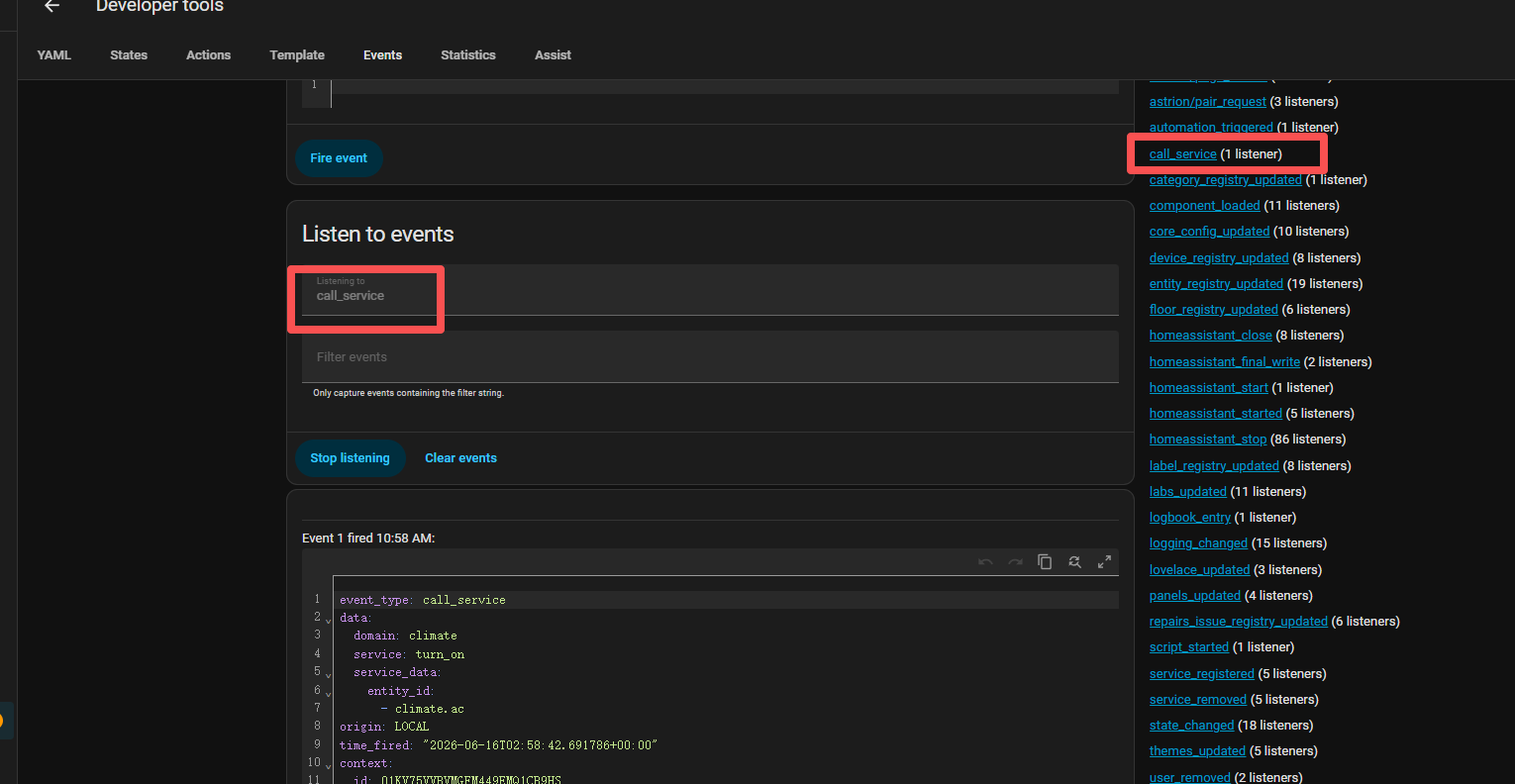
Developer Tools Event Feedback Video: Please record a video showing the latency of ADB control commands, while simultaneously capturing the event feedback in the Home Assistant Developer Tools. Here are the steps:
Open the Developer Tools in Home Assistant.
Select the Events tab, then select Call service on the right side (if the option is not available, you can manually enter it).
Single-click or long-press a button that is mapped to an ADB command — the corresponding event feedback will appear.
Thank you for your cooperation!
Is there a reason you didn’t also add a way to manually enter the IP address of the remote, to avoid having to auto discover if that is causing issues. That seems like a very simple add that could potentially solve it for users. I will be able to test these updates tomorrow and will let you know.
I sincerely apologize that the issue you reported has not yet been resolved.
I also share your concern about why we don’t simply support manual IP address input. To address this, I consulted our engineers again on this matter. Their response is that entering an IP address is not a one-time fix.
The reason is that even if an IP address is entered, the integration may only reach the network layer of the remote without establishing a true communication channel. This could lead to further issues down the line, such as control failures or state synchronization problems. Therefore, identifying the root cause of why the remote cannot be discovered is critical.
The version we provided to you yesterday was specifically designed to better locate the issue — for example, to determine whether the integration fails to discover the remote, or whether the remote fails to send pairing commands, and so on. Only by further pinpointing the problem can we truly resolve it.
I truly apologize for the inconvenience this has caused you. I am really, really sorry that you have not been able to enjoy the new version smoothly.
I tried this to get the remote to update to 1.2.0.1 but it can’t seem to find the update package. Has this method been removed?