It’s working now. After the 5th or 6th restart, I was able to connect. Thank you very much for the quick response.
You’re welcome, Chris — it’s our pleasure to help. We hope you enjoy using it. If you have any suggestions or run into any issues during use, feel free to reach out to us anytime.
 Astrion Remote v1.4.0 Release Notes
Hello Home Assistant community 
We’re happy to share the latest update for Astrion Remote and ROSCard.
 Astrion Remote System Update
-
Software Version: 1.4.0
-
Release Date: July 3, 2026
-
Update Method: OTA (online update)
 Important:
To use the new features, please also update the ROSCard integration to v1.4.0 via HACS.
 ROSCard Update
-
Version: v1.4.0
-
Release Date: July 3, 2026
-
Update Method: HACS (Home Assistant Community Store)
 What’s New
1.  Custom Physical Button Mapping (TV Card)
We’ve added support for mapping up to 8 custom physical buttons on the TV card.
This allows users to fully customize hardware button behavior per device context.
 Configuration Steps
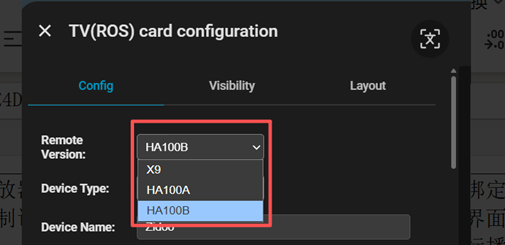
Step 1 — Select Remote Model
In the TV Card settings, select your Astrion remote model.
 This defines which physical buttons are available for mapping.
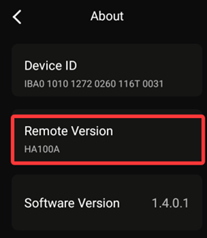
You can find your model here:
Astrion App → Settings → About
Step 2 — Configure Button Behavior
In the shortcut configuration page:
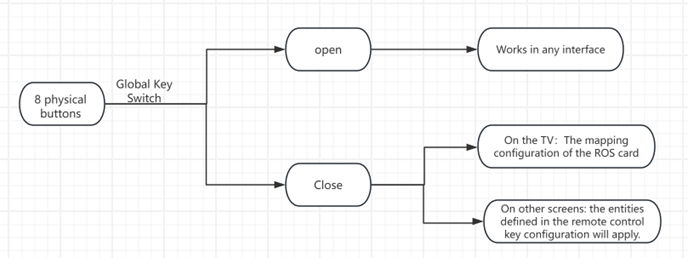
- Disable “Global Buttons”
Once disabled:
-
When inside the TV interface → physical buttons follow ROS TV card mappings
-
Outside TV interface → buttons follow global shortcut settings
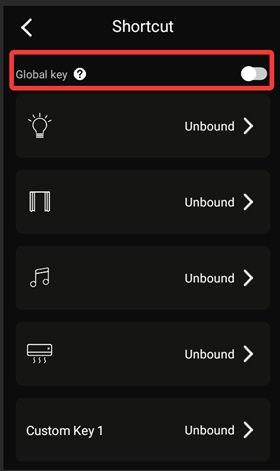
 Global Button Behavior
| State | Behavior |
|---|---|
| Enabled | Uses global shortcut mapping everywhere |
| Disabled | Uses TV card mapping inside TV screen, global mapping elsewhere |
 Bug Fixes
-
Fixed issue where integration sometimes failed to discover the remote
-
Improved device discovery stability
-
General bug fixes and performance improvements
 Notes
Notes
-
Please ensure both firmware + ROSCard are updated to v1.4.0 for full compatibility
-
If you experience any issues after update, please let us know in this thread
 Thank you
Thanks again to everyone in the community for testing, feedback, and continuous support.
We’re actively iterating based on real Home Assistant usage scenarios.
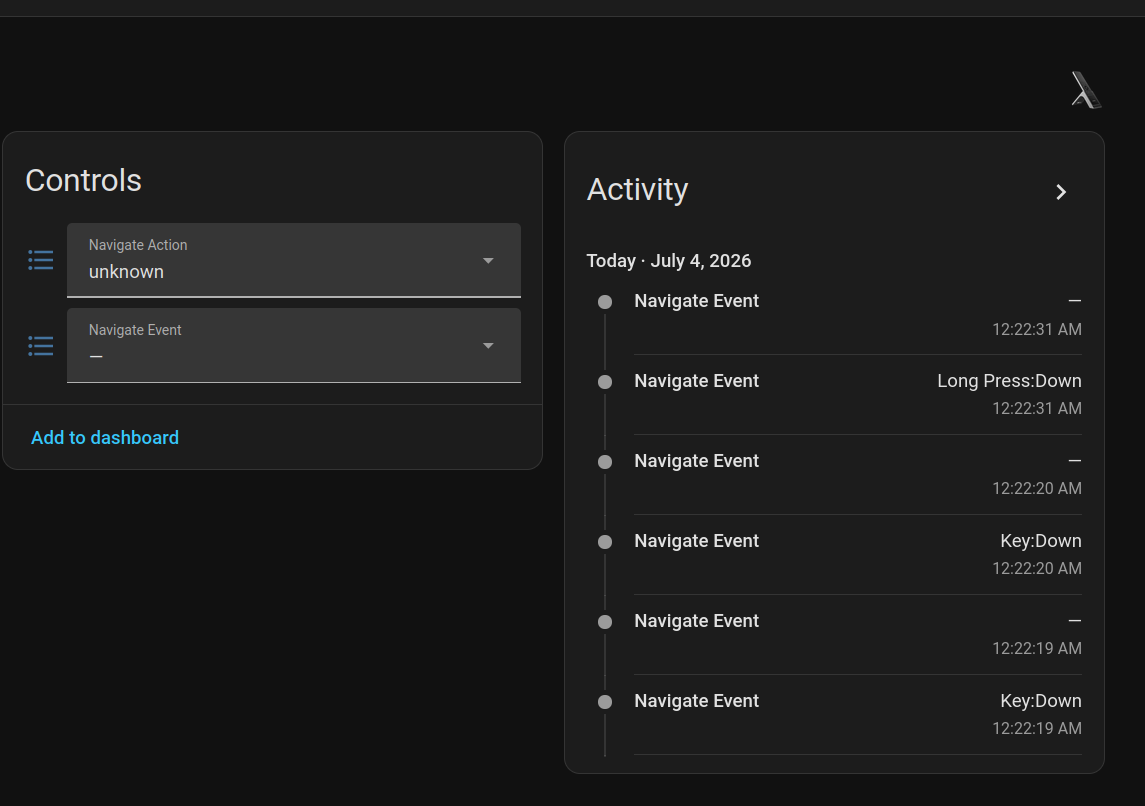
I’ve encountered an issue after updating one of my remotes to v1.4.0: Home Assistant is no longer receiving “navigate” event activity for button presses.
To troubleshoot, I checked a second, non-updated remote and confirmed it is still reporting these events correctly. I attempted to roll back the update on the first remote, but ha is still not receiving button press activity. I’ve attached a screenshot for reference.
This functionality is critical to my setup. Since these events became available, I have no longer needed the HA Companion/Fully Kiosk apps to get the best out of the remote - I was finally able to use the native RosCard interface for everything i wanted (e.g., long-press down runs a script, ch down on home screen dims all lights, etc).
Could you please clarify if this change is an intended feature of the v1.4.0 update, or a bug? Alternatively, is there a supported method to roll back to 1.3.0 properly? (i attempted by uninstaling the updated via the system settings → apps - this put it back to 1.0.38 but it will only allow me to update straight to 1.4.0 in the UI).
Have you ever tried to turn on the global key? In the shortcut interface of the setting.
Yeah that was the second thing i tried.
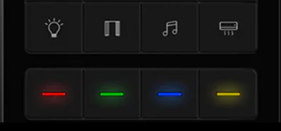
Light, cover, music and air conditioning should remain global.
Red, green blue, yellow need to be able to be mapped in TV Card.
There is no option to do this in the update.
Hello, we want to know about long press and short press. Because of logical problems, it was not released in version 1.3.0. Do you use it through grayscale version upgrade instead of upgrading to version 1.3.0 according to the normal upgrade process?
Hello, we have released this custom button, and it is named Custom 1 to 4 in the card. About curtains, air conditioners, these buttons do not affect the use on other pages, but the eight physical buttons of the TV interface can be configured. If you need curtains and air conditioning functions to remain unchanged, it is recommended that you jump to the page binding in the automated configuration, and then bind the automation to the TV interface, which can also realize air conditioning. Wait for the jump of the relevant device page.
this firmware 1.4 contains a lot of bugs: ‘view is empty’, ‘playback failed’ or playback queue - none, no events for buttons for the Home Astrion integration, connection problem with HA. What happened? Everything used to work well. This whole thing of making this remote resemble a very old Harmony with outdated IRDA doesn’t serve modern HA systems well. For an old TV I’d use an old-style remote, but this ‘scene master’ was supposed to serve a modern home theater setup. This is turning into some kind of nightmare. Wouldn’t it be better to focus on improving Music Assistant support, or support for peripheral devices (in my case, blinds with slat/tilt control).
Hi, both remotes were on 1.3 via normal ota upgrades, and both imported to HA with no issues.
My remote wants to keep updating to 1.4.0 besides being already on 1.4.0. I’ve tried rebooting it and have gone through the update more than once.
1 Like
Same. On 1.4.0 and there is a red dot next to software version to update to 1.4.0. V1.4.0 features seem to be active on the remote.
1 Like
same for me remote in loop trying to upgrade to 1.40, but about shows 1.40 already installed but with red dot next to version no
1 Like
I am not understanding what is happening here. One, still waiting for trim piece on the bottom of the remote as without this the cradle is useless for charging. I was promised this a few times and still nothing. Second, the updates are getting worse not better. My remote is cycling through the 1.4 update screen non stop. How can we roll back to previous working software version?
Understood. I will notify our engineers and have them look into the root cause for an urgent fix. We sincerely apologize for the issues caused by this version.
Hello,
We sincerely apologize for the bugs in the current version. Our testing team was unable to reproduce this issue during their testing. Could you please provide more details—does this prompt appear after upgrading to version 1.4.0 and performing related view switches? Also, were there any other configuration changes made during the process?
Regarding the preliminary research and development for Music Assistant, we currently plan to start around July 20th. For any further updates, please keep an eye on our version release notes.
Thank you.
Hi gregka, welcome to our community! Feel free to share any expectations or ideas you have with us.
Regarding the after-sales issue with the bottom trim piece of the remote, have you been able to track down the shipping tracking number for it? If you need me to look it up for you, please provide your relevant order information. I sincerely apologize for any inconvenience this may have caused.
As for the persistent notification issue in the new version, I have already reported it to the relevant team and asked them to prioritize a fix. Thank you for bringing this to our attention.
Hi Bae,
Here’s the background on this:
In version 1.3.0, we did not enable key-trigger binding because we needed to consider physical events occurring in multiple places. If we had allowed key-trigger reporting and automated binding, we were concerned that users might fall into infinite loop scenarios. Therefore, key-trigger binding was not available in 1.3.0. However, our engineers did not disable the reporting of key events at that time, which is why you could see event reports in 1.3.0—even though there was no binding functionality.
Then, in version 1.4.0, our engineers identified this as a bug and subsequently disabled the event reporting as well.
Just to clarify—were you using the key event reports from our device to manually bind them to other configurations on your side, rather than using our built-in integration for trigger binding?
Hey,
Here is an example of what I was running as an automation in HA - I was semi aware that the event states were not really there to be used as triggers since they are not a ‘last event’ style entity, but it was very, very convenient. I had long press actions for all of the dpad buttons, vol buttons, ch buttons and power to do all lights off.
alias: “Remote up lights”
description: “”
triggers:
- trigger: state
entity_id:
- select.club_smart_remote_navigate_event
to:- Key:Page Up
- action: script.increase_club_brightness_on_lights_only
metadata: {}
data: {}
mode: single