Life After Harmony: Why So Many Home Assistant Users Are Moving Beyond Logitech Harmony

Over the past year we’ve noticed something interesting—many new Astrion users are long-time Harmony owners.

We wrote an article exploring why this transition is happening, what people miss about Harmony, and what they expect from a modern Home Assistant remote.

:open_book: Read the full article:
Life After Harmony: Why So Many Home Assistant Users Are Moving Beyond Logitech Harmony

We’d love to hear your thoughts:

• Are you still using Harmony?
• What feature would you miss the most?
• What finally convinced you to switch?

It is really life still with harmony. It is great that the Astrion can be used to control the Harmony Hub and also other entities in Home Assistant.

When is Astrion going to develop a IR Blaster hub including two remote IR blasters to replace the Harmony Hub?

Regarding your question about a dedicated IR blaster hub with two remote blasters to replace Harmony Hub: we are indeed exploring the concept of a new hardware device that would include IR passthrough ports, RS232, and configurable I/O interfaces. However, this is still in the very early ideation phase. At this stage, we are conducting market research to evaluate whether such a product would deliver real value to our users and justify the development effort.

We don’t have a release timeline yet, as we want to make sure we build something that genuinely addresses the needs of our community. To help us better understand the demand, we would be very interested to learn more about your specific use cases—how would you envision using such a hub? What features would be most critical for you?

1 Like

I already have direct RS232 integration with HA and my NAD787 amplifier. If you made a hub it would have to have IR control of devices and bluetooth control of NVIDIA Shield.

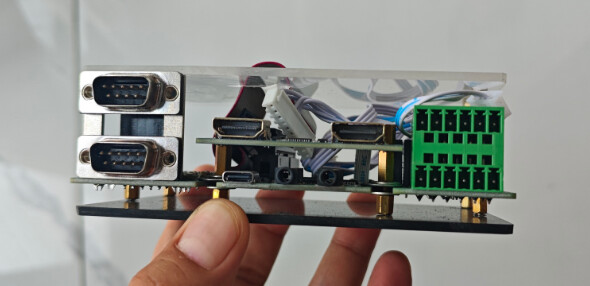
The board mentioned above integrates HID output control (keyboard emulation), CEC control, Bluetooth HID control, IR control, RS232 control, and 4×4 I/O outputs.

1 Like

All very nice but how much do you really need to have control over your stereo components. CEC is always flaky at best. RS2332 has gone to ethernet rather than serial. I/O outputs really only exist on pro equipment.

Can you do it at a decent price point and will it give the same control the Harmony Hub gives? Extra IR blasters are really required for stereo components in cabinets or shelving.

1 Like

Thank you for your brutally honest and highly professional feedback—this is exactly what we need at this early research stage.

You are absolutely right on every technical count, and I’d like to clarify how we envision these features in practice:

  • CEC is indeed flaky across brands, so we treat it as a secondary fallback, mainly for power on/off and input switching. However, many smart TVs and AVRs do respond well to CEC source‑selection commands. In addition, we emulate HDMI hot‑plug events—many devices automatically switch to the active HDMI input upon detection, which gives us a reliable way to change sources without relying solely on CEC messages.

  • RS232 is increasingly being replaced by IP/Ethernet, but we still see a large installed base of high‑end projectors, matrix switchers, and commercial displays that only speak RS232. We include it as a legacy bridge, not a future‑proof star.

  • I/O ports—spot on, they are mainly for cross‑ecosystem smart home integration. For example, when a contact closure output from one system connects to our input, it triggers physical‑level actions, enabling reliable linkage without cloud or API dependencies. This is common in professional installations.also they are indeed mostly for pro installations (screen lifts, trigger relays, occupancy sensors)

And you hit the nail on the head: for purely residential use, these features are overkill. But for professional AV control—think Crestron, RTI, or dedicated home‑theatre controllers—they are essential.

Your comment reinforces our belief that we need to refine our positioning: a simplified version with fewer interfaces would be more suitable for ordinary living rooms and light AV setups, while the full‑featured model can target integrators

It is all well and good to have advanced interfaces but the new hub needs to match your target audience.

If it is a direct Harmony Hub replacement than that is all that is needed.

To replace the Harmony Remote and Hub the Astrion needs a Hub.

My setup is so simple, an older super nice amp and a an older samsung tv (still 4k), it doesn’t support ip control so has to have an IR bug, and the amp is rs232. I’ve got an older control4 setup with a c4 remote, and would love to ditch it, something like this working in conjuction with the Astrion remote would be awesome.

I have been using a Harmony Elite for some time now in my home theater. I have also been doing alot of things with Home Assistant. I even migrated the bulk of power-on and input switching from the Harmony to HA. So the Harmony only handles volume and source navigation…everything else is handled by HA via IP control which is 100x better than the way Harmony and similar remotes like the X2 handle things. I do not have a single device in my theater that requires IR so I was looking for something that would let me totally get rid of the Harmony. I have really wanted a HA only remote…The Astrion seems like the remote…I already have “activity” scripts so based on what I have researched the transition should be rather easy. I think I can use TV Card to accomplish what I need…thou a ROS card specifically for implementing “activities” I think would be a great addition to the Astrion. I ordered a Astrion…so hopefully soon I can get it setup. No clue how long shipping takes since tracking updates seem rather useless.
IMO you don’t really need the Harmony even for such things. I am currently moving all remaining IR controls away from Harmony to a Athom “ESPHome RF433 IR Remote Controller” using HAIR for learning and transmitting commands. That thing is much more potent than the Harmony hub even with the additional senders.

What is missing is something that provides Activities similar to what the Harmony provided and for that I had a LLM write me a custom HA integration that exposes a virtual media center that acts as a multiplexer between media and control inputs, the involved devices and output routing. The old activities are represented by the media center’s sources with virtual radio channels acting as music multiplexers, e.g. channel 1 is tuner channel A, channel 2 is streaming via a defined URL at the receiver, channel 3 is AirPlay etc.

The logic itself is pyscript scripts that do the actual work. It receives control commands by any kind of interface, be it voice control, the old Harmony with virtual Rokus in HA, the Astrion of course and other virtual buttons, maps those to generic control commands and sends them on to the respective internal or external entities e.g. via the receiver’s native HA integration, the mentioned IR blaster, Kodi via its control surface etc.

Personally I’d stay away from the Harmony for actual control logic, since we are at the mercy of Logitech when it comes to how long they still support the Harmony infrastructure in the cloud. What I have now will continue to work even after Logitech turns off their Servers. Or until the actual hardware breaks. But by then we hopefully will have Astrion firmware and HA interfaces that will actually allow us to use it fully.

That’s a fascinating approach. I like this good idea of exposing activities as media sources rather than hard-coded scenes. I hadn’t thought about modelling them that way before.

thank you for join the discussion Rafael. Just wondering how your migration from Harmony has been going. We’d love to hear your first impressions when you’ve had some time with it.

Out of curiosity, if you could redesign one thing about the Harmony Activity model, what would you change?

I have mentioned this to your engineers before.

  • Select activity with sources dropdown menu
  • HA detects activity change
  • Automation to change Astrion to display TV ROS card for that activity. i.e. each activity may have different navigation controls for different devices

That’s an interesting workflow. the remote itself doesn’t need to know anything about the activity,it simply reacts to Home Assistant’s current state.Would you see the RosCard switching automatically based on an entity or state in Home Assistant, or would you prefer to trigger it explicitly from an automation?

The way it currently is the automation only needs to fire from the state of the activity select entity in HA.

The ROS TV card needs to enable selecting the activities via the source selection or a separate activity selector.

This will enable switching the activity from the ROS TV card.

Answering two questions here since this forum doesn’t make it easy to quote.

IMO the Harmony Activity model as represented in the Harmmony Hub isn’t bad beyond being restricted to what the Harmony can control istself and necessarily being quite narrow in what it can route from where to where. I actually redesigned the Activity model competely in HA and simply went to a much more general approach. But that’s not change, it’s reimagining.

The most limiting thing is the control surface. One is restricted to exactly one input of smart remote like the Harmony Elite, one dumb remote like the Harmony Companion and one Keyboard. No further remotes. Yes, there are apps but those are quite limited in their capabilities. Also, putting the Activity logic in the harmony hub made sense for Logitech but if we bring Home Assistant into play that simply doesn’t make sense any more. Any similar system should be simply a input/output device where states are pushed from a much more capable central control instance. Interestingly, that is exactly how I perceive the Astrion.

As to whether the RosCard should be reacting automatically to states. I think that of course would be nice, but much more helpful would be to have better bidirectional control. Currently we can force certain state changes via the Astrion Integration, but those are limited or don’t work - try to wake up a Astrion or get it out of the screen saver - NOOP at least for mine. I’d like to be able to

  • change displayed ‘widget’ reliably
  • push Volume info, Channel Status, ideally any kind of entity to the Astrion if the display widget defines it
  • receive button presses and touch screen interaction without having to resort to rooting the device.

Here are a few updates and quick clarifications regarding your points:

1. Hardware Entities Integration (Coming Soon! :tada:) We are currently finalizing the exposure of Astrion’s native hardware features directly as entities in the Home Assistant integration. The upcoming release will include:

  • Display Control: Remote screen wakeup, brightness adjustment, and screen saver management (fixing the issue you encountered with screen wakeup).

  • Sensor & Input Events: Native event listeners for physical button presses, gravity sensor/accelerometer data (e.g., wake-on-pickup), and microphone input for voice integration. All button and touch interactions will pass standard HA events cleanly—no rooting required.

2. Clarification on “Pushing Volume / Channel Status / Custom Entities”: Regarding your point on pushing volume info, channel status, or any entity to the Astrion screen: Are you suggesting a dedicated, custom display ROS card (or Widget) where users can bind arbitrary HA entities (like current volume level, media channel, or sensor states) purely for state visualization on the remote screen?

If so, could you share a bit more about your ideal layout or use case for this card? We’d love to make sure we design it in a way that fits seamlessly into your HA workflow!

Hi @[Chykan_Hunter],

Thanks for clarifying your setup and workflow! That makes complete sense.

To bridge the gap between users with pre-configured HA select entities (like Logitech Harmony) and users who simply want to manage multiple media devices directly on Astrion, we are designing a new feature called RosCard Groups (Card Grouping) for the ROS TV Card.

Here is the quick design breakdown of how it will work:

:light_bulb: Proposed Feature: ROS TV Card Grouping

1. RosCard TV Group (For Native / Non-Harmony Users)

    • How it works: You create multiple ROS TV Cards (e.g., “Apple TV Card”, “Xbox Card”, “Cable TV Card”) and assign them to a single Card Group.

    • Behavior: The dropdown automatically populates with the cards in that group. Switching the selection instantly switches the underlying button mappings and entity bindings without changing the screen layout, allowing seamless control across different devices on a single card container.

2. Bi-Directional Sync with HA Automations

Whichever mode you choose, changing the dropdown on Astrion will fire a standard HA event (e.g., astrion_activity_changed). You can easily listen for this event in HA to automate turning on specific devices, switching HDMI inputs, or dimming the lights.

:red_question_mark: Quick Feedback Request

Does this RosCard Grouping concept meet your expectations for switching activities/sources directly from the TV Card?

1 Like