Have an experimental idea or technical proposal?
This is the place for:
- Early concepts
- Developer feedback
- Technical feasibility discussion
 Not all ideas will become features.
Have an experimental idea or technical proposal?
This is the place for:
Not all ideas will become features.
Need to be able to pair the Roscard for TV and Media Player together.
Example.
If I open the TV Control Card for my Shield, I should be able to swipe sideways to go to the Media Player Card for my Shield, While the remote keeps the button mappings for my TV Control card active, while on the Media Player Card.
This is a very good suggestion, thanks for sharing the use case.
At the moment:
Each RosCard is independent
Physical button mappings are tied to the currently active card
Cross-card context sharing (TV ↔ Media) is not implemented yet
What you’re describing would require:
Shared device context between cards
Persistent physical button mappings while switching UI views
This is a valid feature request and aligns well with Astrion’s hybrid hardware + touchscreen design.
I will recommend to the RD team for evaluation.
Thank you Charles. It is great that you take on feedback from us users.
I agree with @Chykan_Hunter on this one. A broader design thought might be to realise that actual “devices” are often more complex than a single entity. When I’m watching TV, it’s actually the TV, the media player (a Sky Q satellite stb), and a audio receiver. If I watch amazon prime or netflix, I might use the player built into the TV rather than the one in the media player, if I’m watching sport, I’m using the stb (so changing the TV input). If the source is 4k UHD on the STB, I run a script to change the output. I currently use mini media player which allows me to assemble a set of actions from diverse entities into a single UI element. But in general, I’d say there isn’t a 1:1 mapping always between the “logical” device we want to control and an entity. Maybe building a roscard to Universal Remote might be a way to achieve this?
Below is an example yaml showing what HA entities are used for mapping my keys on my dashboard remote GitHub - PRProd/HA-Firemote: Apple TV, Amazon Fire TV, Chromecast, Homatics, NVIDIA Shield, onn., Roku, Xiaomi Mi, and Android TV remote control card for Home Assistant
  - type: custom:firemote-card
    entity: media_player.shield_debug_bridge
    device_family: nvidia-shield
    device_type: shield-tv-pro-2019
    compatibility_mode: default
    android_tv_remote_entity: ""
    defaultRemoteStyle_override: AL2
    app_launcher_relative_size: -30
    button_overrides:
      mute-button:
        service: switch.toggle
        target:
          entity_id: switch.nad_mute_switch
      power-button:
        service: remote.toggle
        target:
          entity_id: remote.harmony_hub
      left-button:
        service: button.press
        target:
          entity_id: button.harmony_left
      right-button:
        service: button.press
        target:
          entity_id: button.harmony_right
      up-button:
        service: button.press
        target:
          entity_id: button.harmony_up
      down-button:
        service: button.press
        target:
          entity_id: button.harmony_down
      center-button:
        service: button.press
        target:
          entity_id: button.harmony_select
      volume-down-button:
        service: button.press
        target:
          entity_id: button.harmony_volumedown
      volume-up-button:
        service: button.press
        target:
          entity_id: button.harmony_volumeup
      reboot-button:
        service: button.press
        target:
          entity_id: button.harmony_surroundmode
    scale: "100"
    hide_button_group_frame: true
    dpad_style: apple-tv-black
    useCustomSkin: false
    skin: "#7246b4"
So what I need is to be able to have my TV Roscard below have the above entities inserted.
          - type: custom:aiks-tv-card
            id: f880c45f-643d-4119-9e38-94d93426ca12
            tv_type: android_tv
            tv_name: Shield
            media_play_entity: media_player.shield
            entities:
              - key: POWER
                type: select
                entity_id: select.harmony_hub_activities
                value: power_off
              - key: UP
                type: remote
                entity_id: remote.shield_debug_bridge_remote
                value: UP
              - key: DOWN
                type: remote
                entity_id: remote.shield_debug_bridge_remote
                value: DOWN
              - key: LEFT
                type: remote
                entity_id: remote.shield_debug_bridge_remote
                value: LEFT
              - key: RIGHT
                type: remote
                entity_id: remote.shield_debug_bridge_remote
                value: RIGHT
              - key: CENTER
                type: remote
                entity_id: remote.shield_debug_bridge_remote
                value: CENTER
              - key: BACK
                type: remote
                entity_id: remote.shield_debug_bridge_remote
                value: BACK
              - key: PLAY
                type: remote
                entity_id: remote.shield_debug_bridge_remote
                value: PLAY
              - key: PAUSE
                type: remote
                entity_id: remote.shield_debug_bridge_remote
                value: PAUSE
              - key: VOLUME_UP
                type: remote
                entity_id: remote.harmony_hub
                value: VOLUME_UP
              - key: VOLUME_DOWN
                type: remote
                entity_id: remote.harmony_hub
                value: VOLUME_DOWN
              - key: MUTE
                type: remote
                entity_id: remote.shield_debug_bridge_remote
                value: MUTE
              - key: UN_MUTE
                type: remote
                entity_id: remote.shield_debug_bridge_remote
                value: UNMUTE
              - key: SETTINGS
                type: remote
                entity_id: remote.shield_debug_bridge_remote
                value: SETTINGS
              - key: HOME
                type: remote
                entity_id: remote.shield_debug_bridge_remote
                value: HOME
              - key: MENU
                type: remote
                entity_id: remote.shield_debug_bridge_remote
                value: MENU
              - key: NUM_0
                type: ''
                entity_id: ''
                value: ''
              - key: NUM_1
                type: ''
                entity_id: ''
                value: ''
              - key: NUM_2
                type: ''
                entity_id: ''
                value: ''
              - key: NUM_3
                type: ''
                entity_id: ''
                value: ''
              - key: NUM_4
                type: ''
                entity_id: ''
                value: ''
              - key: NUM_5
                type: ''
                entity_id: ''
                value: ''
              - key: NUM_6
                type: ''
                entity_id: ''
                value: ''
              - key: NUM_7
                type: ''
                entity_id: ''
                value: ''
              - key: NUM_8
                type: ''
                entity_id: ''
                value: ''
              - key: NUM_9
                type: ''
                entity_id: ''
                value: ''
              - key: DELETE
                type: ''
                entity_id: ''
                value: ''
Thank you for sharing the FireRemote YAML example — this is a very good reference.
What FireRemote does extremely well is:
Your requirement — “insert the above entities into the TV RosCard” — is valid and highlights a structural limitation of the current TV / Media Play RosCard design.
After internal discussion with the development team, we agree that the Media Play RosCard needs a structural redesign, and your example aligns very well with where we want to go.
Here is the proposed direction, point by point:
 Device family & model selection (FireRemote-style)
The Media Play RosCard will be redesigned to:
This removes the assumption that one media_player entity fits all use cases.
 No UI switching required on Astrion Remote
On Astrion hardware:
This keeps interaction hardware-first, not UI-first.
 Full physical button customization with “Default / Override” logic
Because Astrion’s physical buttons are fixed, we will expose full per-button customization, using this rule:
This is essentially bringing FireRemote-style button_overrides into RosCard, but adapted for hardware buttons.
 The 4 custom function buttons
The four original customizable function buttons on Astrion will also be:
These buttons will remain device-agnostic, making them ideal for global shortcuts.
Your current YAML example clearly shows the limitation:
entities:
  - key: UP
    type: remote
    entity_id: remote.shield_debug_bridge_remote
The redesign goal is to remove the need to hard-code this per card, and instead:
This will make advanced Harmony + Shield + AVR setups much cleaner.
Thanks again for the detailed YAML, screenshots, and explanations — this is exactly the kind of advanced, real-world usage that helps us evolve Astrion and RosCard in the right direction.
We’ll announce the Media Play RosCard redesign officially once the implementation plan is finalized.
I just got my remote last night and so far I’m very impressed with how responsive it is, and I’m excited to see what your team does with it in the future. I think everything you’ve mentioned that you’re working on hits a few of the things I want to do, so thank you for your detailed breakdown of those things. I had a couple ideas I haven’t seen mentioned yet.
Hi @starkkaman, welcome to the community 
And thank you very much for the kind words — we’re really glad to hear you’re enjoying the responsiveness of the Astrion Remote so far.
Your ideas are very good, and they’re also very much aligned with the direction we’re already discussing internally.
 Home button remapping (short press / long press)
This is a very reasonable suggestion.
Separating short press vs long press behavior (for example, keeping system navigation on long press while allowing user-defined actions on short press) is a clean and flexible approach. We’ve taken note of this and will record it as a potential enhancement when we expand physical button customization logic.
Custom touchscreen card with fully mappable layoutThis is also an excellent idea, especially for advanced users.
A custom card that allows:
is something we see as a very powerful extension for Astrion, particularly for complex AV and automation setups. While this is not part of the current stable feature set, we’ve recorded your suggestion as part of our advanced / experimental direction.
Thank you again for taking the time to share thoughtful, constructive feedback.
We actively collect and review ideas like yours, and many of our recent design changes have come directly from community input like this.
Please feel free to keep sharing ideas or use cases as you explore the remote further — discussions like this genuinely help us shape better features going forward.
— The Sanytron Development Team 
Hi,
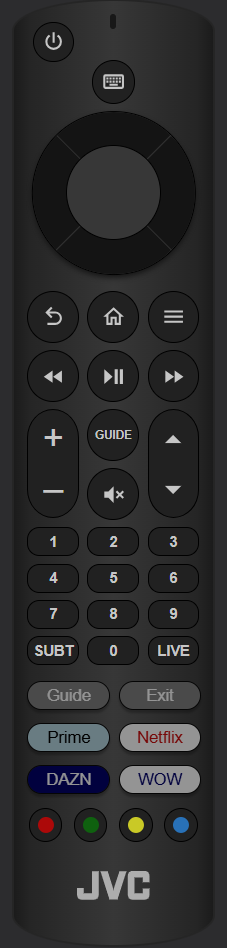
I’d like to share my Firemote config here as well. As you can see basically every button is scripted. This allows me to implement the complete TV logic into HA. As mentioned before I also combined multiple devices into 1 logical remote. The remote knows which device is selected and how the buttons need work in each scenario.
type: custom:firemote-card
entity: media_player.fire_tv_cube
device_family: amazon-fire
device_type: fire_tv_cube_third_gen
compatibility_mode: default
defaultRemoteStyle_override: AFJTV
visible_name_text: IPTV
name_position: hidden
grid_options:
  rows: 13.79
  columns: 12
app_launch_1: customlauncher My_EPG
app_launch_2: customlauncher My_Exit
app_launch_3: customlauncher My_Prime
app_launch_4: customlauncher My_Netflix
app_launch_5: customlauncher My_DAZN
app_launch_6: customlauncher My_WOW
scale: "85"
button_overrides:
  num1-button:
    script: tv_channel_select
    data:
      channel: NUM1
  num2-button:
    script: tv_channel_select
    data:
      channel: NUM2
  num3-button:
    script: tv_channel_select
    data:
      channel: NUM3
  num4-button:
    script: tv_channel_select
    data:
      channel: NUM4
  num5-button:
    script: tv_channel_select
    data:
      channel: NUM5
  num6-button:
    script: tv_channel_select
    data:
      channel: NUM6
  num7-button:
    script: tv_channel_select
    data:
      channel: NUM7
  num8-button:
    script: tv_channel_select
    data:
      channel: NUM8
  num9-button:
    script: tv_channel_select
    data:
      channel: NUM9
  num0-button:
    script: tv_channel_select
    data:
      channel: NUM0
  power-button:
    script: tv_toggle
  volume-down-button:
    script: tv_volume_down
  volume-up-button:
    script: tv_volume_up
  mute-button:
    script: tv_mute_toggle
  channel-down-button:
    script: tv_channel_next
  channel-up-button:
    script: tv_channel_previous
  hamburger-button:
    script: tv_send_key
    data:
      key: INFO
      keyevent: ""
  up-button:
    script: tv_send_key
    data:
      key: UP
      keyevent: "19"
  down-button:
    script: tv_send_key
    data:
      key: DOWN
      keyevent: "20"
  left-button:
    script: tv_send_key
    data:
      key: LEFT
      keyevent: "21"
  right-button:
    script: tv_send_key
    data:
      key: RIGHT
      keyevent: "22"
  center-button:
    script: tv_send_key
    data:
      key: ENTER
      keyevent: "23"
  playpause-button:
    script: tv_send_key
    data:
      key: PAUSE
      keyevent: "85"
  home-button:
    script: tv_send_key
    data:
      key: PORTAL
      keyevent: "3"
  back-button:
    script: tv_send_key
    data:
      key: BACK
      keyevent: "4"
  fastforward-button:
    script: tv_send_key
    data:
      key: FAST_FORWARD
      keyevent: "90"
  rewind-button:
    script: tv_send_key
    data:
      key: FAST_REWIND
      keyevent: "89"
  red-button:
    script: tv_send_key
    data:
      key: RECORD
      keyevent: ""
  yellow-button:
    script: tv_send_key
    data:
      key: YELLOW
      keyevent: ""
custom_launchers:
  - friendly_name: My_Exit
    label: Exit
    color: white
    background: grey
    script: tv_send_key
    data:
      key: EXIT
      keyevent: "3"
  - friendly_name: My_Prime
    label: Prime
    color: black
    background: lightblue
    script: fire_tv_prime_video
  - friendly_name: My_Netflix
    label: Netflix
    color: red
    background: white
    script: fire_tv_netflix
  - friendly_name: My_WOW
    label: WOW
    color: darkblue
    background: white
    script: fire_tv_wow
  - friendly_name: My_DAZN
    label: DAZN
    color: white
    background: darkblue
    script: fire_tv_dazn
  - friendly_name: My_EPG
    label: Guide
    color: white
    background: grey
    script: tv_send_key
    data:
      key: EPG
      keyevent: ""
I second the need for multi device simultaneous control.
In my setup currently with Logitech harmony: the up / down keys control Sky box channel up / down volume amplifier volume.
Similarly when watching streaming through appletv full cursor control on Apple TV and volume on amplifier.
This is a must.
Another need : unlimited mapping of hard keys
Finally: custom buttons on touch screen linked to ha scripts.
right now the remote is a GREAT hardware product but usable almost mainly with homeassistant lights (which should be a added feature )
I might map the function in HA to virtual lights but that is an ugly workaround.
and anyway it would be just mappable to horizontal blocks (Light UI in remote screen)… not ideal.
Is there a public roadmap with features and dates?
I was not expecting such early stage of software.
Is there a chance it would be open sourced? the current roscard is minified javascript that obviously is not editable/modifiable
Hi Nicola,
Thank you again for your thoughtful and detailed feedback — we truly appreciate you taking the time to outline your real-world use cases and expectations. Input like this is extremely valuable to us and directly helps shape our development priorities.
Multi-device simultaneous control
We completely understand your scenario (navigation controlling a media player while volume controls an amplifier), and we agree this is a very practical and important capability. Enhancing layered control logic across multiple devices is already under internal discussion as part of our future software roadmap.
Unlimited hard-key mapping
We fully agree this is essential for advanced users. Expanding button-mapping flexibility — including deeper script logic and conditional behavior — is something we plan to extend beyond the current implementation.
Custom touchscreen buttons linked to HA scripts
Yes, this aligns directly with our direction. Our goal is for the touchscreen to evolve into a highly flexible control surface rather than being limited to preset layouts, and improvements to UI modularity and script integration are actively being evaluated.
Current UI capabilities
At present, RosCard already supports nine control categories, including lighting, climate/AC, curtains, media playback, scenes, statistics, and more. These are designed to cover the most common smart-home interaction scenarios out of the box. You may find it helpful to review examples and configuration guides in our Knowledge section posts, manuals, and tutorial videos, where we demonstrate a wider range of implementations and customization approaches.
Current HA entity limitations
You’re absolutely right that using light entities as workarounds isn’t ideal. That reflects a temporary structural limitation rather than the long-term design goal. We’re actively working toward more generalized entity handling so controls can represent scripts, logic states, device groups, or automations directly.
Roadmap & future updates
We don’t currently publish a fixed public roadmap with dates, mainly because many upcoming features depend on testing and community feedback like yours. However, your suggestions are already aligned with several internal development directions. For the latest progress and next development steps, we recommend following our official announcement and development sections, where we regularly post updates.
Openness & extensibility
At this stage, core components such as RosCard aren’t planned to be fully open source. That said, we are exploring ways to make customization and extensibility significantly more developer-friendly in future versions without requiring modification of compiled files.
Thank you again for your detailed suggestions and for pushing the platform forward with advanced use cases. The Astrion hardware was intentionally designed with performance headroom for software evolution, and feedback like yours genuinely helps guide where we focus next.
Please keep sharing your ideas and experiments — we truly value them.
Hi starob,
Thank you for sharing this — this is a fantastic example of what can be achieved with advanced scripting and thoughtful system design. We really appreciate you taking the time to post your configuration and explain your logic.
Your setup is a great demonstration of how Astrion can function as a fully context-aware universal controller, especially with your approach of combining multiple devices into one logical remote and dynamically adapting button behavior depending on the active device. This is exactly the kind of powerful real-world implementation we love seeing from advanced users.
It’s also worth highlighting for others reading this thread that RosCard already supports nine control categories, including lighting, climate/AC, curtains, media playback, scenes, statistics, and more. These built-in modules cover many common smart-home interaction scenarios. Users who want to explore these further may find it helpful to check the examples and guides available in our Knowledge section, manuals, and tutorial videos, where we demonstrate additional configurations and use cases.
Your approach aligns very closely with where we want the platform to evolve — especially in terms of deeper scripting flexibility, device-aware logic, and customizable control flows. Feedback and shared configs like yours directly help guide future development priorities.
For anyone interested in upcoming improvements and new capabilities, we recommend keeping an eye on our official announcement and development sections, where we regularly post updates on progress and next steps.
Thanks again for contributing this — it’s a great reference example for the community, and we truly appreciate your support and experimentation!
Hi Starob,
How do you use your firemote-card configuration to enable the Astrion to control your TV?
I’ve seen a few firemote-card examples, but I don’t understand how the card maps to Astrion physical buttons or touchscreen buttons.
I’ve had my remote for month or so and cannot find a way to use it with my LG TV.
Not at all. The firemote-card is just an example of what the TV ROScard should support. The key feature of firemote is that you can assign a HA script to every button. That way you can implement whatever you want. Astrion makes assumptions on how you want to use your buttons and does not allow that kind of flexibilty. There is no way right now to directly assign a script to a button.
I believe Sanytron understood this and future software versions should allow more flexibilty.
Hi @NeilsOnWheels and @starob,
Thanks both for the thoughtful discussion here — this is a great thread highlighting an important distinction between what’s possible today and what’s planned for future flexibility.
 Clarifying Firemote vs. Astrion Architecture
@starob is absolutely correct in describing the key difference:
Firemote-style cards → every button can directly call a Home Assistant script
Current Astrion RosCards → buttons are tied to predefined entity logic (media, scene, light, etc.)
So right now Astrion does not yet expose direct script binding per button as a native UI feature. Instead, it operates through structured entity control. This was intentional for stability, validation, and predictable UX — but we fully understand why advanced users want deeper control.
 How to Control Your LG TV Today (Recommended Method)
You can still achieve fully custom TV control using this workflow:
Physical button → HA entity → Automation → Script
Example flow:
Astrion button
   ↓
media_player.turn_on
   ↓
HA automation listens
   ↓
automation runs script
   ↓
script sends LG command
This gives you complete flexibility while staying within the current system architecture.
 Why It’s Designed This Way (For Now)
Current logic prioritizes:
predictable behavior
validation of entity types
UI stability
compatibility across integrations
Direct script binding is powerful but can also introduce:
unvalidated commands
unpredictable state logic
harder debugging for non-advanced users
So it’s not missing by accident — it’s a staged design decision.
Future Direction (Already Being Worked On)Your exact request —
“Assign any script to any button”
is already part of internal development discussions, including:
expanded button mapping logic
conditional button behavior
script-native control entities
layered device targeting
This is a high-value feature area because it unlocks pro-level automation workflows.
 Practical Tip for Now
If you want Firemote-style flexibility today, the best approach is:
Create script-backed template entities
then bind those entities to RosCards
This effectively turns any script into a controllable “device”.
 Summary
You’re not missing anything — current limitation is real
Workarounds exist today via HA automations
Direct script-per-button control is planned direction
Your feedback directly supports prioritizing it
Thank you both again for pushing the platform with advanced use cases like this. Threads like this genuinely help us refine where flexibility matters most.
Hi Charles,
Version 1.1.1 of the software is a major step forward into the right direction, especially adding support for scripts in the TV card. Thanks to you and your team for this and thank you for taking community feedback serious. This is not a given.
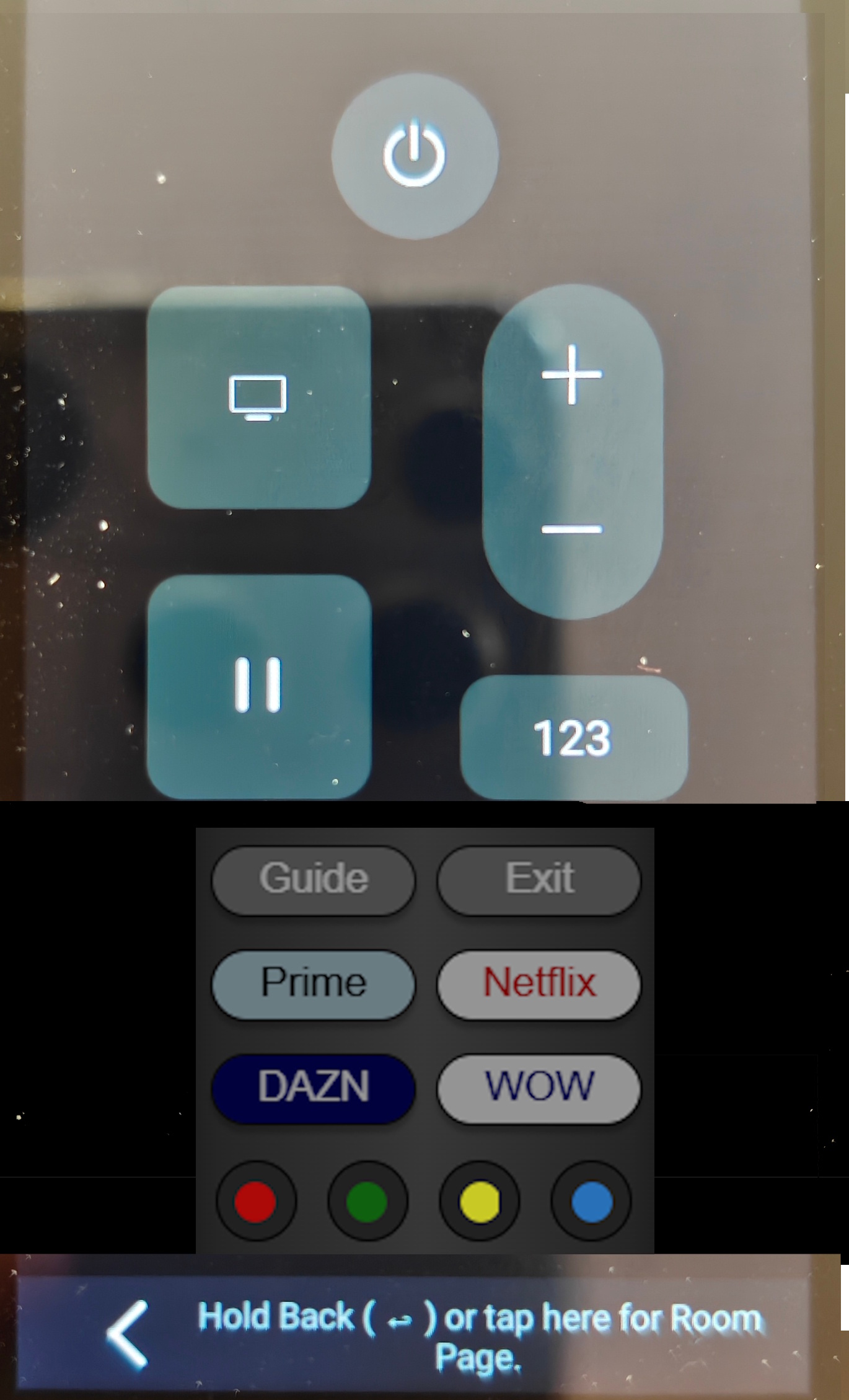
To make the TV card even more useful I would like to suggest to add several (more ist better) optional, configurable, scriptable buttons to it. I’ve cobbled together a picture to illustrate what I mean:
This would also be useful for the Media Player card. For example to configure radio presets etc.
Hi @starob,
Thank you very much for the kind words and for recognizing the progress in version 1.1.1. The team really appreciates the community’s feedback, and suggestions like yours are exactly what help us move the product in the right direction. 
Your proposal to add optional configurable buttons to the TV RosCard is a very good idea, and we have already discussed something similar internally. Based on feedback from users like you, we will consider adding customizable buttons in future versions.
Our current direction is roughly as follows:
App Launcher Buttons – similar to the concept used in the Fire Remote example (quick access to apps such as Netflix, YouTube, etc.).
Custom Script Buttons – users will be able to bind these buttons directly to Home Assistant scripts or services, making it easier to trigger automations or custom device actions.
Editable Button Labels – users will be able to modify the text name shown on the icon/button, so it can match their own setup (apps, presets, scenes, radio stations, etc.).
This concept would also apply nicely to the Media Player RosCard, as you mentioned (for example radio presets, favorite inputs, or commonly used actions).
Your mockup is very helpful for visualizing the idea, and I’ve forwarded it to our development team so it can be considered during future UI iterations.
Thanks again for contributing to the community and helping us improve Astrion. Please keep the ideas coming — they are genuinely valuable to us.
Hello community and the Sanytron Astrion development team!
First of all, I wanted to send a huge thank you to everyone involved in developing such a fantastic product for the Home Assistant community. I’m really enjoying using it!
I’ve been spending some time with both the RosCard and the Remote, and I wanted to share a few ideas for potential features. I think these could really take the user experience to the next level:
Button-Style Interface: It would be great to have more options for the UI, specifically the ability to add custom buttons directly into the cards.
LG TV Support: As many others in the community have mentioned, native LG TV support would be a massive addition for a lot of us.
Display & Clock: My top request is the ability to show a clock on the display. It would be amazing to use the remote as a bedside clock, and adding an alarm function would truly make it the “best of the best.”
Home Assistant Integration: I’d love to see the remote act more as a two-way device rather than just an input controller. It would be great to surface data like battery levels, a “Find My Remote” function, and even room recognition (potentially using Bluetooth Presence). Also, having the ability to manage screen brightness directly via Home Assistant automations would be a perfect finishing touch.
Thanks again for all the hard work on the project.
It does have a clock as a screensaver image. To enhance the clock it may need an option to display as “always on” when charging. Addition of alarm function is a nice to have. If it was a “bed side remote” I could see these as great addition.
Me personally this is a “couch side remote” primarily for media and home theatre control.