I have the same issue.
Hi @jdstephens and @starob,
Thank you both for reporting this — and for including your versions, that’s very helpful 
 About the Monitor / Statistics Card Behavior
The Statistics (Monitor) Card is designed with a very specific purpose:
It is intended for quick status overview + quick OFF control, not full device control.
Its logic is:
-
It monitors devices such as lights, AC units, switches, etc.
-
If any are ON, it shows them so you can quickly turn them OFF
-
Once a device is OFF, it is removed from the list
So:
 Shows active devices
Lets you quickly turn them off
 Does not list inactive devices
Does not provide an ON toggle
This is intentional design, not a bug.
It’s optimized for fast “shutdown / cleanup” scenarios — for example:
-
Leaving home → turn everything off quickly
-
Night routine → check what’s still on
-
Energy check → see active loads instantly
If you want full ON/OFF control, you should use:
-
Device cards (Light / Switch / AC cards)
-
Scene cards
-
Group controls
Those are designed for bidirectional control, while the Monitor Card is designed for status-driven quick actions.
 Regarding Your Specific Issue
If your card is not showing devices even when they are ON, that could indicate one of the following:
-
Entity state not reporting correctly from HA
-
Unsupported entity domain/type
-
Card configuration mismatch
-
Version-specific behavior change
To help check, could you please share:
-
One example entity that is ON but not appearing
-
The YAML (or screenshot) of your Monitor Card config
-
Whether the entity is native or from an integration
That will let us verify whether this is:
-
expected behavior
-
configuration issue
-
or a version-specific bug
Thanks again for the detailed feedback — reports like this help us refine both functionality and documentation 
Hi @starob,
You’re very close — your understanding of the mechanism is correct, and yes, in principle it can work similarly to Scene cards. However, there’s one important detail to be aware of when using event-based triggers like this.
 What Your Approach Does Correctly
Listening for the call_service event with:
trigger:
  - trigger: event
    event_type: call_service
    event_data:
      domain: media_player
      service: turn_on
will successfully fire whenever Home Assistant receives a service call for media_player.turn_on.
So your logic is valid for detecting service invocations
Important Limitation (Why It May Behave Differently Than Scene Cards)
Event triggers listen for service calls, not device state changes.
That means:
| Scenario | Event Trigger Fires? |
|---|---|
| Button sends service call | Yes |
| Automation calls service | Yes |
| Device turns on externally |  No No |
| State restored after restart | No |
Scene-based approaches sometimes appear more reliable because they’re often tied to state changes or structured actions.
 Recommended Improvement (More Reliable)
If your goal is:
“Run automation when device turns on”
Then a state trigger is usually the better choice:
trigger:
  - trigger: state
    entity_id: media_player.your_device
    to: "on"
Why this is better:
-
Works regardless of what triggered the change
-
Doesn’t depend on how the command was sent
-
Matches real device behavior, not just commands
 When Event Triggers Are the Right Choice
Stick with your event approach if you specifically want:
-
Only Astrion / UI-originated commands
-
Only manual button presses
-
To distinguish command source
That’s a perfectly valid advanced use case.
Summary
Your logic is technically correct and should work.
Just choose trigger type based on intent:
-
Want to detect commands → use event trigger
-
Want to detect actual device state → use state trigger
They are definitely on. I have a Philips hue light and other matter lights that are ON, but are not reported correctly in the monitor card.
Ill see if I can post the YAML
type: custom:aiks-switch-monitor-card
uuid: 6420053c-b3b9-4b0c-83d3-ac17b640e6c3
monitor_name: Home
device_types:
light: true
switch: true
climate: true
The entity is from the Philips HUE integration. However the other lights are part of the Matter integration
I dont believe we are on the same page. From your point of view you are assuming the STB needs to just turn on and this can be captured by the media trigger however I need to control the 20+ buttons on the STB which are all controlled by scripts that calls the IR universal remote.
So its not just turn on the STB it is to interact with the STB.
The TV RosCard does not support scene entities so i cannot activate a scene to then trigger a automation as a workaround.
The ideal approach I see is
- Use the remote entity (Ir Blaster) which is supported in the TV RosCard and have this pass the required data to the entity to do stuff ie: change channels. I have been unsuccessful in getting this to work.
- Have the TV RosCard inbuilt actions run scripts when the button clicked on the display. From what i see direct calling of scripts is not supported.
Hope this makes sense. I’m just a bit lost as for a novice there is not enough samples to understand how each card operates. For example I have had zero success with the Host RosCard, can’t even get it to sync to the remote as suspect not passing validation.
This right here is the biggest issue I see so far. This is a fairly expensive product and has little to no documentation.
I do love how responsive Charles is in the forums. Very thorough in responses. Almost like an AI. Maybe they used Charles to train the AIs 
And, there is a huge learning curve for both the users and the company on new released products like this. It often is not clear to the users how the company expected things to work. And, often, the company is learning from the users and hopefully learning that the company’s thinking is not always the best way based on how we want to use the product.
1 Like
First of all, welcome to the community, Jeff!  We’re really glad to have you here, and thank you both for taking the time to share your thoughts, feedback, and testing results — they’re extremely valuable to us.
Jeff, thank you for explaining your use case in detail. You’re absolutely right that your scenario isn’t just about turning on the STB, but about interacting with it through many different buttons, each mapped to scripts that trigger IR commands. That clarification helps a lot. We understand that what you need is for TV RosCard buttons to directly execute scripts or pass command data to a remote entity (IR blaster) so it can perform actions such as channel changes and navigation.
At present, TV RosCard does not support scene entities, which means triggering automations via scenes isn’t available as a workaround. However, we’ve already incorporated this feedback into our upcoming update plan:
 Latest HA100 Version Plan
Version 1.1.1 — Coming Soon
This release will include:
-
TV cards support script binding
Buttons can be directly linked to scripts. -
Dropdown menu enabled
(Note: In looping interfaces, the Back action will still return to the previous page.) -
Empty homepage guidance
When a homepage view is blank, instructional text and a refresh button will appear. -
Scene cards renamed to “Scenes & Scripts”
Scripts can now be added directly within these cards.
After Version 1.1.1 is released, we will spend about two weeks focusing on APK security improvements.
Regarding documentation — we completely agree. Improving guides, examples, and real-world usage samples is a high priority for us right now. Feedback like yours is exactly what helps us understand where users feel the learning curve is steepest and where clearer examples are needed most.
And thank you for the kind words about responsiveness 
While we do use AI tools to help draft responses, we want to assure you that every forum reply is manually reviewed and edited before posting to ensure accuracy and clarity.
If either of you has specific workflows, YAML examples, or button-mapping scenarios you’d like us to test or document, please share them — we’d be happy to include them in future examples for the community.
Thanks again for your support and for helping us improve!
1 Like
I’ve been having a weird issue where my remote frequently disconnects from home assistant and I have to tap on the link button to get it to recconect. It happens randomly after the screen goes to sleep on the remote, though it doesn’t seem to disconnect when put on the charger. I haven’t found a pattern beyond that.
The remote is connected as a local only user and pointed to the local IP of home assistant. I have 2 VLANS setup, one for IoT devices and the other is my primary for everything else. The remote is on the IoT network which is 2.4GHz only.
Side note: I noticed one time after the battery died it reconnected using the auto discovered external address. I manually set it back to the local address because I have fairly regular internet slowdowns and I don’t want that affecting any of my home assistant devices.
Hi Starkkaman,
Thank you for the detailed description — that’s very helpful
Regarding the reconnection behavior, the current Astrion Remote logic handles different situations in the following way:
Scenario 1 – Device is charging
If the remote is connected to the charger and loses connection to Home Assistant, it will automatically attempt to reconnect every 30 seconds until the connection is restored.
Scenario 2 – Device is not charging
If the remote is running on battery and loses connection, it will automatically attempt to reconnect every 10 minutes to reduce power consumption.
Scenario 3 – Screen wakes up
When the screen wakes from sleep, the remote will also attempt an automatic reconnection.
Based on the behavior you described, it is possible that the Wi-Fi connection briefly dropped and then reconnected. In that situation, if the remote is not charging and the screen state does not change, the system will wait for the next 10-minute reconnection cycle before attempting to reconnect automatically. This is why manual tapping of the link button works immediately.
Thank you for pointing this out — it’s a very useful observation.
 Improvement planned:
In an upcoming version, we plan to improve this behavior by adding automatic Home Assistant reconnection when the Wi-Fi connection drops and then reconnects, which should make the experience smoother in network environments like yours (for example with VLANs or IoT networks).
Also, thank you for mentioning your VLAN and 2.4GHz IoT network setup — that information is very helpful for our testing.
If you notice any additional patterns (for example specific sleep timing, Wi-Fi roaming, or router events), please feel free to share them. It will help us further improve stability.
Thanks again for your feedback and support!
—
Charles
Sanytron Team
Thanks for the release of 1.1.1 - the addition of scripts will be very helpful, but they could really do with the ability to pass data - else we need lots of scripts ….. For example, I’m recreating the remote for my STB. I can bind a script to the options, but I’d need a seperate one for each button on the remote currently. To work around this, I’ve created a template select entity and used that instead
template:
  - select:
      - name: 'Sky Q Den Controls'
        unique_id: sky_q_den_controls
        icon: mdi:remote-tv

        options: >
          {{ [
            'sky', 'power', 'backup', 'tvguide', 'home', 'boxoffice', 'search', 'sidebar',
            'up', 'down', 'left', 'right', 'select', 'channelup', 'channeldown', 'i', 'dismiss', 'text', 'help',
            'play', 'pause', 'rewind', 'fastforward', 'stop', 'record',
            'red', 'green', 'yellow', 'blue',
            '0', '1', '2', '3', '4', '5', '6', '7', '8', '9'
          ] }}
        state: "{{ 'Ready' }}"
        select_option:
          - choose:
              - conditions: "{{ option == 'power' }}"
                sequence:
                  - service: media_player.play_media
                    target:
                      entity_id: media_player.sky_q_den
                    data:
                      media_content_type: skyq
                      media_content_id: >
                        {% if states('media_player.sky_q_den') in ['off', 'standby', 'unavailable'] %}
                          home, dismiss
                        {% else %}
                          power
                        {% endif %}
            default:
              - service: media_player.play_media
                target:
                  entity_id: media_player.sky_q_den
                data:
                  media_content_type: skyq
                  media_content_id: '{{ option }}'
This works pretty well and allows me to just choose the option from the select entity on the rocs card. One oddity I noticed is that the Key_A, B and C options don’t allow you to use select or media player entities - only script or remote for some reason.
One other one while I’m here - firmware update doesn’t seem to do anything. I can see there’s a V2026020210 firmware, but when I click Update, nothing happen. Any ideas?
Raise to Wake is not working for me most of the time. It used to work better but after upgrading to the latest software it has gone really bad.
Firmware: 2026020303
Software: 1.1.1
Update: I turned it off & on again and now it seems to work again.
Hi @peteS-UK,
Thanks for the detailed explanation and for sharing the YAML example — that’s a very clever workaround . Using a template select entity as a command dispatcher is actually a very elegant solution and shows a deep understanding of how Home Assistant entities can be leveraged.
You are absolutely right about the limitation you mentioned. In the current version, scripts triggered from RosCards cannot pass parameters, which means users may need to create multiple scripts for similar actions. Your suggestion to allow scripts with data parameters is very reasonable and would significantly reduce the number of scripts required in cases like your STB remote.
We’ve noted this request internally, and we will consider adding support for passing parameters to scripts in future versions. That would make setups like yours much cleaner and more flexible.
Regarding the behavior you observed with Key_A / Key_B / Key_C, your observation is correct. In the current implementation those buttons are limited to script or remote entities, which is why select or media_player entities cannot be chosen there. This is mainly due to how those keys were originally designed as generic action buttons.
Your feedback here is very helpful, and we will review whether we can expand the supported entity types for these keys in a future update.
Thanks again for sharing such a well-thought-out setup — contributions like this are extremely valuable for improving the platform.
Hi @peteS-UK,
Thanks for reporting this.
If clicking Update doesn’t trigger the firmware upgrade, the most common reason is that the remote cannot reach the firmware server at that moment, or the connection request times out. When the update starts successfully, you should normally see a download progress indicator shortly after pressing the button.
A few things you can try:
-
Make sure the Astrion remote is connected to Wi-Fi and online.
-
Restart the remote and try the firmware update again.
-
Wait a few minutes after entering the firmware page before pressing Update, to allow the version check to complete.
The latest firmware you mentioned (V2026020210) is indeed available, so the update should trigger once the connection is established correctly.
If the problem persists, please let us know and we can help investigate further.
Thanks again for the report — feedback like this helps us improve the update process as well.
Yes - still the same after restart. The software update to 1.1.1 worked fine, and I get the notification for the new version and get the update page, but pressing update doesn’t do anything. I wonder if it’s a CDN problem. Is the server for the software update the same as that for the firmware update?
Now its working, pelase check.
Hi Charles. OK - one step forwards, but 2 back. The firmware process did begin now, and seemed to run normally until about 70%, then ran quickly to 100% but when it rebooted I got the following
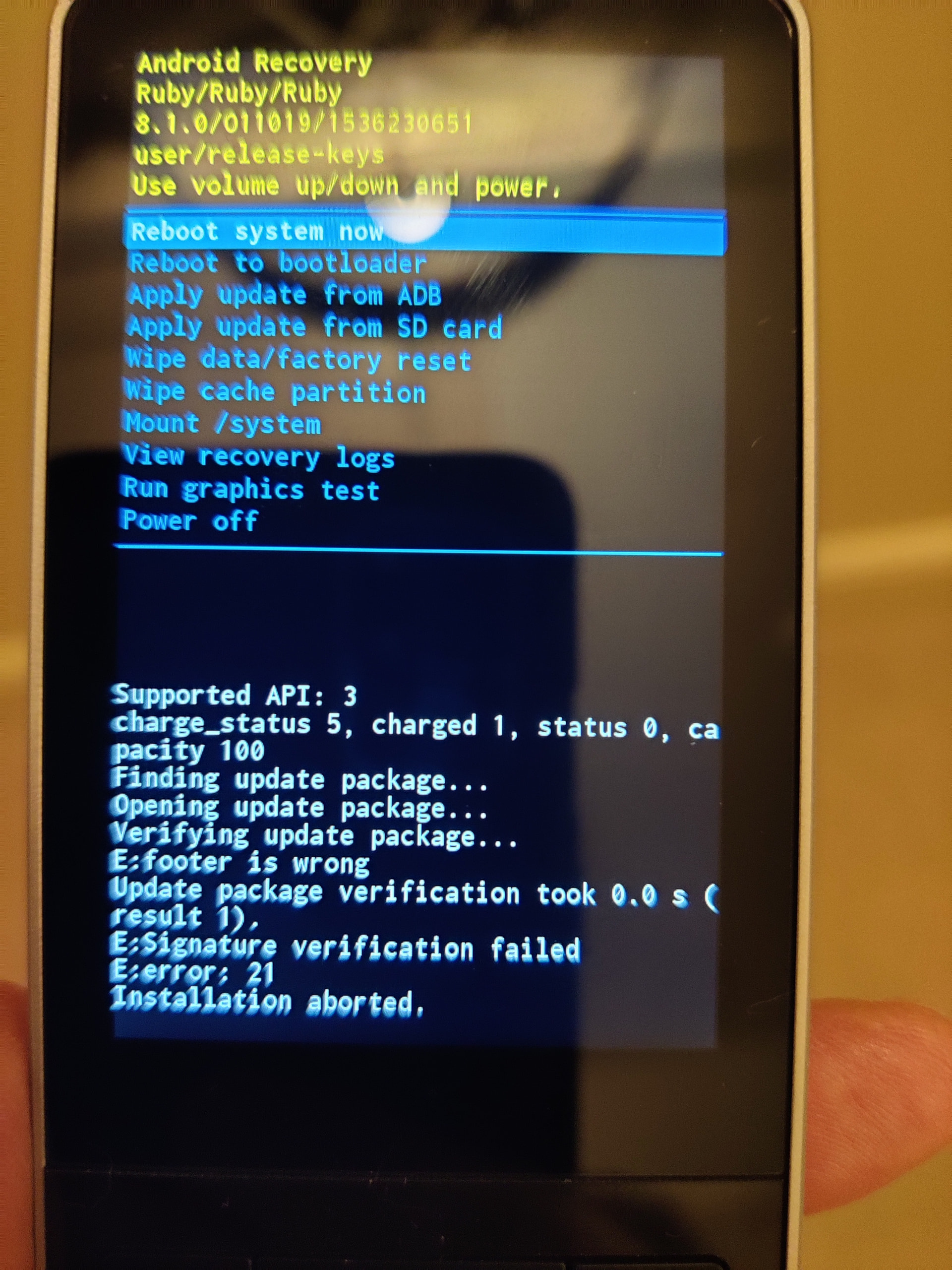
Rebooting took it back to the old firmware and booted ok. I tried a second time and got the same thing, so I guess the firmware’s corrupt.
We apologize, but the verification method has been enhanced after adding the TLS certificate to the download link. We have re-uploaded the firmware, and you can try updating again now.