🐞 [BUG] Describe the issue clearly here

Environment

  • Astrion firmware:
  • RosCard version:
  • Home Assistant version:
  • Network type (local / VPN / remote):

Issue Description

Describe what is happening.

Expected Behavior

What should happen?

Actual Behavior

What actually happens?

Steps to Reproduce

Additional Info

Logs, screenshots, or observations.

2 posts were merged into an existing topic: :locked_with_key: Security discussion: tokens, access control & remote access

Environment

  • Astrion Software Version: 1.1.0

  • Astrion firmware: 2025111419

  • RosCard version: 1.0.8

  • Home Assistant version:

    Core 2026.2.2

    Supervisor 2026.02.2

    Operating System 17.1

    Frontend 20260128.6

  • Network type (local / VPN / remote): Local

Issue Description:

I have an odd issue which I think is a bug but I’m happy to be corrected. I have a Sony TV, Yamaha Sound Bar and Foxtel Set Top Box. The Sony TV and Yamaha Sound Bar have native HA integrations however for the Foxtel STB I need to use a Broadlink Mini RM4 IR Blaster.

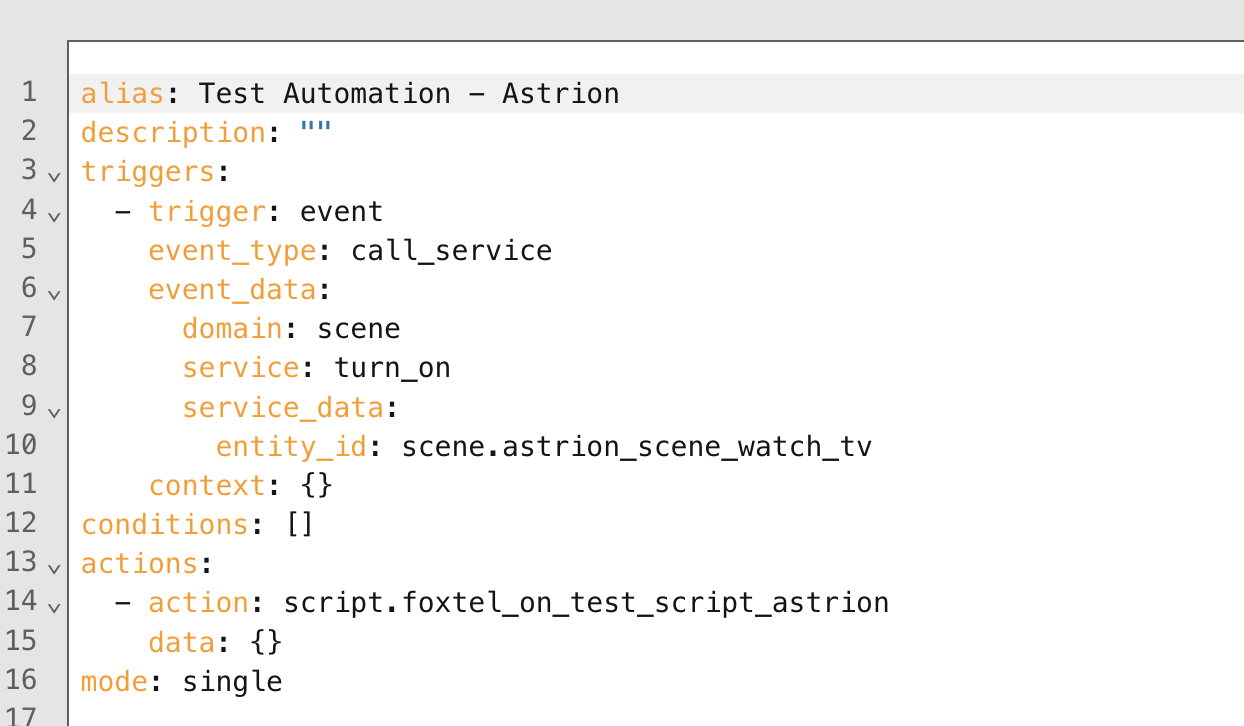
Since the STB isn’t native I cannot just use a Scene to activate all devices. I need to use a Scene, Automation and a script. The Scene turns on the TV and Amp, and the automation via an Event Trigger (call_service) launches a script as an action to turn on the Foxtel unit.

If I launch the scene via HA all works as expected. The TV, Amp and Foxtel box turn on. I see in the listener events that the IR script is being fired. I believe this proves end to end in HA that the Scene, Automation and Script are functional.

If I bind the Scene to the Scene Ros Card and launch it the TV and the Amp are powered on but the automation never fires. I don’t see the script event in the listener.

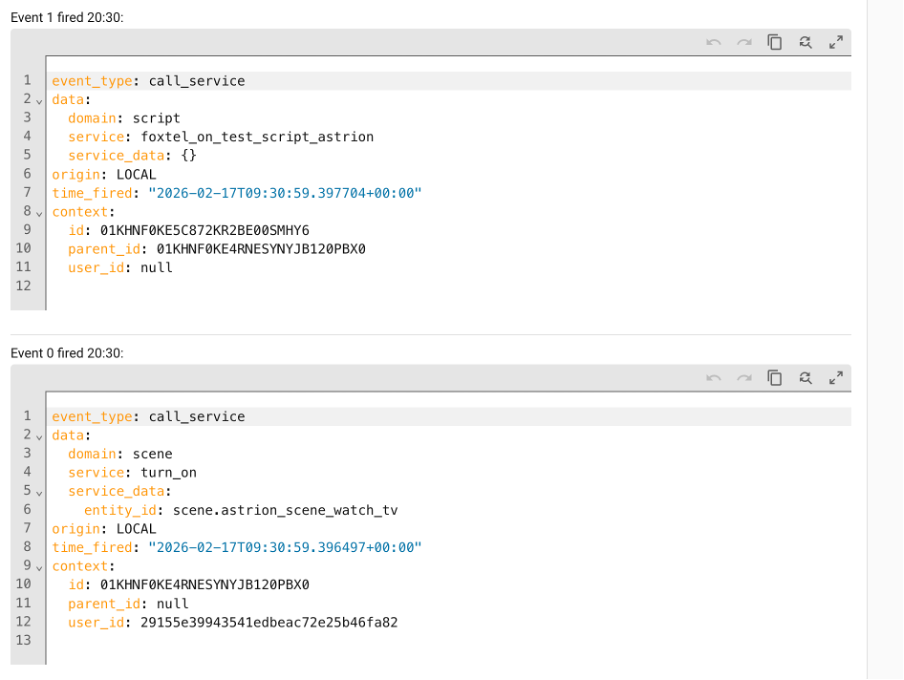
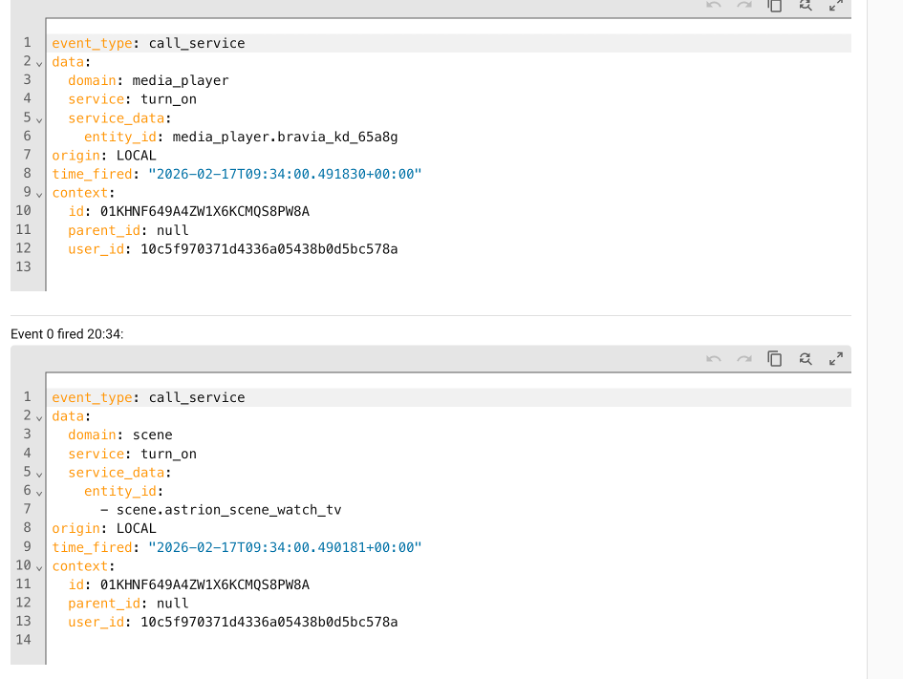
In the listner logs the format for entity id as seen in Event 0 is different when comparing the one launched manually by HA and the other via the Astrion. One has a hypen and one does not. I’m not sure if that makes a difference as my understadning the syntax is still correct.

Working Launched from HA

Not Working when using Astrion

Automation

I’m at a loss why it does not work. In my opinion i thought the only thing the Astrion does is launch the Scene and HA should do the rest. Makes no sense to me why when launching the Scene in HA works but not from the remote.

Hi @MRRIZK — thank you for the extremely clear report and full environment details. This is exactly the kind of diagnostic info that helps us narrow things down quickly :raising_hands:

I’ve reviewed your scenario carefully, and your reasoning is actually correct:

Astrion should only trigger the Scene, and Home Assistant should handle everything else.

Since the Scene works perfectly when launched inside Home Assistant but not when triggered from Astrion, that tells us:

:white_check_mark: Scene itself is valid
:white_check_mark: Automation logic is valid
:white_check_mark: Script is valid
:red_exclamation_mark: The difference must be how the Scene is being called


:magnifying_glass_tilted_right: Root Cause (Very Likely)

The issue is almost certainly caused by event trigger filtering mismatch in your automation.

Your automation is listening for:

event_type: call_service

But when Astrion calls a scene, the service call metadata is slightly different from when HA UI calls it.

Even if both trigger the same scene, HA treats them as different call contexts.


Why This Happens

Home Assistant automations triggered by:

platform: event
event_type: call_service

are extremely sensitive to:

  • domain

  • service

  • entity_id format

  • context

  • caller source

Astrion sends a valid service call — but not identical metadata to the UI call.

So your automation never matches the trigger condition.


:white_check_mark: Recommended Fix (Best Practice)

Instead of triggering automation from a service call event, trigger it from a state change or directly call the script.


:check_mark: Option A — Best Solution

Bind Astrion directly to a script instead of a scene.

Example RosCard action:

service: script.watch_tv

Then your script:

script.watch_tv:
  sequence:
    - service: scene.turn_on
      target:
        entity_id: scene.living_room
    - delay: 2
    - service: script.turn_on_foxtel

Why this works better:

  • avoids event listener edge cases

  • deterministic execution

  • fewer layers

  • easier debugging

:backhand_index_pointing_right: This is the architecture we recommend internally as well.


:check_mark: Option B — Fix Your Current Automation

Modify your automation trigger to listen for state change instead of service call:

Example:

trigger:
  - platform: state
    entity_id: scene.living_room

or

trigger:
  - platform: state
    entity_id: media_player.tv
    to: "on"

This removes dependency on call source.


:check_mark: Option C — Relax Event Filter (Advanced)

If you want to keep using event triggers, remove strict filters like:

event_data:
  domain: scene
  service: turn_on

and only filter by entity_id.


:brain: Why Your Hyphen Observation Matters

You noticed entity IDs appearing slightly different. That’s a good catch.

However, that’s usually just:

  • frontend formatting

  • logging representation

  • or JSON serialization differences

It rarely breaks service execution — but it can break automations that match strings exactly.

So your instinct was correct :+1:


:star: Recommended Architecture Going Forward

For the most stable results:

Astrion Button → HA Script → (Scenes + Commands + IR + Delays)

Avoid:

Astrion → Scene → Automation → Script

The shorter the chain, the more reliable the system.


:white_check_mark: Summary

Nothing is actually “broken” — you’ve just hit a known edge case:

Component Status
Scene Working
Automation Working
Script Working
Astrion call Working
Trigger match :cross_mark: Too strict

Fix = adjust trigger method or call script directly.

Hi @Charles

Thanks for the detailed info which made perfect sense. I can confirm Option B monitoring the State works with the below code however what I have also learnt is that Scene States don’t have a friendly State value like On, Off etc. They have a time stamp value instead.

alias: Test State
description: ""
triggers:
  - trigger: state
    entity_id:
      - scene.astrion_scene_watch_tv
conditions: []
actions:
  - action: script.foxtel_on_test_script_astrion
    metadata: {}
    data: {}
mode: single

For Option A can you please confirm which RosCard to use. All of the RosCards require a intial valid entity type that matches the card type ie: switch, remote, scene etc. The aim is to mimic the same as using the Scene RosCard however launching a script instead. The reason I did it via a automation is I saw this approach in a post on this forum as the work around.

I cannot see how a script can be called. If you can provide the suggested RosCard and sample yaml code that would be appreciated.

This is just to let you know that your forum registration process using email/password is broken. The verification email never arrives. I tried 3 different email adresses. Finally I signed up using google which did work.

Thank you Starob. My team will handle out soon.

Hi MRRIZK,

Thanks for your follow-up — I’m glad the explanation made sense. Let me clarify how to handle Option A (trigger via automation listening for events) and how to set up a RosCard to launch a script.


Why the original automation didn’t work

As you noticed, your automation was listening for events with entity IDs as strings, but the remote control sends them in array format via WebSocket. That’s why your automation didn’t trigger consistently.

  • Commands sent through the HA interface use strings → works as expected

  • Commands from the remote over WebSocket → entity IDs in arrays → original automation fails


Solutions

  1. State trigger (Option B) – works, but note that scenes only have a timestamp as the state, not friendly values like “on/off”. Your YAML for Test State is correct.

  2. Automation template to handle both formats (Option A) – works by checking both string and array formats. The example you shared in your first post (Test Automation-Astrion) is exactly how to do it.


RosCard approach to launch a script

If you want to trigger a script directly from a RosCard (instead of using an automation), here’s how:

  1. Card type: Use a Scene RosCard (or a generic “Host Control” / “Script” card if your version supports it).

    • Scene RosCard can be bound to an entity and used to trigger a script instead of the scene.
  2. Entity binding: Point it to a placeholder scene (or any valid entity matching the card type). The action is overridden in the card YAML to call your script.

  3. Sample YAML for Script Binding via RosCard:

type: scene
title: Launch Foxtel Script
entity: scene.astrion_scene_placeholder   # required for card validation
actions:
  - service: script.foxtel_on_test_script_astrion
    data: {}

Note: entity must exist and match the card type, but the actual action calls your script. This is a safe workaround to keep the card validated while triggering custom logic.


So in short:

  • Automation = use template trigger to handle array vs string entity IDs

  • RosCard = bind a placeholder scene or host entity, override action to call your script

Both methods achieve the same effect, but the RosCard approach gives direct access from the remote interface without relying on automation triggers.

If you like, I can create a full working RosCard YAML example that mimics a “Scene RosCard” but directly launches your script when pressed — this is often easier for daily use than using automations.

Hi Charles, yes, please.

:white_check_mark: Full Example — RosCard Script Launcher

This example creates a button labeled “Watch TV” that runs your script immediately when tapped.

type: scene
title: Watch TV
icon: mdi:television
entity: scene.astrion_scene_placeholder   # must exist for validation

tap_action:
  action: call-service
  service: script.foxtel_on_test_script_astrion
  data: {}

hold_action:
  action: none

double_tap_action:
  action: none

:puzzle_piece: Required One-Time Setup (Placeholder Scene)

Because Scene RosCards require a valid scene entity, create a dummy placeholder scene if you don’t already have one:

scene:
  - name: Astrion Scene Placeholder
    entities: {}

After adding this, reload scenes or restart Home Assistant so

scene.astrion_scene_placeholder becomes available.


:bullseye: What This Does

  • RosCard validates correctly because it sees a real scene entity

  • Pressing the card does NOT activate the scene

  • Instead it directly runs your script

  • No automation or event listener required

This gives you the cleanest and fastest execution path.

Hi Charles,

this is not working for me. I created a dummy scene called astrion_test and used the following ROS scene card yaml:


type: custom:aiks-scene-card
title: Watch TV
icon: mdi:television
tap_action:
  action: call-service
  service: script.wiim_power_on
  data: {}
hold_action:
  action: none
double_tap_action:
  action: none
entities:
  - entity_id: scene.astrion_test
    uuid: f71bdf2b-7598-43dc-8240-489d239b92b4
    alias: ""
    mode: immediate

Does Scene Roscard even support tap_action?

sorry, I checked the scene card codes going like this:

type: custom:aiks-scene-card
entities:

  • entity_id: scene.go_home
    uuid: 21ef9622-8e69-4736-aa1e-b505868a6a00
    mode: immediate
    alias: “”
  • entity_id: scene.enter
    uuid: baf2fc37-473a-4c99-8a79-a75aa943f1a3
    mode: immediate
    alias: “”

So there’s no direct HA script support? The scene could turn a template switch on which triggers a script. That should work but is not optimal.

Hi @starob,

You’re absolutely right — and thank you for testing this carefully.

The key point is:

:backhand_index_pointing_right: custom:aiks-scene-card does NOT support tap_action overrides.
Scene RosCards execute the scene entities defined under entities: and do not expose HA-style tap_action like standard Lovelace cards.

So your YAML structure was valid Lovelace syntax — but the Ros Scene Card simply doesn’t process it.


:white_check_mark: Correct Approach (Current Architecture)

At the moment, Scene RosCard works like this:

  • It requires a valid scene.xxx

  • It executes that scene directly

  • It does not directly support calling script.xxx


:wrench: Recommended Solution

Instead of trying to call a script directly from the card, the cleanest method is:

Step 1 — Modify Your Automation

Edit your automation so it triggers from a scene activation event.

Since Astrion sends control data via WebSocket (entity_id in array format), your automation should support both formats.

Use this compatible trigger:

alias: Astrion Scene Trigger
triggers:
  - trigger: event
    event_type: call_service
    event_data:
      domain: scene
      service: turn_on

conditions:
  - condition: template
    value_template: >
      {% set sd = trigger.event.data.service_data %}
      {% set target = 'scene.astrion_test' %}
      {{ sd and (
        sd.entity_id == target or
        (sd.entity_id is iterable and target in sd.entity_id)
      ) }}

actions:
  - service: script.wiim_power_on

mode: single

This ensures:

  • Works from HA UI (string entity_id)

  • Works from Astrion WebSocket (array entity_id)


Step 2 — Load That Scene Into the Ros Scene Card

Your Scene Card YAML should remain simple:

type: custom:aiks-scene-card
title: Watch TV
icon: mdi:television
entities:
  - entity_id: scene.astrion_test
    uuid: f71bdf2b-7598-43dc-8240-489d239b92b4
    alias: ""
    mode: immediate

Now the flow becomes:

RosCard → activates scene → automation listens → script runs


:bullseye: Why This Is Currently Required

Astrion RosCards are designed around:

  • Scene execution

  • Device control

  • Explicit entity binding

They are not Lovelace wrappers, so they don’t support arbitrary HA tap_action injection.


:brain: About Your Template Switch Idea

Yes — using a template switch to trigger a script would work.

But as you said, it’s not optimal.

The automation-listening-to-scene method is cleaner and more aligned with Astrion’s control model.


:rocket: Future Direction

Direct script binding inside RosCards is already noted internally as a possible enhancement, since this request comes up more frequently now.

For now, the scene → automation → script pattern is the recommended architecture.

Hi Charles,

That works. Thank you. Looking forward to new software versions with such improvments and especially with more general mutli device media_player support.

1 Like

it’s good to know that works, I have also forwarded your info to the team and we will update newer version soon.

1 Like

Hi @Charles,

Based on the above, and noting that the Scene RosCard does not support direct script calls, I’m assuming the TV RosCard does not support this capability either.

If that’s the case, then for my use case where I need to execute scripts to control the Foxtel STB via the Broadlink IR blaster this would not be supported in the current software release of the TV RosCard. Can you confirm if this assumption is correct.

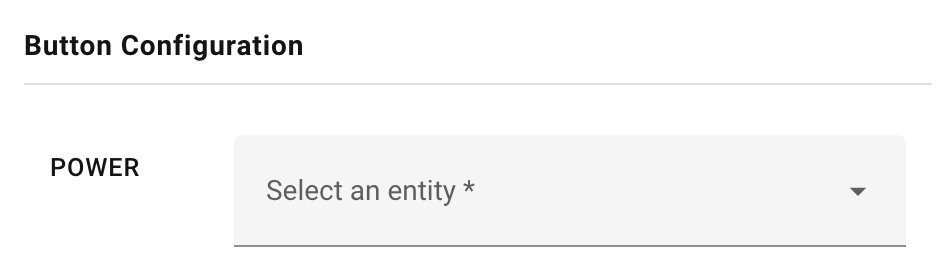
Unfortunately I cannot get the button in the TV RosCard to work with a service call either based on your private message. Below is an example of the power button which isn’t in the correct format as the TV RosCard validator doesn’t show the entity in the UI.

type: custom:aiks-tv-card
uuid: 8227b339-38b2-4dbc-9905-87112d43a510
tv_type: android_tv
tv_name: Unnamed TV
media_play_entity: ""
entities:
  - key: POWER
    type: remote
    service: remote.send_command
    data:
      entity_id: remote.universal_remote
      device: Foxtel
      command: Power
    value: ""

On the remote the error is “The target object of this button is unconfigured or nonexistent” when the button is pressed.

For reference this is the working script.

sequence:
  - action: remote.send_command
    target:
      entity_id: remote.universal_remote
    data:
      num_repeats: 1
      delay_secs: 0.4
      hold_secs: 0
      device: Foxtel
      command: Power
alias: Foxtel - On - Test - Script - Astrion
description: ""

@MRRIZK I assume it shoud work the same way as with the scene cards. So if you create an automation that listens to a call service event for domain media_player it should work:

triggers:
  - trigger: event
    event_type: call_service
    event_data:
      domain: media_player
      service: turn_on

conditions: ...
1 Like

I have a bug where the Monitor card does not show when lights are on or off.

Ross Card: v108

Remote: 1.1.0

HA: 2026.2.3