Astrion Pro is coming — what should we improve, and what price would make sense?

Hi everyone — the Sanytron Sissi here.

We’re preparing Astrion Pro, the next step from the Astrion HA100, with a substantial upgrade across both hardware and software. Before we finalize the launch details, we’d like your help: What does Pro need to get right, and what would you realistically pay for it?

Whether you own an HA100, have been waiting for the software to mature, or use another remote, we’d like to hear from you — including what would make you decide not to buy.

What we’re planning to change

The goal is not simply a faster HA100. It’s a more responsive, more flexible Home Assistant remote that everyone at home can use comfortably.

HA100 already has button mapping and local IR support described in our current software documentation. Pro should build on that foundation, not present existing capabilities as entirely new.

Area Planned direction for Astrion Pro compared with HA100
Hardware platform A more capable processor, more RAM and storage, and an Android 12-based platform.
Dashboard experience A hybrid approach combining native screens with web-rendered Home Assistant dashboards, aimed at greater flexibility with Lovelace and custom cards.
Device control Bluetooth HID support, intended to expand direct control options for compatible media devices.
Everyday software A broader upgrade focused on reliability, customization and easier setup — not just performance.

These are development plans, not a finalized launch specification. Dashboard and device compatibility still need validation. The ideas below are priorities we want your input on, not a promise that every feature will ship at launch.

1. Which improvements would actually change your experience?

What is the single most frustrating thing about your current setup? Then please rank your top three launch-day priorities. Add anything we’ve missed.

•Reliability and responsiveness: dependable wake-up, re-connection and button response. What must keep working if Home Assistant is restarting or unavailable?

•Activities: one action to start “Watch TV,” “Movie Night” or “Gaming,” with the right devices, inputs and button assignments.

•Button customization: broader remapping, long presses and activity-specific button behavior.

•Dashboard freedom: your own Lovelace dashboards and custom cards, rather than a fixed interface.

•Media control: reliable navigation, playback and volume control for your TV, streamer or audio system.

•Infrared control: better IR workflows and learning. Is built-in IR essential, or would an external bridge be acceptable?

•Battery and charging: reliable battery reporting and real-world endurance. What is your minimum acceptable time between charges?

•Simpler configuration: easier setup, visual editing, troubleshooting and configuration backup/migration.

•Developer access: documented APIs, button events and reusable configurations.

Concrete examples help: “During Movie Night, volume should control the AVR, navigation should control my streamer, and the lights should dim.” Please include device models where compatibility matters.

2. What would make Pro a worthwhile alternative?

SofaBaton X1S offers hub-based Activities; Unfolded Circle Remote 3 emphasizes local control and customization. Both list Home Assistant-related capabilities, so simply saying “works with HA” is not enough.

If you use either of these, another SofaBaton model, Harmony, or a phone/tablet, what does your current setup do well that Pro must not lose? What remains difficult? We’re interested in practical differences — compatibility, control flexibility, setup effort and total cost — rather than declaring a winner on paper.

For HA100 owners: which improvements should come to your current remote through software updates, and which hardware changes would justify upgrading? What would make an upgrade offer fair? This thread does not announce an update policy or discount.

3. What price would make sense to you?

Rather than suggesting a target price first, we’d like your own expectation.

For this question only, assume one Pro remote with a standard charging dock, priced in USD before shipping and taxes, with no optional IR bridge included. This is a survey reference, not a confirmed retail bundle.

What would be a fair price or price range? At what price would you stop considering it? Please say which launch-day features your answer depends on. If using your local currency, include your country and whether tax is included.

Finally, are you likely to consider buying if your requirements are met, waiting for independent reviews, mainly interested in updates for your current HA100, not interested, or still unsure? Why?

Quick reply template

•Current remote/setup:

•Biggest frustration:

•Top three launch-day priorities, in order:

•Must-keep feature from my current setup:

•Fair price/range and walk-away price:

•Features that price assumes:

•Interest level and main reason:

Short answers are welcome — no need to complete every field. Honest criticism is useful, and “I’d keep my current remote” is a valid answer.

A thank-you for helping shape Astrion Pro

To thank community members who share thoughtful, constructive feedback, we’ll offer exclusive contributor pricing when Astrion Pro launches. We may also offer a complimentary Astrion Pro to selected contributors whose input is especially valuable.

We value practical ideas, detailed use cases and honest criticism — not just positive comments. Tell us what you need, why it matters, and how it would improve your everyday experience. Contributions will be recognized for their usefulness, not the number of comments posted.

Thanks for helping us decide what Astrion Pro should deliver, rather than just what looks good on a spec sheet.

— The Sanytron Team
1 Like

matte screen, logo on the back instead of the front, no glossy black plastic, USB-C port accessible without needing a screwdriver (even if you just ship with an optional bottom plastic piece to switch out).

Decent discount for existing users.

3 Likes

Continuing the discussion from Astrion Pro is coming — what should we improve, and what price would make sense?:

Current setup:
Home Assistant is the main dashboard/control layer in my smart home, but I also use Homey Pro extensively for devices, flows and automations. I currently use phones/tablets for visual control, but I’m looking for a dedicated physical remote that anyone in the family can pick up and use immediately.
Biggest frustration:
Phones and tablets are great for dashboards, but they are not good remotes. For everyday actions like changing volume, controlling media, dimming a light or activating a scene, I want physical buttons that work instantly without unlocking a device or navigating through several screens.
My top three launch-day priorities:

  1. Button customization and context-aware controls.
    I would love every physical button to be exposed to Home Assistant and fully configurable, including short press, long press and ideally double press. Button behavior should also change depending on the active Activity. For example, during “Movie Night,” volume controls the TV/AVR, navigation controls the media player, while a long press on a button could adjust the room lights.
  2. Dashboard freedom without sacrificing speed.
    The proposed hybrid native + Lovelace approach sounds ideal. I would like to create a lightweight dashboard specifically for Astrion rather than reproduce my full tablet dashboard. Native screens should handle the most common actions instantly, while Lovelace/custom cards could provide more advanced controls when needed. Fast wake-up and responsiveness are more important to me than having a visually complex interface.
  3. Strong local integration and multi-platform support.
    Home Assistant should remain the primary integration, but I think direct Homey Pro support would make Astrion much more attractive to users with mixed smart-home systems. Ideally, Homey devices, Flows and Advanced Flows could be exposed to Astrion locally, or Astrion button events could be sent directly to Homey. An official Homey app/API integration would be a very interesting addition.
    Other features I would really value:
    Reliable local operation even if the internet is unavailable; excellent battery life and a charging dock that makes the remote always ready; IR learning; Bluetooth HID; reliable media controls; HA Assist/voice; haptic feedback; proximity/motion wake; and an easy visual editor for assigning buttons, entities, scripts and Activities.
    I would also really like configuration backup and migration. If I spend time building Activities, button mappings and dashboards, I should be able to restore everything easily or migrate it to another Astrion.
    One additional idea:
    It would be great if Astrion Pro could expose its own hardware to Home Assistant — battery level, charging state, current Activity, screen state and especially physical button events. That would allow advanced users to build their own automations around the remote rather than limiting the device to predefined functionality.
    Must-keep feature:
    Physical buttons. This is what separates a dedicated remote from another small smartphone. The touchscreen should complement the buttons, not replace them.
    Fair price:
    For a well-built Astrion Pro with Android 12, significantly improved processor/RAM, reliable Home Assistant integration, full button customization, local IR/Bluetooth control, charging dock and the hybrid native/Lovelace interface, I would personally consider $250–300 before tax a fair range.
    Interest level:
    Very interested. I was actually considering buying the current HA100, but after reading about Astrion Pro I would rather wait and see what the new hardware offers. If the final product delivers substantially better performance, flexible physical controls and the proposed hybrid Home Assistant dashboard experience at a reasonable price, I would seriously consider buying it.

I own an Astrion HA100, but recently I have also gone back to experimenting with a Philips ProntoPro TSU9400 that I last used around seven years ago. Comparing the two physically has highlighted a few things that I think are worth considering for Astrion Pro.

Interestingly, the number of physical controls is very similar. My TSU9400 has 21 user-function buttons plus a scroll wheel; Astrion has 23 addressable buttons. But in everyday use the Pronto makes more effective use of them.

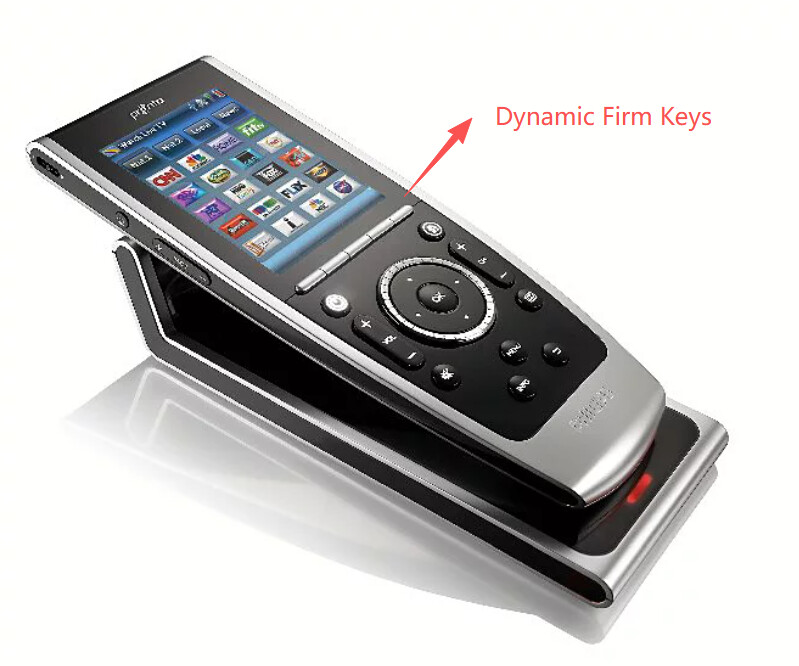
The feature I would most like to see borrowed from the Pronto is its five “firm keys” immediately below the touchscreen. These are real tactile buttons, but their labels are displayed on the screen immediately above them and can change with the current Activity or page.

That is an extremely powerful arrangement. In a disc-player Activity the five keys might be Eject, Audio, Subtitle, Top Menu and Popup Menu for example. In a music Activity the same five physical keys could be player controls like Play, Pause, Skip Forward and Skip Back leaving the screen real estate free to display play progress and cover art. You retain the tactile advantage of a real button without requiring the user to remember what an arbitrarily reassigned button means.

That leads to a second point: I think permanent button legends on a programmable remote should be as function-neutral as possible.

Volume, mute, navigation, OK, back, play/pause and power are useful general-purpose concepts. Buttons permanently marked for Lights, Curtains, Air Conditioning or Voice make assumptions about what the owner has in Home Assistant and how they want to use the remote. They can of course be remapped in software, but then the physical legend becomes misleading.

I would question dedicating four permanent buttons to red/green/yellow/blue for the same reason. They remain useful for some equipment, but four permanently labelled hardware positions is a substantial allocation on a general-purpose remote. Dynamic firm keys or touchscreen controls could provide them when an Activity actually requires them.

The lesson I am taking from going back to a nearly 20-year-old Pronto is that the best programmable-remote hardware tries not to predict too specifically what the user will want its buttons to do. The software supplies the context; the physical controls should remain useful across as many contexts as possible.

I also have a slight concern that Astrion Pro is being discussed while it still feels as though there is unrealised potential in the HA100 platform. Projects such as Harmonium are beginning to demonstrate what the existing hardware can become when Home Assistant provides the Activity/state model. I would therefore very much like to see software capabilities that do not genuinely require new hardware continue to reach HA100 owners.

For Pro itself, my priorities would consequently be:

  1. Activity-specific mapping of as many physical controls as technically possible, including short and long press.

  2. Several physical “firm keys” adjacent to the display whose labels and functions can change dynamically with the current Activity/page.

  3. Neutral, generally applicable physical button legends rather than buttons dedicated to particular smart-home device classes.

For me, those things would matter more than simply having a faster processor or a more elaborate specification. The remote is ultimately a physical user interface, and that interface has to remain intuitive when its context changes.

That’s a very profound insight. Let me add a bit to explain to everyone the ingenuity of the PHILIPS design.

The Dynamic Firm Key architecture bridges the gap between tactile feedback (physical pushbuttons) and contextual flexibility (touchscreen UI).

Instead of printing static icons on physical buttons (e.g., dedicated “Curtain” or “Air Conditioner” icons) or relying purely on standard touchscreen buttons, the physical buttons are located directly adjacent to the bottom border of the display.

The system draws dynamic UI labels (icons or short text) on the screen immediately above each corresponding physical key. When the active scene or device context (“Activity”) changes, the screen updates the labels, while the physical keys underneath handle the tactile actuation.

+-----------------------------------+
|                                   |
|        Main Display Area          |
|  (Cover Art, Status, Controls)    |
|                                   |
+-----------------------------------+
| [ Eject ] [ Audio ] [ Subtitle ]  |  <-- Dynamic UI Label Dock
+-----------------------------------+
  [  Key1  ] [  Key2 ] [  Key3  ]   <-- Physical Hard Keys (No static legends)

2. Why It Works: UX Advantages

  • Eyes-Free / Blind Operation: Users get real tactile click feedback without having to look at their thumb position while pressing.

  • Context-Aware Usability: A single set of 4–5 physical buttons can serve dozens of different functions depending on the current Activity (e.g., Media Player vs. HVAC Control vs. Lighting Scenes).

  • Conserves Main Screen Real Estate: Moves primary action triggers off the main screen area, leaving more space for rich content like album art, sliders, or high-density status information.

  • Neutral Hardware Design: Avoids permanent, specific hardware legends that become obsolete or misleading when remapped in software.

3. Hardware & Mechanical Requirements

  • Ultra-Narrow Screen-to-Key Gap: The physical distance between the bottom active area of the LCD/OLED panel and the top edge of the physical keys must be kept to an absolute minimum (ideally $<1.5\text{ mm}$).

  • Visual Alignment: The physical key spacing (pitch) must match the grid layout of the software UI labels to maintain a clear 1:1 visual link.

  • Key Cap Design: Keycaps should be function-neutral (unprinted/blank or minimal neutral geometric marks) and offer distinct tactile displacement (e.g., metal dome or crisp micro-switches).

4. Software & Architecture Requirements

  • Activity / State Machine Integration: The UI system must treat the bottom region of the screen as a dedicated Dock/Label Area registered to the active Activity controller (e.g., Home Assistant Activity model).

  • Dynamic Event Binding:

    • When Activity = Disc_Player: Key 1 sends remote.send_command(command="eject") and the display renders the EJECT icon above Key 1.

    • When Activity = Music_Player: Key 1 sends remote.send_command(command="previous_track") and the display renders the PREV icon above Key 1.

  • Multi-Input Event Handling: Software event listeners should support distinct triggers per firm key:

    • Short Press: Primary contextual function

    • Long Press: Secondary/advanced option or sub-menu popup

    • Double Press (Optional): Universal shortcut (e.g., back to Home Activity)

1 Like