I. Overview
ULTRA BAR is the world’s first desktop-level cross-ecosystem intelligent control terminal. Through its BAR ultra-narrow screen form factor and magnetic modular design, it condenses technological aesthetics and full-scenario intelligent control capabilities into the space of your desktop. Equipped with the self-developed LineOS operating system and SceneShift™ dynamic scene engine, it achieves seamless dynamic reconstruction of the desktop interface across office/gaming/music scenarios through the fusion of environmental awareness and behavioral prediction, redefining desktop human-computer interaction.
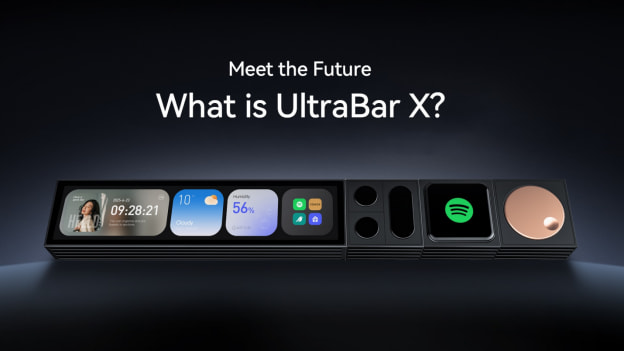
II.ULTRA BAR System Main Modules
The UltraBarX system consists of multiple modular components that work together to provide users with a complete desktop intelligent control experience.
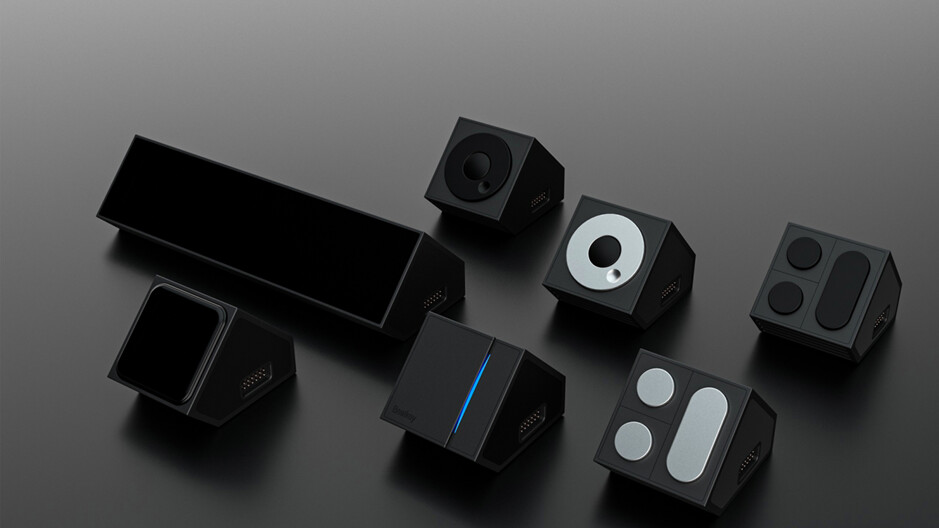
III. Module Power Supply and Distributed System Architecture
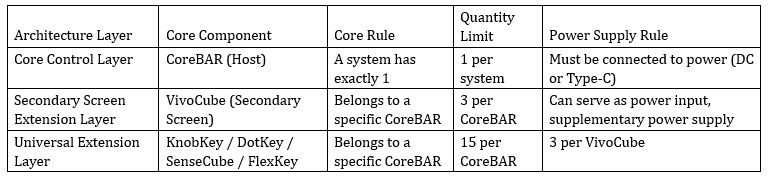
Table 1: System Architecture Layer Definition
Key Supplementary Notes (Usage Guidelines)
Connection Layout: Each CoreBAR can have up to 10 extension modules connected on each side (left and right).
Power Supply Strategy
Core Principle: Each CoreBAR and each VivoCube can serve as an independent power input.
Simple Configuration: For lightweight usage (connecting a small number of modules), simply power the core host CoreBAR.
Full Configuration: When connecting a large number of modules, it is recommended to connect each CoreBAR and VivoCube in the system to an independent power source to ensure all modules receive stable power and achieve full performance release.
Hard Limit Protection: 15 per CoreBAR is the absolute upper limit of the system. Even with stronger power supply capability, this limit cannot be exceeded. This is a firmware lock set to ensure system stability.
Core Rules Interpretation (Complete Distributed Architecture)
1. Full Wireless Link, Zero Layout Constraints: Any device acting as a slave (VivoCube) communicates with the host via Wi-Fi. Completely free from physical magnetic interface constraints, you can place the CoreBAR slave anywhere on the desktop or even in any corner of the room, achieving true split, multi-zone control layout.
2. Clear Role Definition: The host (1 unit) is the sole brain of the system, responsible for unified scheduling and decision-making. The VivoCube slave is a flexible micro control screen that can extend up to 3 modules.
3. Unified Extension Logic: Whether host or slave, each CoreBAR (primary/slave) can connect up to 15 modules; each VivoCube slave can connect up to 3 modules.
4. Independent Power Supply and Communication: Each device (primary/slave CoreBAR and VivoCube) requires independent power connection. Hosts, slaves, and secondary screens can form a closed, low-latency control private network through local Wi-Fi. Hosts and slaves expand modules through the QuantumLink interface, achieving integrated power supply and communication.
IV. Module Interface Definitions and Detailed Explanations
1. CoreBAR - The Command Center
CoreBAR is the core of the entire system. It is not only the basic power supply and connection center of the UltraBAR system but also the high-performance brain that drives the entire desktop ecosystem intelligence. It integrates the most advanced sensing, computing, and connectivity capabilities, providing a unified platform for all extension modules.
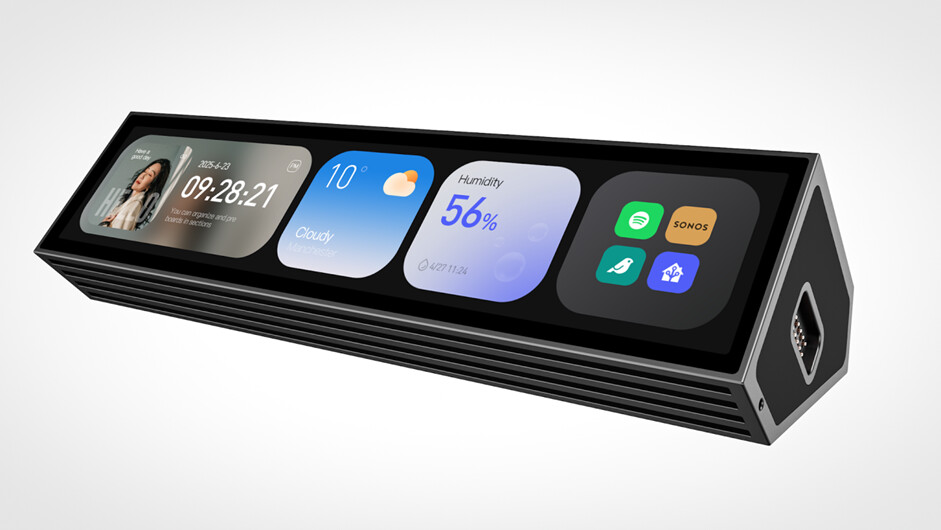
Core Functions
Universal Connection Center (The Hub): Provides wired (custom magnetic contacts) and wireless (Bluetooth Low Energy Mesh) interfaces; built-in high-speed CAN bus ensures high-speed lossless data flow between CoreBar and modules.
Self-Developed System Platform (The Platform): Equipped with LineOS™ deeply customized based on Android; built-in SceneShift™ dynamic scene engine that processes data streams from all sensors in real-time and learns user behavior habits to proactively predict user intent, achieving automated seamless reconstruction of desktop scenarios.
Cross-Domain Control Terminal (The Controller): Can establish private protocol communication with Windows/macOS hosts via wired/wireless methods, transforming into your physical shortcut panel; natively integrates mainstream smart home ecosystems (such as Apple HomeKit, Xiaomi Mi Home), supports HomeAssistant and other open-source platforms, with one interface to uniformly control whole-house lighting, music, and air conditioning.
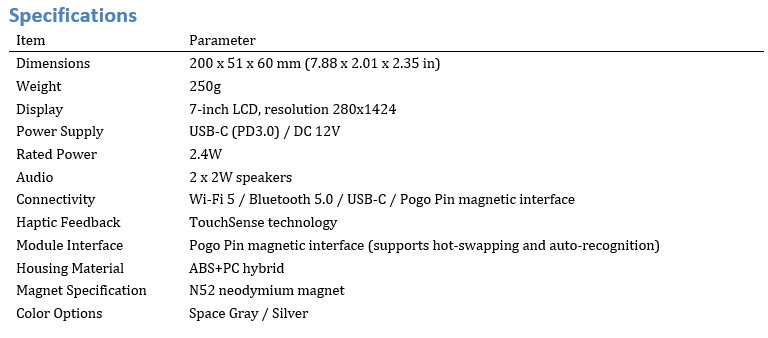
Table 2: CoreBAR Technical Specifications
2. VivoCube - The Dynamic Magic Cube
VivoCube innovatively integrates the precise tactile feel of physical buttons with the infinite possibilities of OLED screens, becoming a super all-in-one screen-key that can intelligently change with the scenario. At the same time, it serves as a secondary screen extension of CoreBar.
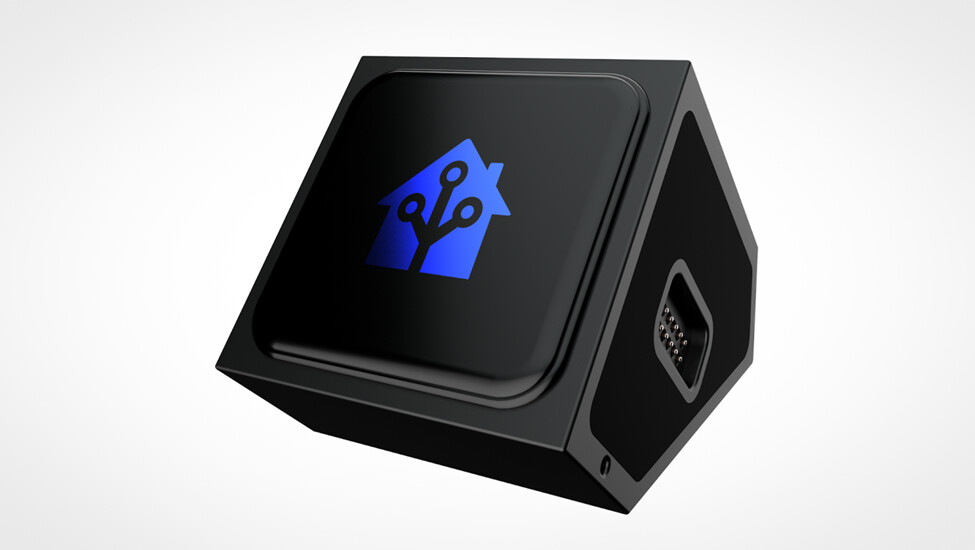
Core Innovation: Hybrid Interaction
Reassuring Physical Feel: Uses high-quality mechanical keyboard switch micro-movements, providing clear and consistent press tactile feedback, very suitable for blind operation and scenarios requiring confirmation (such as submission, confirmation, etc.).
Infinite Flexible Visual Display: Equipped with a 2.0-inch high-resolution AMOLED display, with completely dynamic programmable display content (such as text, icons, dynamic weather, or audio spectrum analyzer).
Touch Interaction Layer: The screen supports touch operation, allowing up/down sliding, long press, etc., achieving multiple controls without pressing (such as sliding to adjust volume/brightness).
Breakthrough Split Extension Capability: When VivoCube acts as a slave, it communicates with the host via Wi-Fi, allowing it to be placed away from the host CoreBAR, breaking traditional layout constraints; each VivoCube slave can form a small extension center itself, directly magnetically extending up to 3 modules (such as KnobKey, DotKey, SenseCube).
Deep System Coordination: Automatically switches content based on SceneShift™ engine; office mode transforms to Teams meeting keys, gaming mode switches to macro skill keys, music mode transforms into playback control keys; the division of labor is clear—the main screen is responsible for global information display and management, while the secondary screen is responsible for high-frequency core one-touch direct single operations.
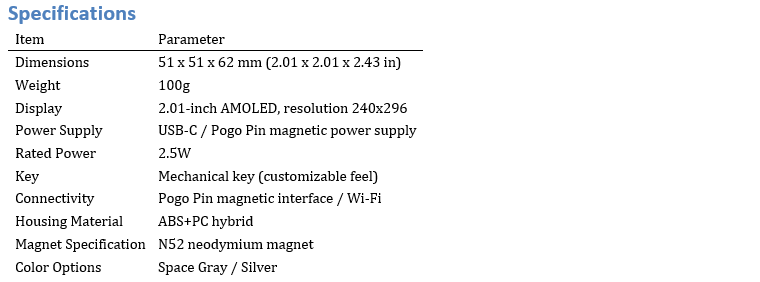
Table 3: VivoCube Technical Specifications
3. DotKey & KnobKey
DotKey and KnobKey these two modules supplement the UltraBAR interaction system, covering precise tapping and stepless rotation, forming a very complete interaction iron triangle: VivoCube (dynamic screen key) + DotKey (mechanical shortcut key) + KnobKey (stepless knob).
DotKey™ Module: Professional-Grade Mechanical Action Key
DotKey is a professional-grade input module designed for users pursuing ultimate efficiency and pure tactile feel.
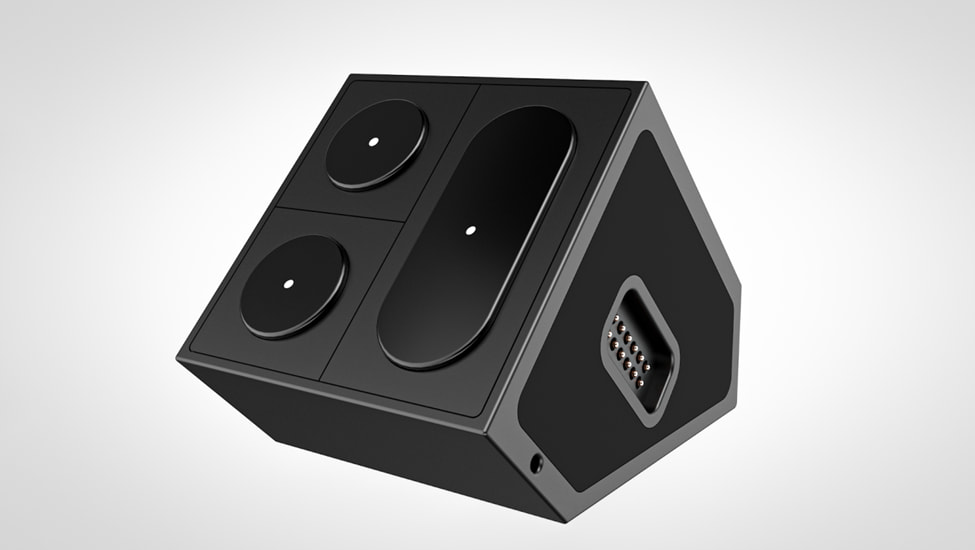
Palace-Level Mechanical Feel: Uses high-end Cherry MX switches (or equivalent custom switches), each press brings precise consistent travel and satisfying physical confirmation feedback.
Pure Ultimate Function Customization: Through the accompanying Ultra Studio configuration software, each DotKey can be bound to any complex shortcut key or macro command (one-key mute, one-key execute workflow, or one-key insert code snippet, etc.).
Colorful Backlight and Status Indicator: Equipped with RGB LED (supports 16.8 million colors), backlight is not only aesthetic but also can distinguish mode indicators through color (office blue, gaming red), or provide status feedback (recording flashing red, low battery yellow breathing).
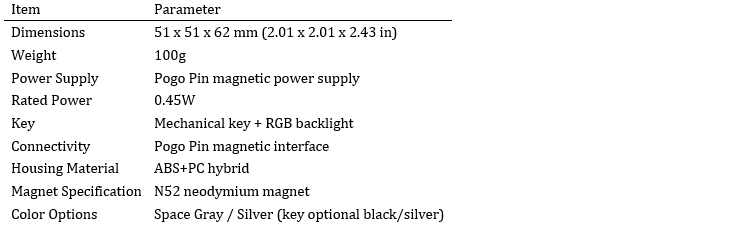
Table 4: DotKey Technical Specifications
KnobKey Module: Precision Stepless Adjustment Knob
KnobKey is an interactive art module focused on fine adjustment.
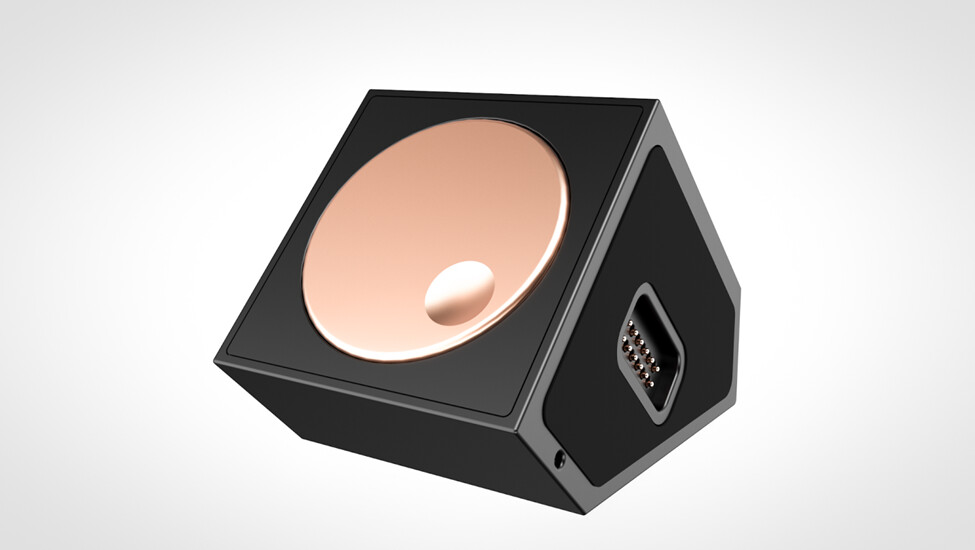
Precision Knob with Click Ritual Feel: Made with high-quality aluminum alloy CNC process, built-in digital encoder, rotation produces clear clicking sounds similar to high-end safes or camera lenses.
Infinite Possibility Scenario-Based Adjustment: Intelligently changes with scenario, such as controlling Photoshop brush size, adjusting AV system volume or screen brightness; the knob itself supports pressing, which can be defined as mute, switch, or mode toggle.
Elegant Ambient Backlight Ring: The base has a programmable RGB light ring, volume length, brightness, or color temperature can visualize current parameters through the light ring.
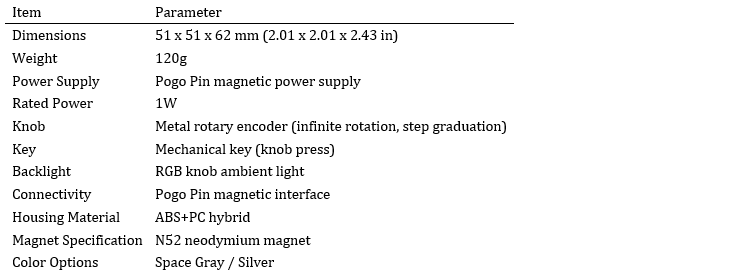
Table 5: KnobKey Technical Specifications
4. SenseCube - The Perception Magic Cube
SenseCube is the environmental intelligent perception core of the system. It can actively perceive environmental changes and user presence, endowing the desktop with vision, touch, and temperature sensing.
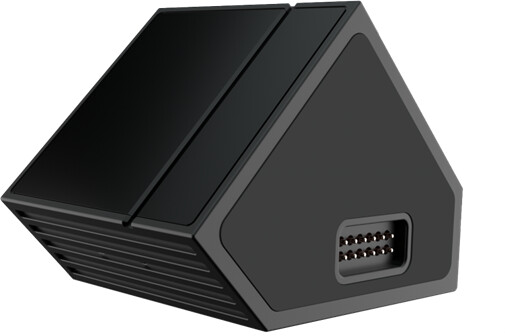
Core Functions and Application Scenarios
1. Intelligent Presence Detection: Based on 60GHz millimeter wave radar, accurately detects user seating, approaching, or leaving status. Can achieve screen-on-when-person-arrives (walking to the desk, CoreBAR screen automatically lights up), screen-saver-when-person-leaves (leaving briefly, system automatically locks).
2. Tactile Interaction Commands: Built-in high-sensitivity vibration sensor recognizes different tap patterns. For example, double-tap the desktop to start flow mode with one key.
3. Environmental Climate Monitoring: Real-time monitoring of micro-environment temperature and humidity, can set smart home linkage (such as automatically turning on air conditioning when temperature exceeds 28°C, automatically turning on humidifier when humidity is low).
4. Adaptive Light Sensing Adjustment: Captures ambient light intensity, automatically adjusts CoreBAR screen brightness and screen lamp color temperature.
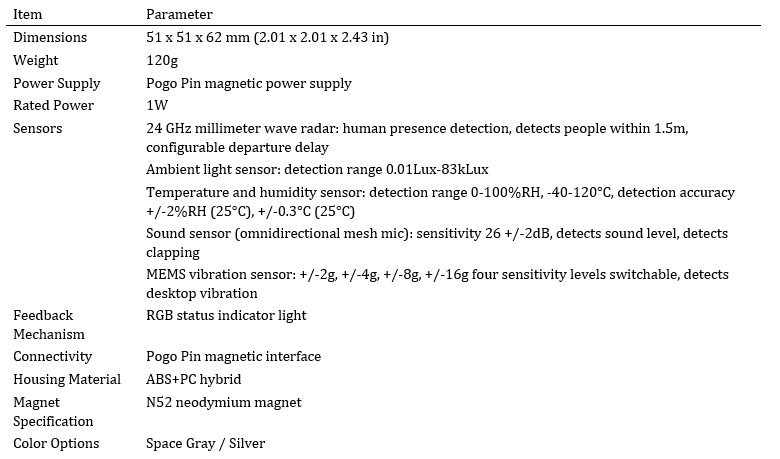
Table 6: SenseCube Technical Specifications
5. FlexKey(Coming Soon) - Modular Dynamic Interactive Key
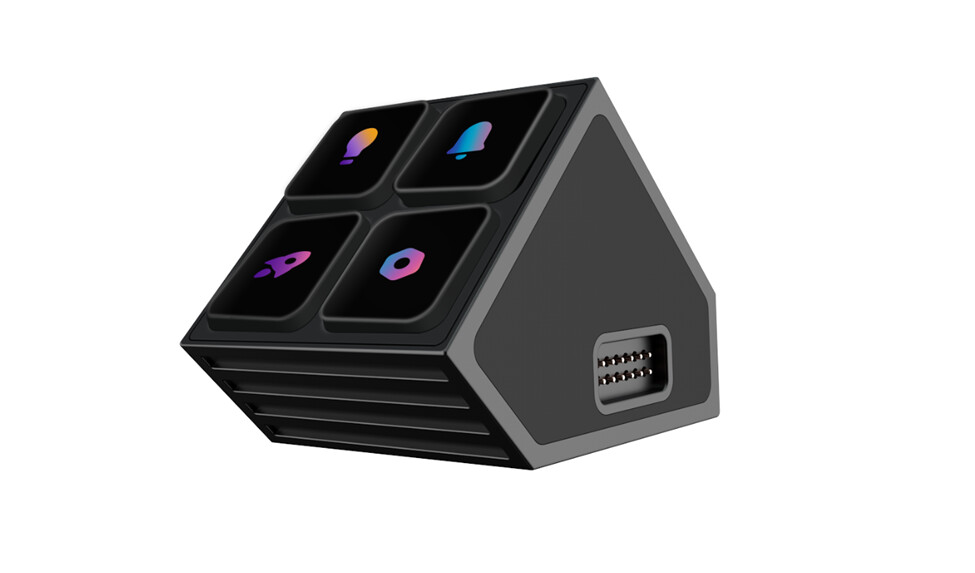
FlexKey integrates the solid tactile feel of physical keys with the flexibility of touch screens. Each FlexKey module is an independent, magnetic smart key.
Core Features
1. Physical Press, Reject Accidental Touch: Uses high-quality mechanical switches (optional blue/red axis), supports blind operation and is more reliable than touch screens.
2.Screen Changes with Core, Icons Defined by You: Each key’s screen supports dynamic icons, which can be software logos, macro command identifiers, system status (volume/brightness percentage) or even GIF animations, synchronized with one click through UltraMate software.
3.Magnetic Module, Free Combination: FlexKey uses a single key as a unit, connected through magnetic pogo pin contacts, no cables needed. Can be used individually as 1 unit, or assembled into any array such as 2x3, 3x3 to build a custom control panel.
Cross-Scenario Adaptive: When switching software, icons and corresponding functions automatically follow and switch. For example, showing brush undo in Photoshop, showing stream mute in OBS, etc.
V. Summary: Redefining the Complete Desktop Interaction Ecosystem
CoreBar: Responsible for [Core Hub] and [Interaction Center]
VivoCube: Responsible for [Smart Display], [Dynamic Shortcuts], and [Split Extension]
DotKey: Responsible for [Absolute Efficiency] and [Tactile Confirmation]
FlexKey: Responsible for [Custom Definition] and [Touchscreen Visualization]
KnobKey: Responsible for [Fine Adjustment] and [Ritual Immersion]
SenseCube: Responsible for [Proactive Environmental Intelligence], goodbye to manual control, let the environment move with you