Hi @mindedc,
First of all, thank you again for the incredibly detailed explanation of your system. Your setup is clearly a very advanced home theater environment, and feedback from users with this level of experience is genuinely valuable for us.
Before addressing the design discussion, I also want to acknowledge something you mentioned earlier. You were absolutely correct that our posts sometimes appear highly polished. Our team is primarily composed of Chinese engineers, so English is not our native language. We do occasionally use AI tools to help refine the wording of posts and documentation. However, every message is still manually reviewed and edited by our team to ensure the technical meaning and intent are communicated accurately. Your observation was fair, and we appreciate the understanding.
Regarding the remote control discussion, your explanation actually helped clarify an important perspective. Users coming from high-end home theater environments often think about a remote primarily in terms of media transport control — dedicated buttons for Play, Pause, Stop, Rewind, Fast-Forward, chapter navigation, subtitles, audio tracks, and so on. In those environments, having a clearly defined transport control cluster becomes very important because it allows fast operation without relying on on-screen UI.
Astrion was designed with a slightly different primary goal. The design priority for Astrion was smart-home control first, with quick access to lighting scenes, shades, comfort systems, security functions, and automation shortcuts. Media control was considered important, but more as a complementary capability rather than the central design focus.
Because of that design philosophy, the eight customizable buttons and the colored buttons were intended to provide flexible shortcuts for home-automation tasks, while still allowing integrators to map media commands if needed.
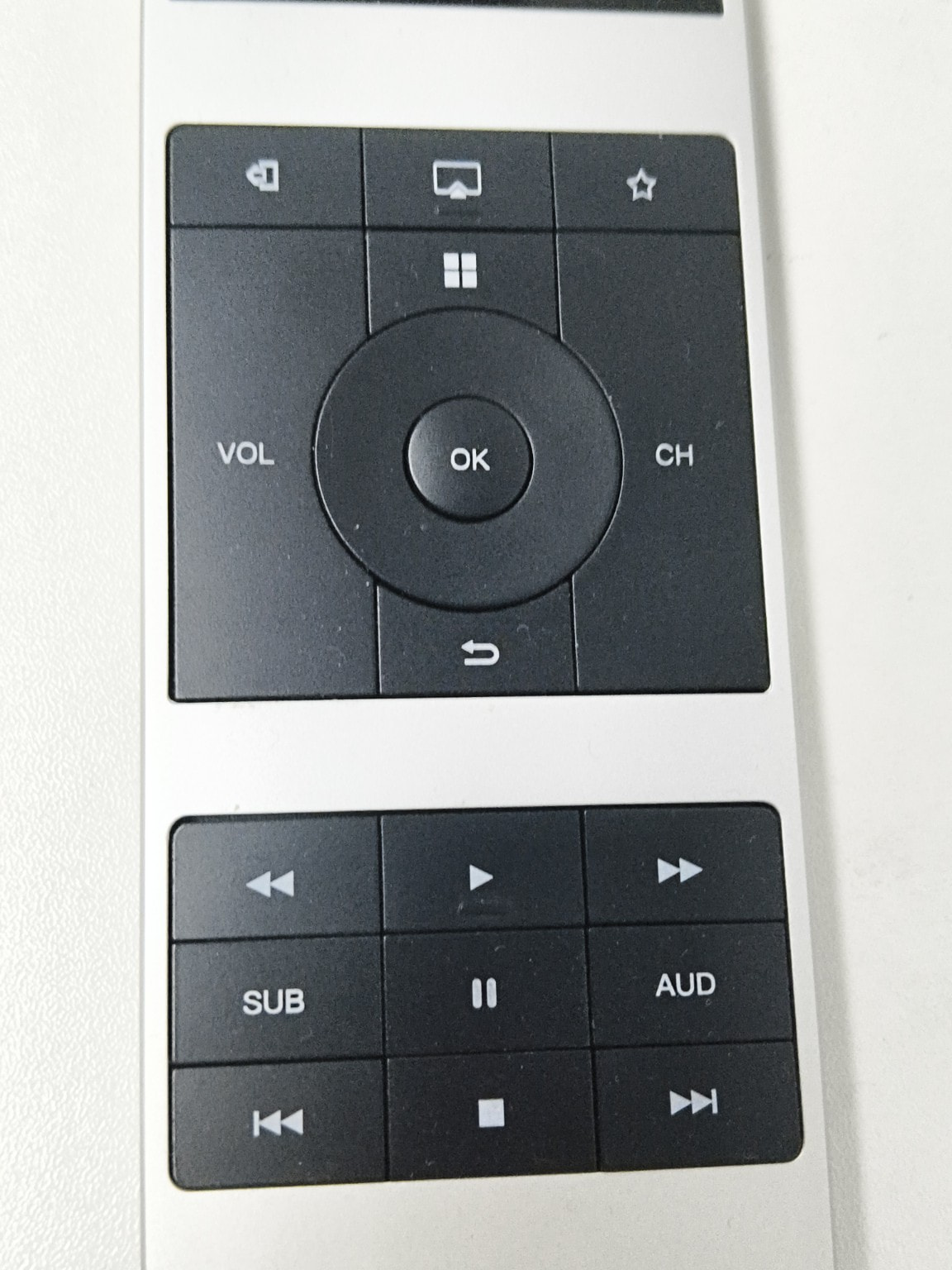
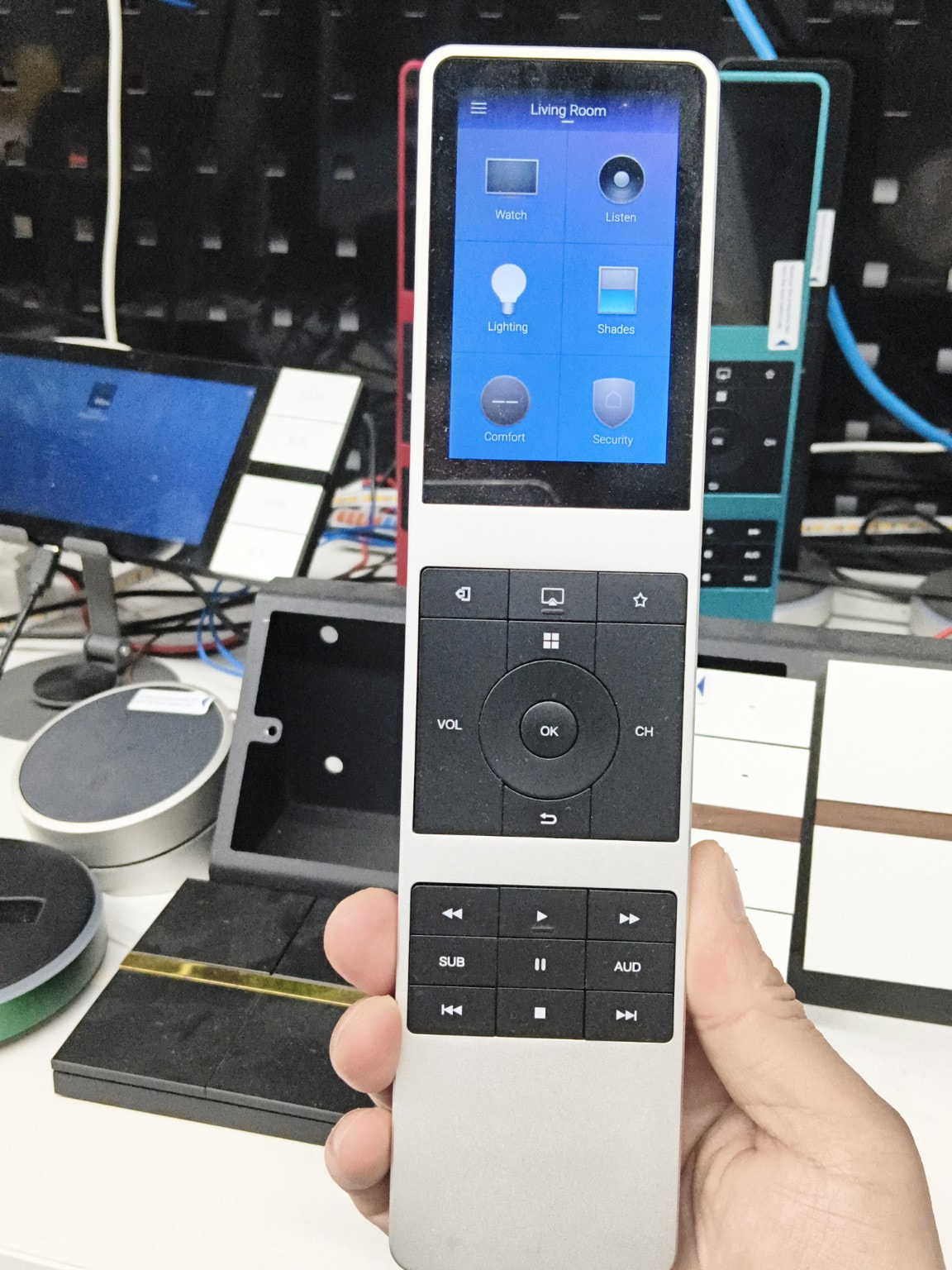
Interestingly, the workflow you described is actually very similar to the design philosophy behind another remote in our lineup, the iRemote Control4 Edition, which was originally developed with Android TV and media-center environments in mind. That remote includes a dedicated transport control cluster with buttons such as Play, Pause, Stop, Rewind, Fast-Forward, subtitle and audio selection, which may look closer to the layout you described.
(Images attached below for reference.)
However, Astrion intentionally follows a different approach, trying to balance touch UI + physical buttons + smart-home shortcuts in a single device.
Your suggestion about changing the button labeling or appearance (for example using different colors, icons, or tactile markers) is very interesting. From a product design perspective, these ideas make sense, especially for users who rely heavily on media playback control.
That said, implementing such changes immediately is not always straightforward from a manufacturing perspective. Even relatively small adjustments — such as changing laser-etched icons, adding tactile bumps, or altering button shapes — typically require tooling adjustments and new production batches. Since we recently experienced some production delays, we also currently have inventory based on the existing design.
Nevertheless, your suggestion is absolutely something we will study internally. One of the long-term questions we continue to explore is how a remote can effectively bridge multiple ecosystems and usage patterns — for example:
• smart-home control (lighting, scenes, automation)
• home theater media control
• platforms such as Control4 or Home Assistant
• and other advanced automation workflows
Finding the right balance between those worlds is actually one of the most interesting design challenges for us.
Your feedback — especially coming from a real-world high-end theater environment — is extremely helpful as we evaluate future product directions and possible hardware revisions.
Thanks again for taking the time to share such thoughtful and detailed ideas.


 Remote = Media First (We Agree)
 Media control is the primary use case
 Your Idea (This Is Interesting)
 Final Thought