We want UltraBAR to be more than just a shortcut keyboard—we want it to become a Creative Control Surface that truly integrates into designers’ workflows.
This time, we’re exploring deep Photoshop control:
-
Automatically detect Photoshop and the currently active tool
-
Sync brush parameters with the software in real time
-
Dynamically bind knob controls to parameters based on the current context
-
Dynamically map the three physical buttons according to context
-
Quick controls for layers, masks, and selections
-
Automatically surface frequently used functions as a dynamic action panel
-
Execute common basic workflows with one click
Let hardware understand software, and let control follow creation.
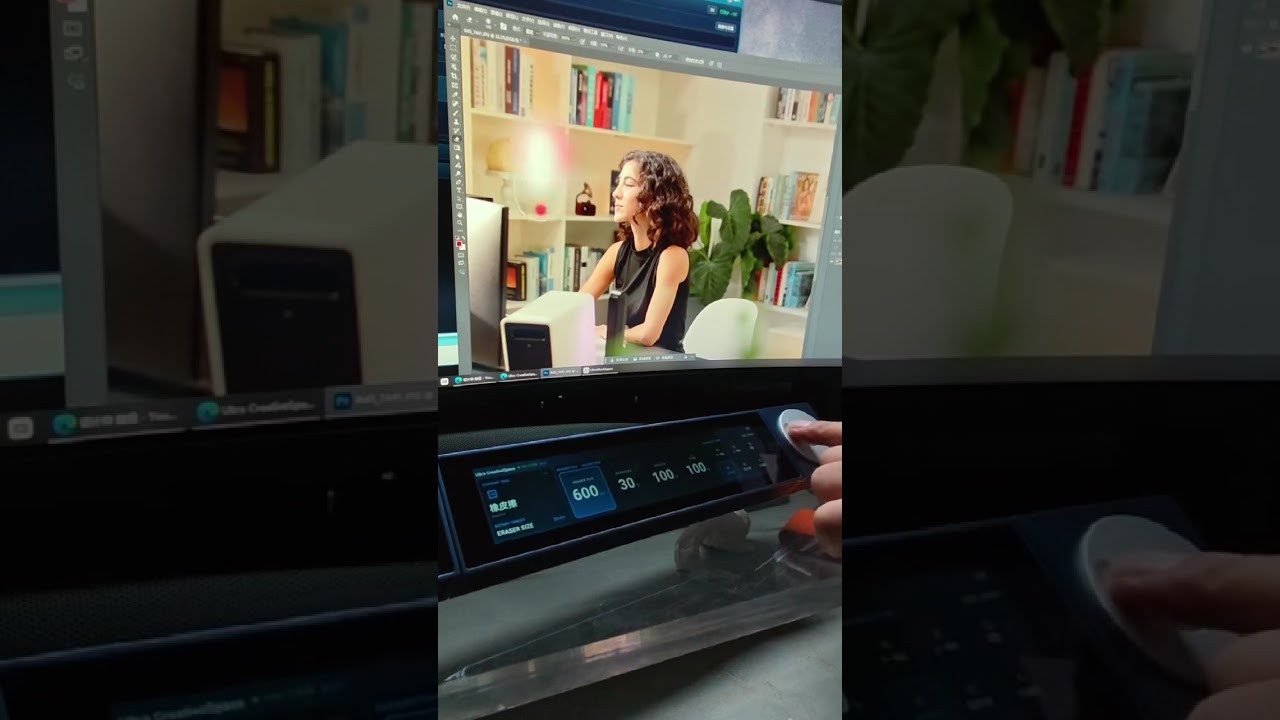
Ultra CreativeSpace is a two-part system that bridges Adobe Photoshop on your PC with a handheld LineOS Android terminal. A lightweight PC plugin mirrors Photoshop’s live state — current tool, brush size, hardness, opacity, flow, layers, colors, and document info — and pushes it to a compact terminal in real time, so every control you need is always one tap, twist, or keypress away.
What you can do
- Remote brush & tool control — adjust size, hardness, opacity, and flow; switch tools and toggle the eraser directly from the terminal.
- A physical knob that follows context — the rotary encoder auto-targets the most relevant parameter (brush size, font size, or layer opacity) and steps through Photoshop’s native ladder.
- Quick action pads — one-tap shortcuts for undo/redo, save, swap colors, new layer, layer mask, fit screen, and more, organized by tool category.
- Color & layer workflows — set foreground/background colors, swap or reset them, and select layers without reaching for the mouse.
- A customizable dashboard — arrange function tiles into groups (UI design, layout, print, photo retouching) and bind hardware keys, combos, and PS commands to each slot.
- Works even when Photoshop is closed — a built-in Mock mode lets you try every control and configure layouts before the real connection resumes.
Built for the way you work
The terminal UI adapts to the active tool, surfacing only the relevant parameters and quick actions. A PC-side config page lets you edit layouts, manage the Photoshop command whitelist, and sync settings to the device. And because the whole interface is bilingual (中文 / English), you can switch the terminal language remotely at any time.