How can I make the refresh work?
I refrehed a 1000 times.
restarted the remote
changed Lovelace views,
Refresh is simply random or not working!
How can I make the refresh work?
I refrehed a 1000 times.
restarted the remote
changed Lovelace views,
Refresh is simply random or not working!
Hello,
We are truly sorry that you had a less-than-satisfactory experience. To confirm, were you trying to refresh by pulling down, and the refresh failed to complete?
To help us investigate, could you please:
Check if any of your room names are duplicated. If you’re using the default names, please try renaming the view.
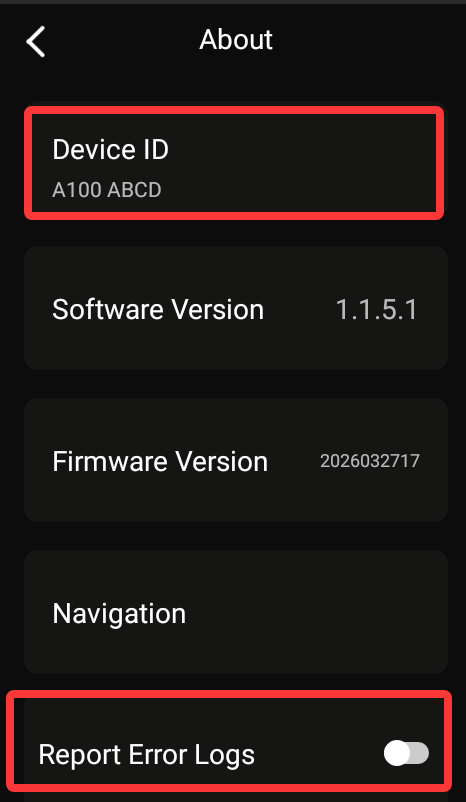
Go to Settings → About, enable Log Upload, and perform the refresh operation again. Also, please provide us with your remote control’s SN number so that our engineers can look into the issue.
We sincerely apologize for the inconvenience this has caused you.
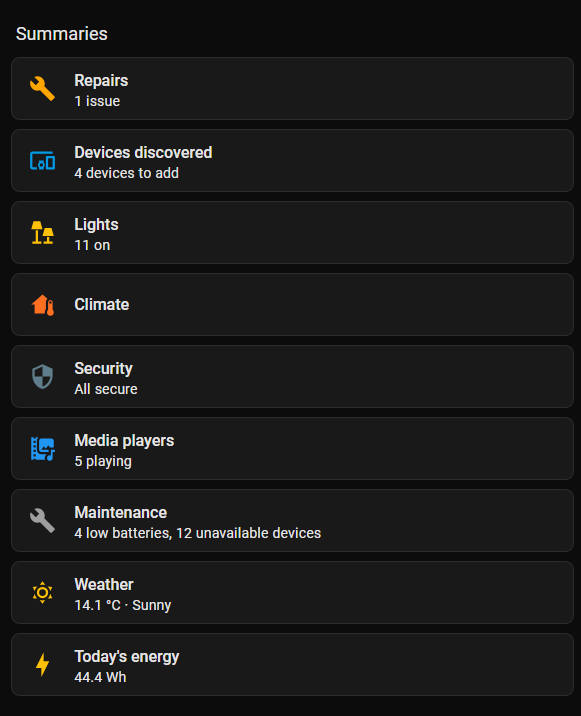
By default names he means any of the below from the default dashboard. I had a view calledClimate with ROS cards on it, would not work until I changed the view name to Heat Pumps
Additionally, our remote control requires the corresponding card to function, and the infrared feature needs to be used in conjunction with the Astrion Home integration.
For the first-time card setup, you need to go to HACS, select Custom Repositories, choose Card as the type, and add the card using the following download URL:
https://github.com/yyqclhy/RosCard
Similarly, for the integration, go to HACS, select Custom Repositories, choose Integration as the type, and add the integration using the following download URL:
https://github.com/yyqclhy/Astrion-integration
If you have any additional information that could help us with the analysis, we would really appreciate it. You may also visit our official support forum for more guides and resources: