The Missing Layer of Smart Homes
Why interface design matters as much as automation
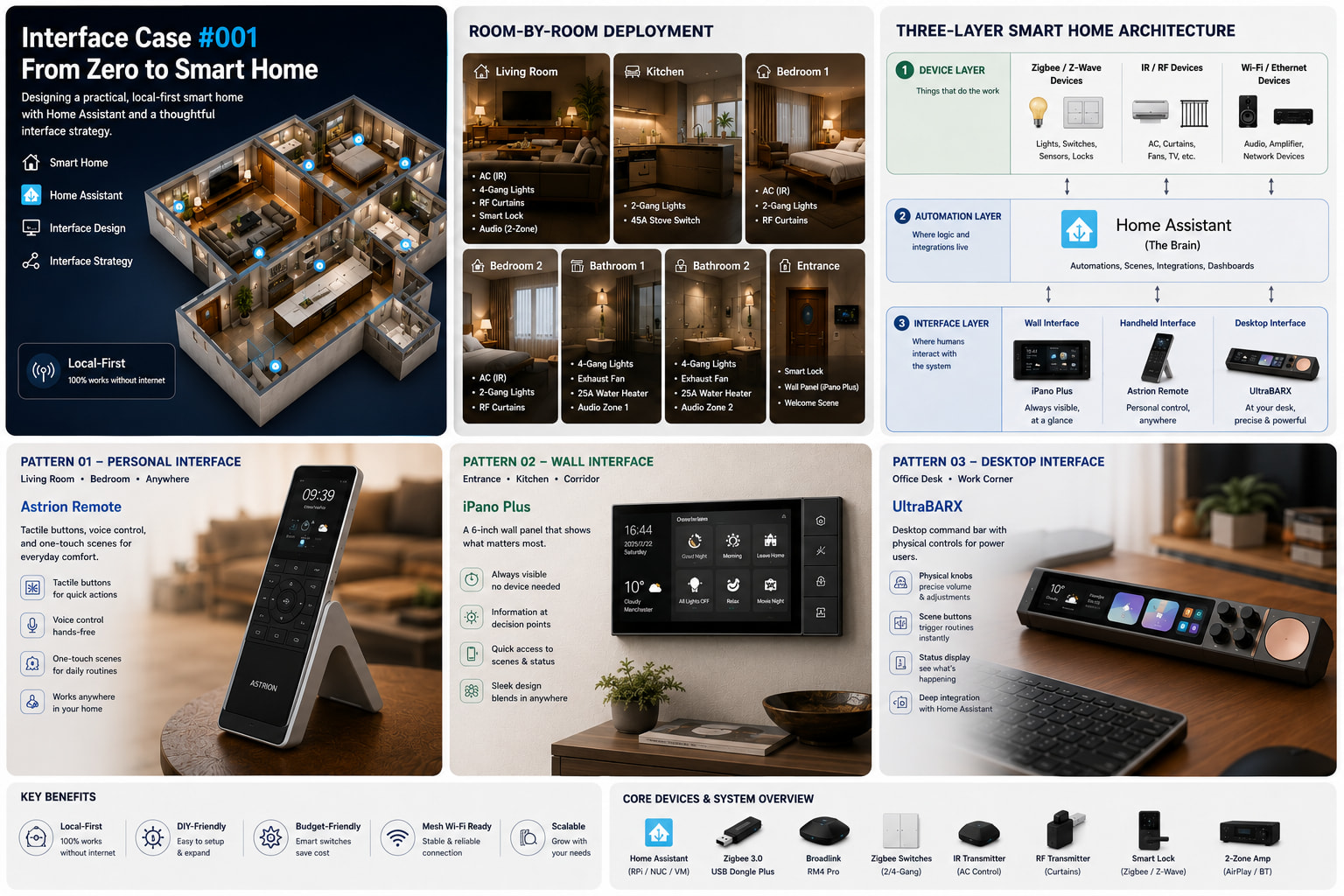
Interface Case #001
The Missing Layer of Smart Homes
Why interface design matters as much as automation
A practical Home Assistant architecture for building a local-first smart home through interface-first design
July 16, 2026
Smart Home · Home Assistant · Interface Design · Interface Strategy
Inspired by a real community question
Problem Source
Every week, someone moving into a new home asks the same question:
“Where do I start?”
Smart home technology has never been more accessible, but turning dozens of devices into one coherent system is still the hardest part.
This article is the first in our Interface Case series, where we take real community questions and explore practical interface strategies for solving them.
The Three Layers
Think of a smart home as a layered system—not a collection of gadgets.
Device Layer
Lights, sensors, locks, thermostats, speakers—the things that do the work.
↓
Automation Layer
Home Assistant—where logic, rules, and integrations live.
↓
Interface Layer
The physical touchpoints—where humans interact with the system.
Most people spend their time choosing devices. In reality, the experience of living with a smart home is shaped by its interface.
Every automation begins with devices and logic, but it always ends with a human interaction.
That’s why the Interface Layer deserves as much attention as the Automation Layer. And humans interact differently depending on where they are and what they’re doing.
Reference Architecture
text
┌─────────────────────────────────────────────────────────────┐
│                    DEVICE LAYER                             │
│  ┌──────────────┐  ┌──────────────┐  ┌──────────────┐     │
│  │ Zigbee/ZWave │  │    IR/RF     │  │   Wi-Fi/ETH  │     │
│  │   Devices    │  │   Devices    │  │   Devices    │     │
│  └──────────────┘  └──────────────┘  └──────────────┘     │
│  Lights, Switches   AC, Curtains      Door Lock, Audio    │
└─────────────────────────────────────────────────────────────┘
                              │
                              ▼
┌─────────────────────────────────────────────────────────────┐
│                   CONTROL LAYER                             │
│              ┌─────────────────────────┐                    │
│              │   Home Assistant         │                    │
│              │   (The Brain)            │                    │
│              └─────────────────────────┘                    │
└─────────────────────────────────────────────────────────────┘
                              │
                              ▼
┌─────────────────────────────────────────────────────────────┐
│                   INTERFACE LAYER                           │
│                                                             │
│  ┌──────────────┐  ┌──────────────┐  ┌──────────────┐     │
│  │    Wall      │  │   Handheld   │  │    Desktop   │     │
│  │   Interface  │  │   Interface  │  │   Interface  │     │
│  └──────────────┘  └──────────────┘  └──────────────┘     │
│                                                             │
│  • Entrance      • Living Room      • Office Desk          │
│  • Kitchen       • Bedroom          • Audio Control        │
│  • Corridor      • Anywhere         • Productivity         │
└─────────────────────────────────────────────────────────────┘
Key Insight
There is no universal interface.
Every room creates different interactions, and every interaction deserves an interface designed for that context.
-
A wall panel works best where people naturally pause.
-
A handheld remote works where people relax.
-
A desktop controller belongs where people work.
The best interface depends on the context—not the technology.
Generalized Requirements
This case is grounded in a real user’s needs:
-
Living Room: AC, smart lock, 4-gang switch (4 lights), RF curtains
-
Kitchen: 2-gang switch, 45A stove switch
-
Bathrooms (x2): 4-gang switch (3 lights + exhaust), 25A water heater, 2-zone AirPlay/Bluetooth audio
-
Bedrooms (x2): AC, 2-gang switch, RF curtains
-
Constraints: Local control only, budget-friendly, DIY-friendly, works with mesh Wi-Fi
Notable: This user doesn’t want smart bulbs—they want smart switches that preserve traditional light control while adding automation. This is the right approach for a family-friendly smart home.
Here’s our proposed design.
What would you change?