Hi @mindedc I also have some kinda messy items to script. I’m not sure if it helps in your case, but are you familiar with Universal media player - Home Assistant - basically make up your own media player from whatever underlying entities you want and once you template things like sources, you can combine a whole bunch of things together into a single player. I then use that with a selector template so that I can control all the navigation using the tv card.
I believe this can all be done with a few additional virtual buttons and home assistant scripts. The logic of which actitivity is active and therefore which device needs to be on and which source needs to be selected can all be done much better in HA. I’ve done this and it works very well. In fact much better than any of my old Harmony Remotes were able to do. Yes you need a bunch of scripts but that is the preferred way, at least that’s my perspective.
This is what I’m trying to get these guys to understand. I don’t know if you’ve used control 4 before. The drivers for the media devices know what inputs and outputs they have. You then virtually connect everything and a default video and audio endpoint are selected per room. If you activate a given source the system automatically traverses the path between the source and the endpoints and it powers on what you need active and powers off what you don’t. If you change sources it automatically powers on and off components and selects inputs. When you power the room off it only powers off what is turned on. When you interact with the system its through a single remote proxy and you’re oblibvious as an end user that some commands are going from the remote to many devices. As a programmer it only takes a few seconds to virtually connect the inputs and outputs and enable the sources on the room. I could rebuild my main theater config that has external amps, DSPs, a surround processor, A HDMI switch, two video processors and something like 8 sources in about 10-20 mins including adding drivers to the system.
I have looked into the universal media player and it looks like it would let you have say media controls going to a streamer (like kodi or apple TV) and say volume controls going to an AVR. It doesn’t seem to manage power and state for intermediary components like video processors or amplifiers. Unfortunately the examples on the universal media player page are all scenarios that don’t fit any traditional “media room” patterns, its more of a smart TV with internal apps or using HDMI-CEC from a streamer.
When I googled around I can’t find anything about “selector templates” with respect to universal media player. In the docs it indicates you can use an “active child template” with a Jinja template in the yaml. I don’t understand what this does for you as it seems the system should know what media player is active but it seems to let you force the active child media player based on someone say using the device’s remote instead of controlling it with HA which in my opinion is a recipe for disaster….you don’t ever want the devices out of sync with the automation platform by using local control. The only other template I see is for state of the media player itself which again seems to be to just say the universal media player is on or off or whatever but seems very ass-backwards as the state of the media player should be maintained by the control system not derived from the devices. I don’t see anywhere to tell the universal media player what input a source is on or even to attach a script to it so I assume that would need to be done with a whole pile of external automations.
Even the way that harmony or whatever does it is pretty antiquated compared to the commercial systems. I can build out a hyper complicated config in a few seconds with no programming and no scripting or debugging…It wouldn’t be a terribly complicated integration to set up to monitor and manage a media room and automatically control the devices. Given that HA doesn’t track the interconnection between devices you would have to define that to some degree and select whatever action would be needed to say change an input.
I am trying to get these guys to understand that it would help them to bring that kind of functionality to HA. I’m starting to think I may need to write it myself..
Thanks for sharing your detailed thoughts — this is exactly the kind of insight that helps everyone understand the possibilities and limitations with Home Assistant media control.
I completely agree that Home Assistant scripts and virtual buttons can handle a lot of scenarios, especially for simple setups or single media devices. For example, controlling a single streamer and a whole-home AVR can be done elegantly with some scripts and RosCard button mapping.
Where it starts to get tricky — and where traditional commercial systems like Control4 shine — is in complex media rooms with multiple endpoints, AV processors, HDMI switches, and multiple sources. In those setups:
-
The system needs to track device interconnections (which source is on which input, which amplifier or processor is active).
-
Activating a source should power on/off intermediary devices automatically, without requiring the user to trigger multiple scripts.
-
The state of each component should be maintained by the control system, not inferred from device responses alone.
Home Assistant’s universal media player can combine multiple media controls, but as you’ve noticed, it doesn’t natively track the intermediate device states or automatically manage power routing between sources and endpoints. Right now, users would have to build a large network of automations and scripts to replicate what commercial control systems do natively. That’s feasible, but it’s definitely more work and more fragile.
I think there’s a real opportunity here: a dedicated media room integration for HA that manages source selection, intermediary device state, and endpoint routing could bring HA closer to the Control4 experience, while still allowing advanced users to script or customize behavior.
It’s encouraging to see both of you experimenting and pushing the boundaries — your feedback is exactly what drives better integrations and user experiences.
By default, the univeral media player assumes that the first entity in it’s list is the “main” entity. So, it will generally pass commands that you don’t override to that entity. Using the active_child_template allows you to dynamically change the active child using a template. It’s useful to minimise the number of overrides you need to have. So, you might do something like
active_child_template: >
{{ “media_player.sky_q”
if is_state_attr(“media_player.universal”, “source”, “Sky Q”)
else None }}
to set the active child to the Sky media player if the source attribute of the universal mp is set to Sky Q - otherwise return None, which then just uses the first entity in the list as the active.
If I understand what you’re saying, then I think you’re right and it’s the way things work. I trigger everything by having automations which are triggered by the change of state of a device. So, if the Sky box is turned on in any way, the automation turns on the relevant devices, sets the sources etc.. All any of my front ends (remotes, HA app etc.) is turn on the Sky box and let the script do the rest.
The template select is just an tidy way to wrap a bunch of commands (calls to scripts etc.) into a single entity. Since the astrion doesn’t currently let you pass parameters to a script, I use one to create an entity which has all the navigation keys for the sky device so that i can link them to buttons in the tv card without having to create individual scripts for each one.
So, I do this a simplified version of what I do with universal to create an overall player.
media_player:
  - platform: universal
    name: Den Universal
    unique_id: den_universal
    children:
      - media_player.den
      - media_player.sky_q
      - media_player.oppo
    active_child_template: >
      {% if is_state('input_select.den_media_source', 'Sky Q') %}
              media_player.sky_q_
            {% elif is_state('input_select.den_media_source', 'Music') %}
              media_player.den
            {% elif is_state('input_select.den_media_source', 'DVD') %}
              media_player.oppo
            {% elif is_state('input_select.den_media_source', 'Netflix') %}
              media_player.sky_q
            {% elif is_state('input_select.den_media_source', 'Prime') %}
              media_player.sky_q
            {% else %}
              none
      {% endif %}
    attributes:
      source_list: >
        input_select.den_media_source|options
      source: >
        input_select.den_media_source.state
    commands:
      turn_on:
        service: script.den_power_on
        data:
          source: "{{ states('input_select.den_media_source') }}"
      turn_off:
        service: script.den_all_off
      select_source:
        service: input_select.select_option
        target:
          entity_id: input_select.den_media_source
        data:
          option: '{{ source }}'
Then, I have a helper which contains the source
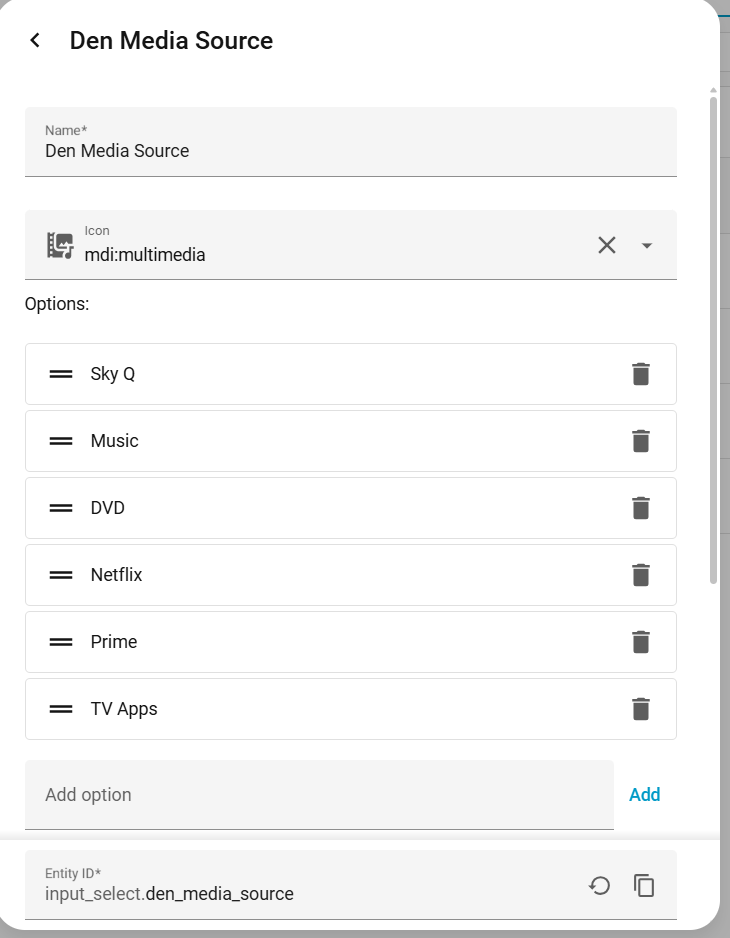
and i have lots of automations, but for example i trigger on source change
alias: Den Media Switcher
description: ""
triggers:
  - trigger: state
    entity_id:
      - input_select.den_media_source
conditions: []
actions:
  - choose:
      - conditions:
          - condition: state
            entity_id: input_select.den_media_source
            state:
              - Sky Q
        sequence:
          - action: ...
      - conditions:
          - condition: state
            entity_id: input_select.den_media_source
            state:
              - Music
        sequence:
          - action: ....
Hi @peteS-UK,
This is a really great example — thanks for sharing it in detail 
What you’ve built here is essentially a Home Assistant–driven “Activity Engine”, very similar in concept to how systems like Harmony or even Control4 handle source selection and routing.
 Why This Approach Works Well
Your setup nicely demonstrates a powerful pattern:
-
input_select→ acts as the “current activity/source” -
Universal Media Player → acts as a unified control interface
-
Automations → handle power, routing, and switching logic
 This separation is actually very clean and scalable:
-
UI (remote) stays simple
-
Logic stays centralized in Home Assistant
 How This Fits with Astrion
This kind of setup works very well with Astrion, especially when combined with:
-
TV Card → for control (D-Pad, volume, etc.)
-
Scene / Script Card → for activity selection
-
Media Player Card → optional for status/feedback
For example:
-
Bind source selection to:
-
Scene buttons
-
Or script buttons (e.g. Watch TV, Watch DVD)
-
-
Use your universal media player (
media_player.den_universal) as:- The main media entity in the TV Card
 Nice Advantage of Your Method
Compared to traditional remotes:
 Fully customizable logic
Handles complex setups (AVR, multiple sources, etc.)
Easy to extend (just add new options to input_select)
 Small Suggestion
One thing to double-check:
media_player.sky_q_
 There seems to be a small typo (extra underscore), which might cause issues in the template.
 Future Direction (Our Side)
What you’ve built is exactly the kind of workflow we see advanced users moving toward.
We’re actively evaluating ways to make this easier to configure, such as:
-
More native “activity-style” abstraction
-
Easier multi-device control mapping
-
Better UI support for source-based switching
 Summary
-
Your setup = excellent best practice
-
Works very well with Astrion today
-
Represents a powerful alternative to traditional “Activity” systems
Really appreciate you sharing this — it’s super helpful for other users trying to achieve the same kind of setup 
@Charles You really need to allow the Astrion to select Harmony Activities.
I rely on what I have already programed into the Harmony Hub to mange the sequence of ON, OFF and Switching between Activities. I have 5 components that need to be managed in a particular order. Activities built into the Harmony Hub is the best and simplest way to do this.
Adding this ability to the Astrion will allow direct control of the Harmony Hub device that is in Home Assistant. Re-enforcing the Astrions UI only ethos. At the moment the TV ROS Card is only good for direct control of Android TV or Apple TV Devices
This will also keep the Astrion in sync with the Harmony Remote and status of the Harmony Hub device in Home Assistant.
Your script solution is NOT GOOD ENOUGH and duplicates automation that already exists in the Harmony Hub.
Adding a simple dropdown selector to the Astrion that replaces the Power Toggle on the TV ROS Card is the solution you need to implement. Also allowing *.button entities to be directly mapped to the TV ROS card hardware buttons would help.
You need to add a Harmony Device Type in addition to the Android TV or Apple TV Devices in your TV ROS Card. This should allow clean separation between the power behavior of the different devices.
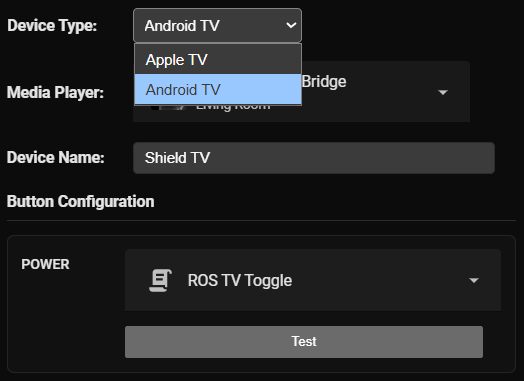
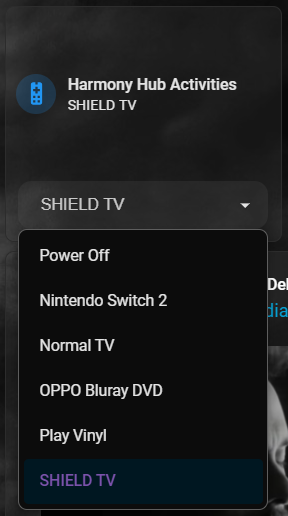
thank you Chaykan, I will ask the team to check and do the evaluation jobs and update you later
1 Like
After using the remote for a few days next to my main control system, and testing some possible integrations I can see that I can get my system working but there are some awkward or clunky restrictions.
I’d like to see:
trigger a script on TV card select, this would allow selecting a TV card on the remote to trigger some function.
Trigger card on scene/script, if a scene or script is activated from the remote, have the remote auto-switch to a defined TV, Media or other card for that action.
media/tv card cominations, there seems to be a disconnect between TV cards for remote control functions and media cards for media control, there are many devices where these are the same and there should be some way to add a media entity to a TV card if needed and have it on screen.
media browsers, many media entities in HomeAssistant support a media browser, if some of this functionality could be brought to the display of the remote it would open up new functionality.
Combined, these functions would allow for a smooth use for AV systems, wake up remote, select “watch a movie” scene, remote triggers a script to tell HA to start the appropriate sequence, remote moves automatically to a TV card for the “movie" device so that the remote buttons work, there is then a media entity on the top of the screen where I can bring up the “recently added” media list and have transport controls on screen without having to switch from TV card (DPAD works) to Media Card (DPAD not configurable) to access media controls.
2 Likes
General feedback, I’m in complete agreement that input selection could be improved. I think a quick fix would be leveraging Home Assistants Dropdown function, either at the top of a dashboard or as an option in the remote ROS card (or ideally both). This way you can immediately tap into the existing Harmony Activities as hub inputs already appear as entities in a HA dropdown. Plus it might allow a cleaner option compared to multiple buttons/scenes for folks with custom scripts/scripts.
Other issues I’d love to see addressed:
Button Cooldown - I’m not sure if it’s user error, or something to do with how keybinding works for shortcuts, but when I try to use any button in quick succession, the second press is not registered. There seems to be a roughly 1 second cool down before button becomes actively clickable again. If this has something to do with how shortcuts are implemented, there should be an option to disable a “wait for shortcut” option. Especially for arrow keys, as typing is unbearable if I have to wait 1 second before so I can move in a direction again on the on-screen keyboard. It also hobbles volume control, if you accidentally hear something load you can’t turn it down quickly.
Split-input power button - In the remote card, it would help to have an option to use separate script/scenes/activities for “Power On” and “Power Off”, while still functioning as a single button on the remote. This would also likely help with some Harmony Issues (if like me there is an activity that is used by default 99% of the time, a script to run that activity for on and then turn off hub for off would be handy).
Default card behaviour on remote - It would be really helpful to change what a long vs short press on a card on the remote does. For example, I’d like to swap short press on the media card to open it and a long press to pause media. I think this would be more intuitive for people in my house as you only need a single tap to open the remote card. So just allowing some control over how this works on a per-card basis directly on the remote OS would be helpful.
Media/remote card combo - just echoing the feedback that seperating media and remote functions is clunky. I know it’s in the pipeline but just being able to see some artwork AND still be able to control devices as selected from the remote ROS card would be preferable. I don’t want to have to come out of the “remote” on my remote just so I can view media settings/select apps ect.
1 Like
How are you implementing your control, and for what devices? I have no issue with input rates and can use the DPAD for example extremely quickly and with less lag than my old IR based solution.
The ROS TV Card needs three selectable options for the power button.
- Current implementation - Power Button acting on the Android TV or Apple TV device
- Separate ON/OFF Commands. Ability to select separate ON and OFF commands i.e. ON - Harmony TV Activity, OFF - Harmony Off or This also could act on the Harmony Hub device itself toggling the switch ON and OFF.
- Dropdown Activity selector - Add a dropdown list where you can select the Harmony Activity from the remotes on screen UI.
To implement this properly:
- Options 1. and 2. need to be selectable for the power button behaviour.
- Option 3. needs to be added so you can select it from the remote UI.
One of the main issues here is the Astrion does not allow the ROS TV Card to control standard HA Entities. Scripts work but Switches, Buttons and Dropdown Select entities do not work. If they just get the ROS Card to control these entities correctly the user will be able to configure what they need.
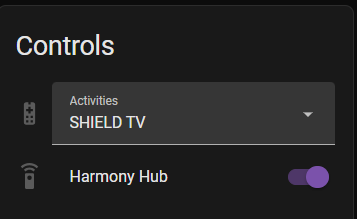
Select Entity
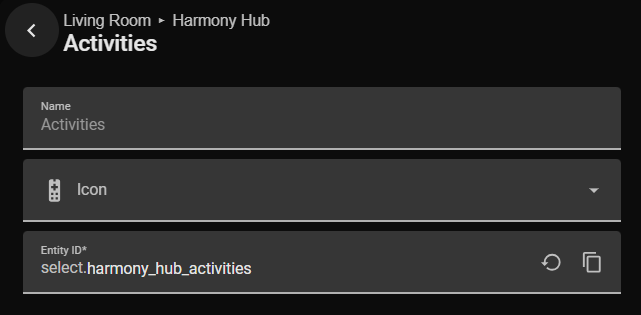
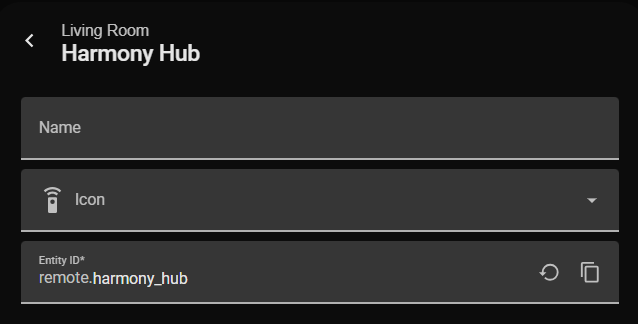
Remote Entity
Actually that makes me think that any button should ideally be able to bring up any HA input_selector on the screen as a menu. That would offer great flexibility for custom devices and selectors,like an AV receivers audio modes for example.
1 Like
@Faceman There is two types of entities they need to cater for. `select.*` and `input_select.*` entities.
In addition to the selectors and other things mentioned, an ideal “power user” control method would be to be able to chose whether a button is:
“standard” (just send the trigger) - current operation
“long/short" (send a different command based on press duration) - promised soon
“press/release” (separate press, release states) - for more advanced custom control loops without having to construct a looping script.
Then have different settings for each one as needed.
“Press and hold” is also currently not properly supported, many devices require this but the current method of passing button press commands to HA doesn’t allow for this in many cases, this is a bit of a HA limitation but there must be some way to improve it if other devices like sofabaton can make it work reasonably well. some devices will interpret a repeating press as a held button, but others really need a separate Press/Held/Release command set.
1 Like
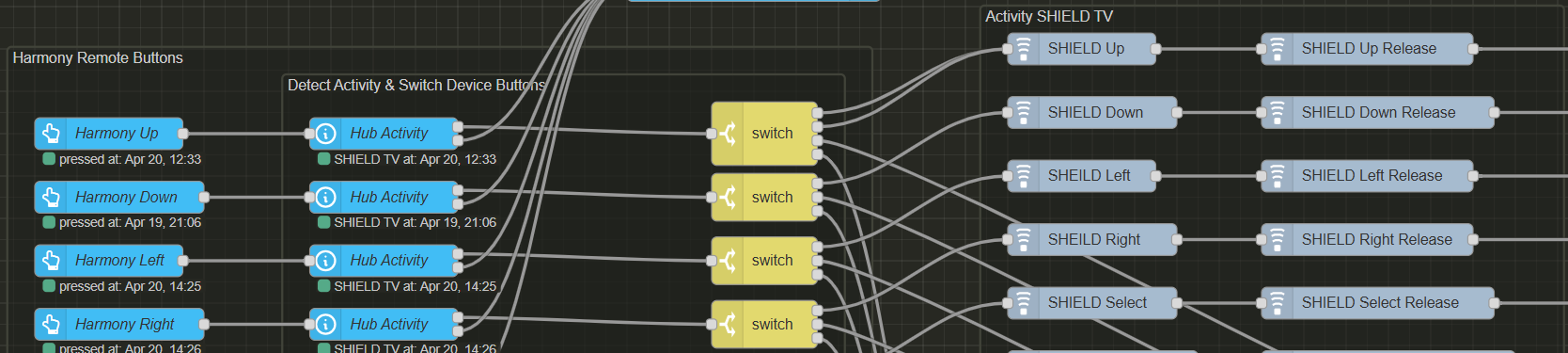
Curently in my NodeRed Harmony Button Mapper flow I have the press and release function. Required to ensure there is only a single button press when requested.
so how are you translating the Astrion single button press to a press and release? a looping script?
Press and release are nodes in node-red-contrib-harmony-extra
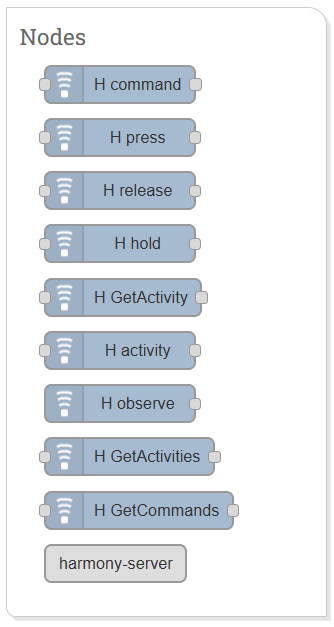
Press and release gets pressed sequentially in the flow.