So cool!!!
 Release: v1.1.3 Beta
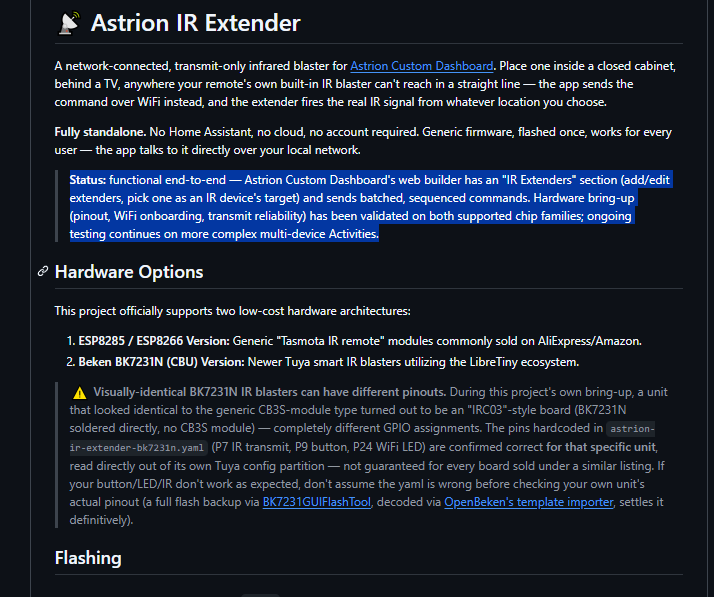
 Astrion IR Extenders Support: Use network-connected WiFi IR blasters as a full alternative to the built-in IR blaster. Perfect for controlling devices in closed cabinets or other rooms without needing Home Assistant.
 Batched & Sequenced Sends: Groups consecutive commands for the same extender into a single HTTP request with pre-defined delays. This eliminates missing commands during rapid sequences like switching Activities.
 Clean Architecture Refactor: Extracted all IR and Activity dispatch logic from
 Dashboard into a dedicated ActivityDispatcher class, ensuring safer and more reliable command delivery.
 Web Builder Enhancements: Added a new “IR Extenders” section to manage extenders by MAC address (keeping IDs stable) and a new target selector on the IR device editor.
 Bug Fix: Fixed a visual bug where editing an existing IR device from the Devices page silently duplicated it instead of updating it.
Hi everyone,
I might be posting less often around here lately, but rest assured: the project keeps evolving behind the scenes!
This week marks a significant milestone with the deployment of version 1.1.8-beta. Since the 1.1.0 release, numerous major improvements and stability fixes have been implemented.
Here is a summary of the key features and enhancements coming with this new update:
 Card & Button Enhancements (
button_grid & scene_grid)
- Direct commands for buttons: Buttons in
button_gridare no longer hard-wired to Home Assistant service calls. They can now directly fire Harmony device commands, trigger Harmony Activities, or send local IR commands. You can even combine multiple actions into a single tap (e.g., call an HA service and send an IR command simultaneously). - Conditional styling: Buttons can now dynamically change their background color or display an accent border based on the state of a specific Home Assistant entity. This is perfect for highlighting active sources on a TV or receiver.
- Icon positioning: Configurable icon positioning (top, bottom, left, right) is now supported on
scene_grid, mirroring the existing feature frombutton_grid.
 UI & D-Pad Navigation
- Page-as-Popup & Auto-Close: You can now open any page as a floating popup overlay from a standard tile instead of doing a full page navigation. A new
"closePopup": trueoption lets you automatically dismiss the open popup after the tile’s action runs—perfect for a TV source layout where selecting an input automatically triggers the command and closes the menu. - D-Pad Focus Outlines: When navigating via D-pad or a remote control, a full card
theme.accentoutline will now draw around the entire card whenever focus is inside it. This makes it instantly clear which section of the page you are currently browsing.
Web Builder Updates
- Tile Reordering: The
/builder/interface now features ↑/↓ arrow buttons next to each tile insidescene_gridandbutton_gridforms, allowing for easy reordering. This was chosen over drag-and-drop to ensure maximum reliability on touch/tablet screens. - Better UX: Added a clean “← Accueil” (Home) link at the top of the builder page to quickly head back to the main catalog without having to manually edit the URL.
 Media Browser
- Long-press Context Menu: Long-pressing any playable row now opens a popup with “Play” or “Add to queue” options. Choosing “Add to queue” deliberately keeps the browser open so you can queue multiple tracks seamlessly.
- LMS/Lyrion Radio Fix: This long-press option also acts as an escape hatch for certain radio stations (like in Lyrion/LMS) that Home Assistant flags as expandable folders but turn out to be dead ends. Long-pressing resolves and plays them directly.
Core & Stability
- ConfigServer Watchdog Supervisor: Added a self-healing loopback watchdog (shoutout to DimpOne for the contribution!
 ). If background HTTP requests freeze on legacy hardware (such as older Android 8.1 / HA100 panels), the supervisor detects it and gracefully restarts the server lifecycle to restore connectivity.
Thank you all for your ongoing support and feedback. Feel free to give this beta a run and let me know how it works for you!
1 Like
Astrion Custom Dashboard v1.2.0 (2026-10-07)
A massive release introducing native Apple TV control without Home Assistant, network IR extenders support, powerful new layout/popup capabilities, and a self-healing watchdog supervisor!
 Major Additions & Features
 Direct Apple TV Control: Added a native client (
appletv/) supporting mDNS discovery, HAP PIN pairing, and encrypted OPACK sessions over the network. Each paired Apple TV is exposed locally as amedia_playerentity, allowing full remote control (D-pad, Siri, apps, power) with or without Home Assistant.- Astrion IR Extender Support: Full support for network-connected WiFi IR blasters (
astrion-ir-extender), enabling reliable command delivery to closed cabinets or other rooms without Home Assistant. Includes batched, sequenced command sending for activity switches.  Advanced Popups & Navigation:
linkedPageandopenWhenEntitycan now optionally open as clean floating popups rather than full-page transitions.- Standard tiles (
button_grid/scene_grid) can now trigger popups via"pageMode": "popup"and close them automatically using"closePopup": true.
 Grid & UI Enhancements:
scene_gridtiles can now be highlighted using arbitrary Home Assistant entity states (state_entity,state_value,active_color) alongside the existing Activity tracking.button_gridbuttons can now fire direct Harmony commands, local IR, or HA services, and support conditional styling based on entity states.- Added configurable
iconPosition(top,bottom,left,right) for grid cards.
 Volume & Feedback: Added a temporary on-screen volume overlay popup triggered automatically by physical
 VOLUME_UP/VOLUME_DOWN/MUTEhardware hotkeys bound to HA entities.- ConfigServer & Watchdog: Added a self-healing loopback watchdog supervisor that automatically monitors local endpoints and restarts the server if HTTP requests stall on legacy hardware (thanks to @DimpOne).
 Localization: Added Italian translation support (thanks to @dvbit)
Release: v1.2.3-beta
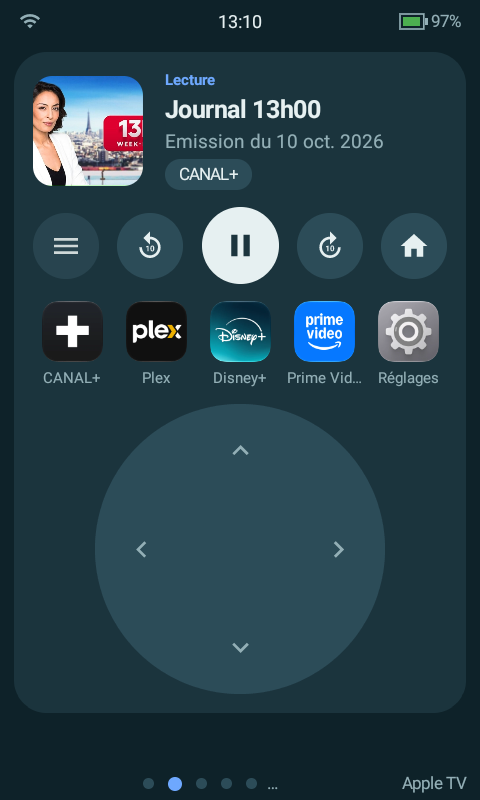
A big update for the Apple TV remote card: now playing, app shortcuts, long press and real seeking, all on the remote.
 New card layouts: The apple_tv_remote card gets a “layout” option. Compact keeps the remote first, with a slim now-playing strip (artwork, title, progress, play/pause) and a row of app icons. Full adds large artwork, a draggable progress bar, −10 s / Play / +10 s, labelled apps and side buttons around the trackpad. Both size themselves to fit the page. No layout = the classic card, unchanged.
 App shortcuts: Pick your apps in the builder (names suggested from the Apple TV), give them an icon (uploaded PNG or URL) or a color, reorder them. One tap launches the app.
 Long press: Hold the trackpad centre to open the tvOS context menu (e.g. remove an item from Up Next / watchlist). Hold
 to jump 10 s. Commands also accept hold_secs or a “…Hold” name, so you can map a held hardware key too.
 Seek & scan: Drag the progress bar to jump anywhere. Astrion uses the app’s own seek (works in Plex, Prime Video…) and automatically falls back for apps that ignore it (Canal+). New Fast forward / Rewind commands work like the iPhone remote (press again to resume), alongside ±10 s and next/previous track. Tip: scan on short press, ±10 s on long press.
Builder: Layout picker, display toggles, media_player dropdown, apps editor with icon picker, new buttons and hotkey commands (Select held, ±10 s, Rewind, Fast forward).
 Seeking, fast forward and now-playing info need the Apple TV’s second pairing (now-playing / MRP) in the Devices page.
** v1.2.2-beta — Harmony-Style Activities & Direct Harmony Import!**
Slight detour from the usual version chronology (since v1.2.3-beta was already released to focus on the Apple TV card). Today, I’m sharing v1.2.2-beta. Don’t let the version number fool you: this release represents a massive overhaul of the Activities engine and Logitech Harmony integration:
- Harmony-Style Activities: Composed activities now run exactly like a Logitech Harmony hub. Your IR devices power on in the correct order, overlap their warm-up delays, and intelligently switch inputs. Plus, Astrion now remembers device states (power, current input) even through restarts. No more toggle-only TVs accidentally switching off!
 Direct Harmony Database Import: Using the Web IR Sniffer (0.5.x), you can now import any device from the Logitech Harmony IR archive. Both codes AND the full profile (delays, repeats, named inputs) are pulled instantly into your database.
 “Help & Fix” Button: Did an IR command get blocked by someone walking past? Hit the new Help button on any running activity, tell Astrion what is actually on or off, and click Fix to resend only the missing commands.
 Bonus Optimizations: Fixed the annoying ~34s Apple TV disconnection issue, improved IR repeat burst handling, and added automatic storage cleanup for downloaded APKs and temp files.
 Join the Discord!
Do you want to communicate more easily, share your feedback, or track progress and updates in real time? **Join the Discord server** to stay connected with the project! Request dckilller.
 Official Documentation & Wiki is Live!
 Access the Astrion Custom Dashboard Wiki
 Reminder: Beta Version 1.2.9 is Available!
Astrion Custom Dashboard 1.3.0 is out: the stable release that brings together everything from the 1.2.1 → 1.2.9 betas, plus a version history of your dashboard.
New here? Astrion Custom Dashboard is a free, open-source app that turns the Sanytron HA100 touchscreen remote into a Harmony-style universal remote and a Home Assistant dashboard. Pages of cards, physical keys you can bind, one-tap Activities, a built-in IR blaster, a Harmony Hub, an Apple TV paired directly… All local, no cloud. Home Assistant is optional.
Your Logitech Harmony died? → Coming from Harmony
What’s new since 1.2.0
 Version history & undo
- The remote keeps every save of its dashboard (the last 30, plus the ones you pin), with an optional note. Open a version in the builder, restore it, download it, pin it.
- Undo / redo in the builder: ↶ ↷ or Ctrl+Z / Ctrl+Y.
Activities, the Harmony way
- Import a device from the Harmony archive with its profile: power type, delays, repeats, input sequences.
- Switching Activities leaves shared devices on and changes inputs only when needed.
- “Off” per room (or the whole house), on a tile or a key.
- Device and Activity state remembered across restarts; Help → Fix if a device was switched by hand.
- Pages that appear only while their Activity runs.
 Remote & dock
- Dock screen: battery, a dim night clock (time, weather, what’s playing in the room) or the dashboard.
- Standby & battery: Home Assistant goes quiet while the screen is off, motion wake limited in time.
- Reorganized Settings, logs without adb (
http://<remote>:8080/logs), “Find my remote” can be stopped from the remote.
 Builder & cards
- A form for every card type: no more hand-written JSON (row, picture elements with click-to-place, TV remote, speaker group…).
- Builder and web page in English, French, Italian and Spanish.
- Apple TV remote: compact and full layouts, app shortcuts, long press on the trackpad.
- Long press on grid tiles, pages as popups, Select “dropdown” layout, TV remote volume row, PNG icons on switches.
 Home Assistant & several remotes
- Each remote has its own id and name, sent with every event.
- Battery pushed to HA, hotkey action “Home Assistant event” (
astrion_button). - Works with the Astrion integration 2026.10.0.
- Several remotes? The community add-on Astrion Config Manager by @dvbit manages all their dashboards from the HA sidebar.
 Fixed
Fixed
Apple TV session dropping every 30 s (tvOS AirPlay 2), Harmony-archive devices in Activities, screen waking by itself, and many card fixes.
 Good to know when updating from 1.2.0
- A long press on Menu opens Settings when no hotkey of yours does.
- No “Disconnected” banner on remotes used without Home Assistant.
tv_remote: default apps (Netflix, YouTube, Prime Video, Plex) and a defaultmedia_entity. Set them if yours differ.- The Select card follows your theme colours.
Get it
- Already installed: the remote’s web page (
http://<remote-ip>:8080) → Update. - New install: Installation guide
 Full changelog ·
  Wiki · Discord
First Astrion TikTok is out! “My Harmony died, so I built this”
[LIEN]
A like, a comment or a share helps a lot to reach other Harmony owners. Thanks!
 New: “The remote isn’t dead” — a TikTok series about Astrion Custom Dashboard
Part 1 is out: a dad, a sleeping baby, and a smart speaker that really should have stayed quiet 


The idea: show why a real remote still beats voice assistants and phone apps, especially for those of you coming from Logitech Harmony. Keep your Harmony Hub and your Activities, add IR and Apple TV, Home Assistant optional, no cloud.
Part 2 drops tomorrow, and the next episodes will show the remote and the dashboard up close.
If it made you smile, a like, comment or share on TikTok helps a lot to reach other Harmony orphans 
Ideas for future episodes? Drop them here 