[Beta Testing Invitation] UltraBARX for macOS

THANK YOU! This was super helpful. I can now confirm majority of items appear to be functional. I was able to download the cloud app for home assistant, connected and can confirm operational on the limited test I tried, but I am seeing the entities etc as expected. Can also confirm I was able to assign the Mac volume to the knob key and can see it updating when rotated. Having trouble getting the button to act as expected, but I think it’s a Mac focus issue and may not be an ultrabar issue.

Question: does anyone else get the static noise feedback when sound is played thru the bar? I hear the tone confirming the action when pressed, followed by audible static for 3-5 seconds. Also, this was happening pre-firmware update and continues after, when the bar is powered off the fan (or what sounds like a fan) runs indefinitely. I let it go for 6 hours the other day when messing with it. I powered the bar down before typing this and it still sounds like a fan is running. This doesn’t occur while the bar is on.

@joshputman I can reproduce the static here. After each button chime, the bar keeps its speaker amp on for about 3 more seconds, and the amp hisses while it’s on. I’ve reported it with measurements here: LineOS 1.0.9: static after every button chime; VivoCube makes a pulsing noise

Lowering the bar’s media volume (Settings) makes the chime and the hiss quieter in the meantime.

The fan-like noise with the bar powered off: mine is silent when it’s off, so that sounds specific to your unit or its adapter, and is worth a support ticket.

1 Like

Hi Xacto, thanks a lot for the detailed feedback — and for actively testing this release and sharing the results. This is incredibly helpful for us.

Let me go through your points one by one:

1. Modules not working after the LineOS update until you press Home. Thanks for the suggestion! This is something we’ve taken note of, and I’ll discuss it with the team to come up with a proper solution (e.g. starting the module on app start, or bringing up the home screen after an update).

2. The store’s Cloud tab contradicting the Installed tab, and the “requestPageData error: key ‘data’ not found”. Could you send us a screenshot of that error popup? That would help us pinpoint the issue more easily.

3. The AccuWeather widget showing “~”. You’ll need to get your own API key from AccuWeather’s official site: https://developer.accuweather.com/home

Once you have the key, enter it into the widget. For better accuracy, you can also fill in your current latitude and longitude and then check if the weather displays correctly.

4 & 5. For these, I’ll need a bit more information from you to look into them properly.

If it’s convenient, it’d be great to connect with you directly so we can gather the details more quickly. Let me know what works best for you!

Thanks for the detailed feedback, joshputman!
For both of those issues (the static noise whensound plays, and the fan still running afterpower-off), could you record a short videoshowing the problem and send it tosupport@sanytron.com?
That’ll help us see exactly what’s happening,and we’ll have the relevant team follow up on
it right away.
Thanks again for helping us dig into this!

1 Like

Thanks, Jiahuan! Answers below.

2. Store error: there isn’t a popup. It’s a line in UltraWorkSpace’s own log, which I saw by starting the app from Terminal (/Applications/UltraWorkSpace.app/Contents/MacOS/UltraWorkSpace). Opening the App and Plugin Store logs [AppLocalItem] requestPageData error: key 'data' not found. Nothing appears on screen. My two store screenshots in #19 show the mismatch: the Cloud tab says Whitenoise 1.0.4, Calculator 1.0.2 and Alarmclock 1.0.2 are installed, while the bar has 1.0.3 / 1.0.1 / 1.0.1 and the Installed tab offers those updates.

3. Weather: I had found the key setting. The point is that the widget only shows “–”, with no hint that a key is missing, so most users won’t know why. A “set your AccuWeather key in Settings” message on the widget would fix that. Also, the request uses language=zh-cn on an English bar.

4. Log spam: on the bar (LineOS 1.0.9), logcat shows Unable to start service … com.ultrabar.sonos/.common.service.SonosService: not found and the same for com.ultrabar.homeassistant/.common.service.IOTService, every few seconds. Neither app is installed. SoftAP start failed also appears every 30 seconds, while the hotspot is already up and the VivoCube is connected to it. Probably harmless, but it fills the log and wakes the CPU.

5. Sensor widgets: my layout from 1.0.3 has a Temperature widget bound to 37:ult:temperature_sensor. In 1.0.9 the device list only shows the SenseCube itself. Should the old Temperature and Humidity widgets be replaced by the new SenseCube widgets, or should they keep working?

Happy to connect directly: feel free to send me a private message here on the forum.

Great, thank you so much for the detailed information! I’ve collected all your suggestions and the bugs, organized them,and submitted them to our R&D engineers for review. If we need anything further, 'l reach out to you via private
message.

Hello, I just sent a video of the power down sequence and sound to support@sanytron.com

Okay, received. Just to let you know, we’vealready reproduced this issue and it’s beingworked on. It’ll likely be fixed and pushedthrough a firmware update later.

Is anyone else having issues with the Button-Click controlling the Mac? For example: I have the wheel of the knob key set to Device>Computer>Volume and it works as it should. I have a button on the dot key set to run home assistant devices and that works as expected, but assigning a button-click to execute on my Mac mini isn’t working. The bar registers and alerts a button-click action, but the Mac does not respond. I tried mapping it to a hotkey (F9), created a custom keyboard shortcut (ctrl+opt+cmd+p), input scripts into a command and all of those variations failed to produce any result on the Mac. The only workaround I found that worked was to create a shortcut in the Mac shortcuts app to invoke Play/Pause and then in the action of the button-click run the command “shortcuts run “Play/Pause”” Is this the intended behavior?

FWIW I did wonder if this was just a media issue so I did assign a simple command like opening launchpad to the button-click and it also produced no results. It seems like there is something stopping the button clicks from performing on a security level? And since shortcuts is a native app it can invoke and then essentially run a hardware level script?

Hi joshputman,
Good news - this is all working as designed, and here’s the key difference:
Why volume & HA work wirelessly:The knob wheel (volume) and DotKey buttons mapped to Home Assistant are controlled wirelessly. They sendcommands over the network (Wi-Fi) to your computer/HA hub, so they don’t need to touch macOS’s input system at all-
that’s why they work instantly no matter how you connect.
Why hotkeys & custom shortcuts need a cable:The button-click actions (hotkeys like F9, custom keyboard shortcuts, scripts) are different These need to be injected intoyour Mac at the HID (Human Interface Device) level -ie., macOS has to see them as a real keyboard keystroke coming in.For that to happen, the CoreBar must be physically connected to your Mac through a Type-C cable (PC-Link)
So the fixis:

  1. Connect your CoreBar to your Mac via a Type-C cable (this is the PC-Link connection).
  2. Make sure UltraWorkspace shows the CoreBar as connected (green).
  3. Then grant the permissions we mentioned (Accessibility / Automation) if prompted.
    Once it’s connected over Type-C, the button-click actions (F9, shortcuts, scripts, etc) will be delivered as HID keyboard
    events and will work properly.
    Your shontcuts run workaround works precisely because it bypasses the HD requirement -it’s a native Apple command
    running on the Mac itself.

UltraWorkSpace 1.0.1: crash on wake from sleep, and two data problems

Setup: MacBook Pro, Apple M4 Max, macOS 27.2, UltraWorkSpace 1.0.1 (1.0.1.0), CoreBar on LineOS 1.0.9.

1. The app crashes when the Mac wakes from sleep

UltraWorkSpace quit by itself three times in the last week (Oct 27, 29 and 31). Each time it had been running for 11 to 18 hours, and each crash happened within 0 to 3 seconds of the Mac waking up (macOS power log):

Crash report Mac woke App crashed
UltraWorkSpace-2026-10-27-124508.ips 12:44:18 12:44:21
UltraWorkSpace-2026-10-29-075858.ips 07:58:56 07:58:56
UltraWorkSpace-2026-10-31-014716.ips 01:47:14 01:47:14

All three reports have the same stack on the main thread:

EXC_BAD_ACCESS (SIGSEGV), KERN_INVALID_ADDRESS at 0x0000000000000040
UM::Workflow::then(std::function<void (UM::Workflow&)>)
UM::CoreBarDevice::connectAndAuth()
UM::CoreBarDevice::onTimer()
QTimer::timerEvent(QTimerEvent*)

So the reconnect timer calls connectAndAuth(), and Workflow::then() reads through a null pointer (offset 0x40). The app retries every 25 seconds while the bar is unreachable, and the log prints [Workflow] ~Workflow() after each failed try. My guess: after sleep, timer events that were held back fire together, and a second connectAndAuth() starts while the previous workflow is being destroyed. Suggested fix: don’t start a new connect while one is running (or hold the workflow in a shared pointer), and check the workflow pointer before calling then().

There’s no message when this happens. The app just disappears, so the bar’s buttons stop controlling the Mac until the user notices and opens it again. I can send the three .ips files.

2. The project is saved inside the app bundle

The layouts, widgets and plugins live in UltraWorkSpace.app/Contents/MacOS/project/UltraWorkSpaceProject.umpf and Contents/MacOS/plugin/. This causes two problems:

  • Installing a new build replaces the app, and each build ships empty project/ and plugin/ folders, so every update deletes the user’s layouts and plugin packs. It happened to me going to 1.0.0-14; I had to restore them from a backup.
  • Each save changes a file inside the signed bundle, so the signature breaks: codesign --verify says “invalid signature (code or signature have been modified) In subcomponent: …/project/UltraWorkSpaceProject.umpf”. Once the app is Developer ID signed and notarized, this will still break it. It also fails for a user who isn’t an admin, because they can’t write to /Applications.

Suggested fix: keep the project and plugins in ~/Library/Application Support/UltraWorkSpace/, and on first launch move them over from the bundle if they’re there.

3. The app never picks up the bar’s new IP address

The app saves the bar’s IP when you pair, then only ever connects to that saved address. If the router gives the bar a new address, the app shows Offline for good, even though the bar still answers discovery (discovery.ultrabar on UDP 5319, with the same serial number) at the new address. The fix that works now is removing and re-adding the bar. Suggested fix: when a connection fails, run discovery, look for the paired serial number, and update the saved IP. (The pairing token still works after the IP changes, so the user doesn’t need to pair again.)

Minor

  • At startup the log repeats QLayout: Attempting to add QLayout "" to UM::BaseWidget "coreBarWidgetListGroupItem", which already has a layout once for each widget group. A layout is set twice, so it’s probably harmless.
  • When the bar is off, the app only says Offline, and the log only says failed to connect core bar (once Socket error: -1, Unknown error). Something like “CoreBar not reachable at 192.168.4.22:7431” would help users.
  • With the bar off, the app stayed up through 13 reconnect tries over 6 minutes, so it needs the wake from sleep to crash.

Happy to send logs and the crash reports.
1 Like

Thank you. I have added a cable to the pc-link port and connected to the Mac via front usbc port (I tried multiple cables including a thunderbolt 4 to ensure I was using a data capable cable) and mapping a hotkey to the button-click on knob key still produces no action.

Dear Xacto,
Thank you so much for your detailed feedback and thorough analysis. I have forwarded all the issues youmentioned to our engineering team for review. We will look into these points carefully.
We will keep you posted once we have any updates.
Best regards,Ethan
UltraBar Support
Sanytron Support Team

:globe_with_meridians: Official Website: www.sanytron.com

:hammer_and_wrench: Tech Support: hub.sanytron.com
:speech_balloon: Sanytron Forum: forum.sanytron.com
Join Our Community:
:busts_in_silhouette: Facebook Group | :video_game: Discord | :orange_heart: Reddit

Connecting your smart home devices seamlessly.

Hi @joshputman, thank you for the detailed information and the screenshot.
I have a quick question: Are you using a double Type-C (C-to-C) data cable?
Currently, on our end, we are using a USB-A to Type-C cable. Since the Mac only has Type-Cports, we added a Type-C adapter to it, and it works. You might want to try this combination(USB-A to Type-C cable + adapter).
I also discussed this issue with our engineers. The Ultrabar runs on an Android system, and itmight temporarily not support data transmission via a direct double Type-C (C-to-C) connection.Please let us know if trying the USB-A to Type-C method works for you!
Best regards,Ethan
UltraBar Support
Sanytron Support Team

Sanytron Support Team

:globe_with_meridians: Official Website: www.sanytron.com

:hammer_and_wrench: Tech Support: hub.sanytron.com
:speech_balloon: Sanytron Forum: forum.sanytron.com
Join Our Community:
:busts_in_silhouette: Facebook Group | :video_game: Discord | :orange_heart: Reddit

Connecting your smart home devices seamlessly.

Feature request: switch pages automatically by the app in front on the Mac

A request for the macOS app: let the CoreBar switch to a page automatically when a certain app comes to the front on the Mac.

For example: Photoshop comes to the front, and the bar shows my Photoshop page. The knob changes brush size, and the DotKey keys do undo, layers and tools. Switch to Illustrator or Final Cut and the bar shows that app’s page. Any other app, and it goes back to my default page.

Loupedeck, Stream Deck and Logitech’s MX Creative Console all do this (“app-specific profiles”), and it’s the feature I use most on those. UltraWorkSpace already runs on the Mac, so it could watch which app is in front and tell the bar which page to show.

What would make it work well:

  1. A page setting: “Show this page when [app] is in front” (one or more apps per page).
  2. A default page for every other app, and a way to pin a page so it stops switching.
  3. The knob, DotKey and VivoCube functions follow the page, the same as when I switch pages by hand.
  4. The same option for apps on the CoreBar. The “App opened” automation trigger works on LineOS 1.0.9 (thank you!), but a “page for this app” setting would be easier than building two automations per app.

Happy to test it in a beta.

thank you for the info. I was using a C-to-C cable. I have the Mac mini sitting on a docking station that has usb-a ports. Utilizing a usb-a to usb-c cable plugged into the docking station did not produce the expected result, still no action when mapping a hot key to a button. I tried mapping a simple F9 key to a button and also used the on screen keyboard in ultraworkspace to assign the play/pause under media keys. I left my apple shortcut for play/pause on one button and used a different button for the above process. The apple shortcut still operates as expected, but as I mentioned, nothing coming thru when I assign the keyboard shortcut. I will search for a A-to-C adapter to skip the docking station and go straight to the Mac usb-c input, I think I have one around somewhere possibly.

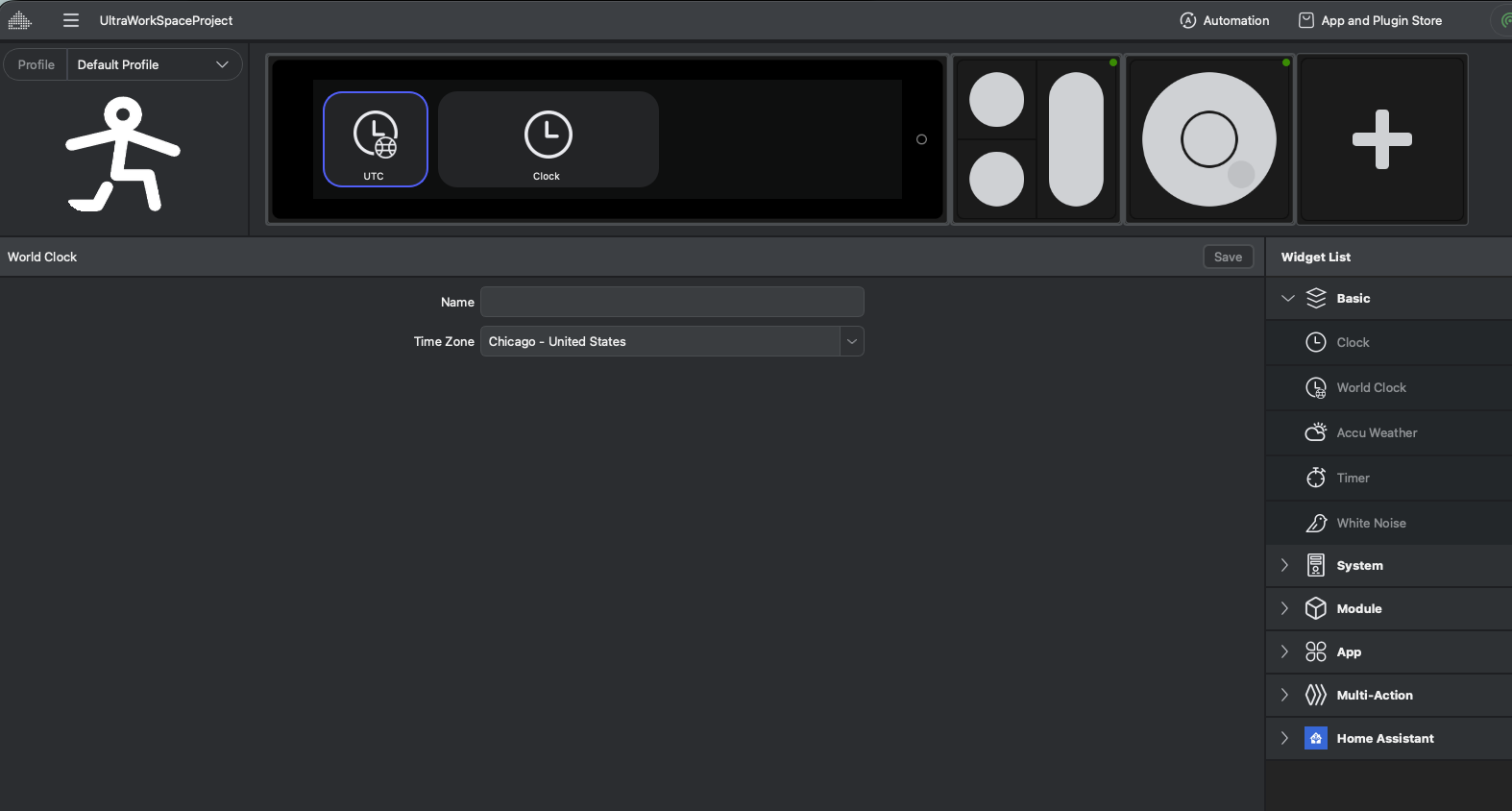
While I am here, question: will the widget customization features mentioned on the website documentation eventually make it into the ultraworkspace app for Mac? For example, the documentation mentions on the world clock widget the ability to switch between analog and digital, change backgrounds etc. However, in my instance I don’t see any options other than name and timezone?

Hi Josh,
We’re currently testing our third-party developer platform. Down the line, otherdeveloper-made clock styles will be available in the app store. Right now we’re stillfocusing on improving the UltraBar ecosystem, and we may make adjustments tothe built-in widgets later.

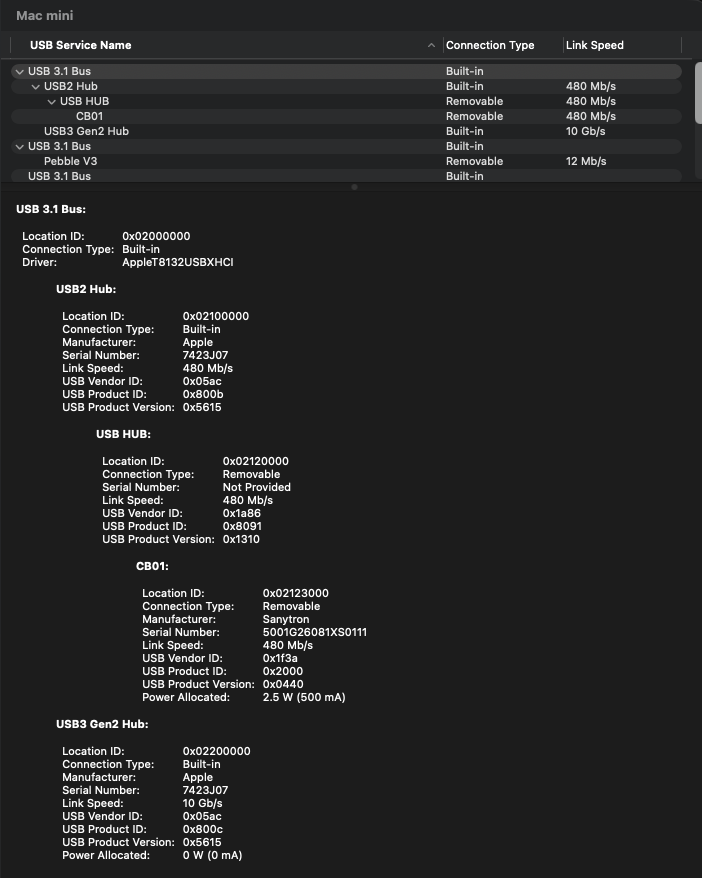
@joshputman From LineOS 1.0.9’s code: hotkey actions never go over Wi-Fi. The bar types them itself as a USB keyboard through the PC-Link port. Only actions like open browser, open app and run command go over Wi-Fi to UltraWorkSpace, which is why your shortcuts run workaround works without the cable. So with the cable in, check System Information → USB on the Mac. If the bar doesn’t show up there as a device, the cable or port isn’t passing data, and no hotkey will arrive. One more thing: the bar logs “Invalid hotkey action” even when the keys were sent, so ignore that line in the log.

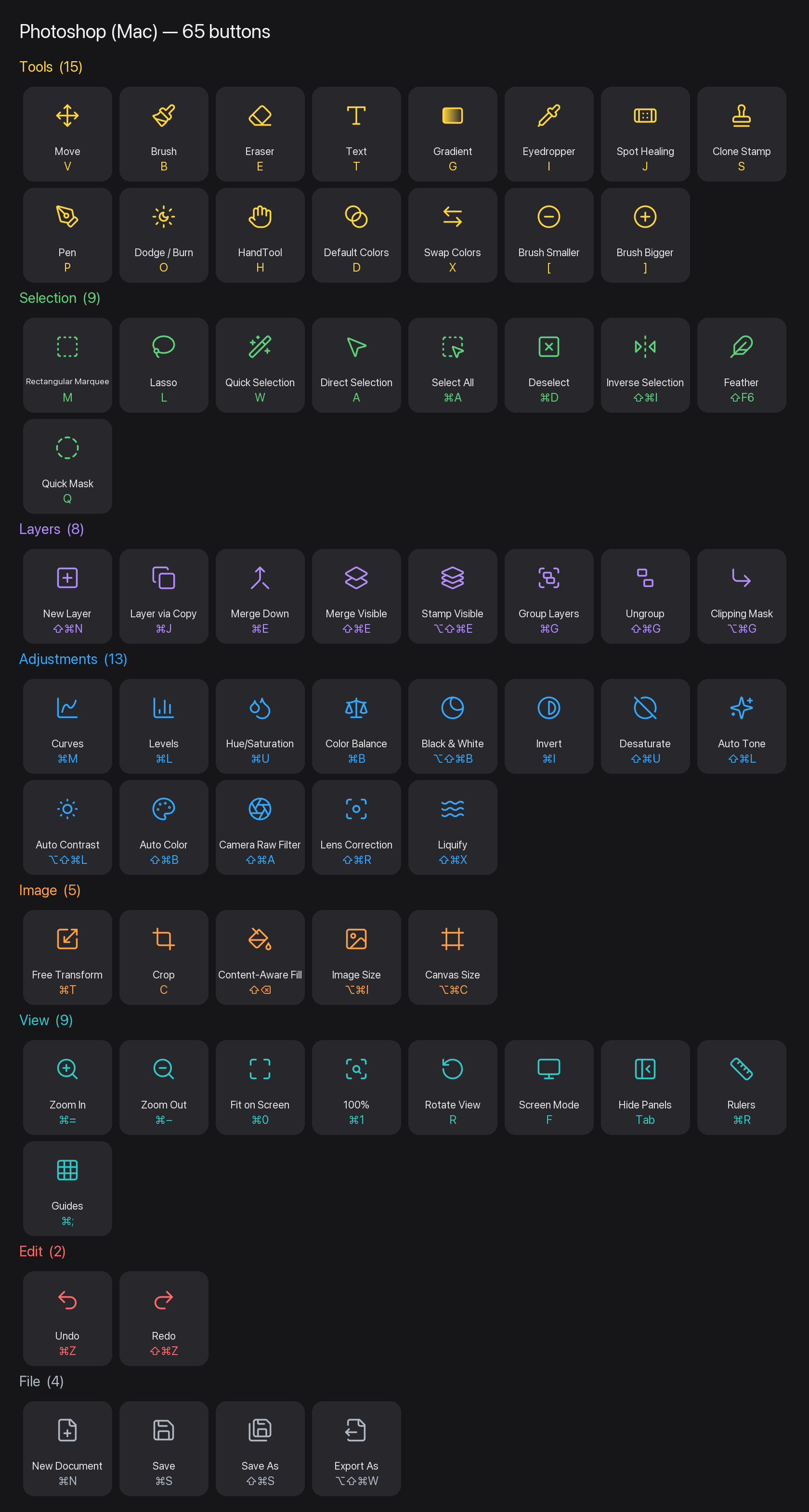
Photoshop (Mac) plugin pack: 65 buttons, free for Sanytron to publish

Following up on my #9: the store’s Photoshop pack (v1.0.0) still sends Windows Ctrl shortcuts, and the Black & White, Content-Aware Fill and duplicate-id bugs are still there.

So I built a Mac version for my own bar, “Photoshop (Mac)”:

  • your 23 buttons, converted to Cmd (227), with those 3 bugs fixed
  • 42 more Photoshop defaults: Undo/Redo, Free Transform, layers (Copy, Merge, Stamp, Group, Clipping Mask), selection (Select All, Deselect, Inverse, Feather, Quick Mask), view (zoom, Fit, 100%, Rulers, Screen Mode, Hide Panels), image (Image/Canvas Size, Desaturate, Auto Tone/Contrast/Color), file (New, Save, Save As, Export As) and more tools
  • one consistent icon set (Lucide, ISC licence), colour-coded by group

Working on my UltraBar X over PC-LINK, MacBook Pro M4 Max, Photoshop 2026 (27.11). Happy to send the config.json + icon folder (same zip layout as your packs) if you’d like to publish it as an official pack. Or, if you open plugin-pack submissions to the community, I’d upload it myself (the Open Platform only takes apps right now).